Your finance team just spent another Friday checking tax rates across 15 states. Several rates may change again next month. Meanwhile, you discover that one rate changed weeks ago. Your team has been collecting the wrong amount ever since. Sales tax setup in NetSuite does not need to become a weekly cleanup job.
Tax rules change often, and manual upkeep gets harder as you grow. SuiteTax can automate calculations and apply tax rules based on transaction details. It can also support tax reporting and nexus setup. For harder tax needs, you can connect NetSuite with an outside tax engine.
Key Takeaways
- SuiteTax from Oracle can provision US tax records and update supported tax rates.
- Sales tax exposure varies by state, filing history, and unpaid tax.
- Outside tax engines can reduce manual work for harder tax rules.
- Tax automation can reduce rate checks, transaction reviews, and reporting work.
- SuiteTax activation cannot be reversed, so test it in sandbox first.
- Setup time depends on nexus, tax rules, integrations, and data quality.
Is NetSuite right for you?
Six honest questions. We'll tell you straight - even if it's "not yet."
Your verdict
A strong fit
Understanding Sales Tax Nexus: What It Means for Your NetSuite Business
Sales tax nexus is a legal link between your business and a state. That link may require you to collect sales tax.
Before you set up tax codes, identify where you owe tax. A good NetSuite setup cannot fix a wrong nexus decision.
Physical vs. Economic Nexus
There are two common ways to create nexus:
- Physical presence: You have employees, inventory, offices, or warehouses in a state.
- Economic nexus: Your sales activity passes a state's economic nexus threshold.
The 2018 South Dakota v. Wayfair ruling changed the rules for remote sellers. A company may owe tax without having a physical office in the state.
That means an online seller can create nexus through sales alone. Each state has its own rules and limits.
Key Triggers for Sales Tax Nexus
Watch for these common nexus triggers:
- Remote employees working in another state
- Inventory stored in fulfillment centers
- Trade shows or temporary sales events
- Affiliate relationships that may create nexus
- Drop-ship arrangements with vendors
These rules vary by state. Your tax team should confirm whether each activity creates nexus.
How Nexus Impacts Your NetSuite Configuration
In NetSuite Services, nexus records help control tax calculation. They tell NetSuite where tax rules may apply.
If your business has nexus in a state, NetSuite should reflect it. Missing or incorrect nexus setup can lead to wrong tax results.
A quarterly nexus review can help prevent these gaps. Pull sales by state and compare them with current thresholds.
Also review physical activity in each state. Sales thresholds are only one part of nexus.

Navigating Sales Tax Rules in NetSuite: Configuration Best Practices
Once you know where you owe tax, you can build the NetSuite setup. Tax codes, tax groups, and tax schedules may all play a role.
Setting Up Tax Codes and Tax Groups
Tax codes represent tax rates or tax rules. A transaction may include several local tax parts.
For example, one sale could include:
- State sales tax
- County tax
- City tax
- District tax
Tax groups combine several tax codes into one rate. This can make local tax setup easier to manage.
The tax type also matters. A wrong tax type can affect reports and accounting.
For example, sales tax and VAT follow different rules. Do not treat them as the same tax type.
Managing Item and Customer Taxability
Not every product is taxable in every state. Software is a good example.
One state may tax a software product. Another may treat the same product differently.
Customer status also matters. A reseller may have a valid exemption certificate.
Oracle NetSuite can handle tax rules through:
- Tax schedules: Special tax rules for certain items
- Non-taxability rules: Rules for items that are not taxable
- Exemption certificates: Records that support customer exemptions
- Customer tax settings: Tax defaults for certain customers
This is where things can get squirrelly. A SuiteTax tax schedule is not always required.
Oracle allows default nexus rules to apply in some cases. Special tax schedules are useful when an item needs different treatment.
You can still run a saved search before go-live. Review items with no tax schedule and confirm that the default rules are correct.
Automating Tax Calculations with NetSuite
The goal is simple. Remove tax work that your team should not need to repeat.
NetSuite automation can support tasks such as:
- Calculating tax during transaction processing
- Updating supported tax rates
- Showing tax details by transaction line
- Applying rules based on nexus and taxability
This gives your finance team one clear tax process. It also reduces the need for separate spreadsheets.
Streamlining Sales Tax Compliance with NetSuite
Correct tax calculation is only part of the job. You also need reports, filing processes, and good records.
Generating Sales Tax Reports in NetSuite
NetSuite offers several reports through its US Sales Tax Reports SuiteApp.
These include:
- Sales Tax Liability by Tax Item Report
- Sales Tax on Sales Detail Report
- Sales Tax Analysis Report
- Sales Tax by State Analysis Report
- File Ready Report - California
These reports can support month-end close and audit work. They also help your team review tax activity by state.
Your tax liability reports should match the related GL accounts. If they do not, investigate the difference.
The issue may come from tax setup, transaction data, or accounting entries.
Automating Compliance Workflows
NetSuite workflows can support tax controls.
For example, you can:
- Alert finance when internal sales limits are reached
- Flag records missing exemption documents
- Route tax changes through approval
- Schedule tax reports for review
These alerts do not replace tax advice. Your team still needs to maintain the rules behind them.
Handling Exemptions and Non-Taxable Sales
Exemption certificates can be tedious to manage. They still matter during an audit.
A basic process should include:
- Collect valid certificates from exempt customers.
- Confirm each certificate covers the correct state.
- Store the supporting records in NetSuite.
- Apply the correct customer and item tax rules.
Some outside tax tools also manage exemption certificates. That can help when you have many wholesale customers.
Integrating with Avalara and Other Sales Tax Software for NetSuite
Native SuiteTax works well for many businesses. Some companies need more tax tools as they grow.
A third-party engine may help when tax rules become harder. This is common with digital goods or many jurisdictions.
Benefits of External Tax Software Integration
Tax engines such as Avalara and Vertex may offer:
- Real-time tax calculation
- Address checks and geolocation
- Product taxability tools
- Filing and payment services
- Exemption certificate tools
Features vary by provider. Review what your business needs before choosing a tool.
Tax Engine Comparison for NetSuite
| Feature |
Native SuiteTax |
Avalara AvaTax |
Vertex |
Managed tax service |
| Tax calculation |
Yes |
Yes |
Yes |
Varies |
| NetSuite connection |
Native |
Available |
Available |
Varies |
| US tax support |
Yes |
Yes |
Yes |
Varies |
| Global tax support |
Available |
Available |
Available |
Varies |
| Filing services |
Separate process |
Available |
Available |
Often available |
| Exemption tools |
Available |
Available |
Available |
Varies |
| Best For |
Standard needs |
Growing companies |
Complex tax needs |
Outsourced work |
Setup time can vary a lot. The number of states is only one factor.
Subsidiaries, product rules, data quality, and integrations can also affect the work.
Choosing the Right Sales Tax Solution
The decision should start with your tax needs.
Strong fit for Native SuiteTax:
- Simple product or service tax rules
- Teams that want tax inside NetSuite
- Manageable nexus requirements
- No need for full filing automation
Strong fit for third-party engines:
- Complex product taxability
- Large exemption certificate volumes
- Automated filing and payment needs
- Complex international tax needs
May not be the best fit for enterprise solutions:
- Businesses with simple tax rules
- Teams with limited integration needs
- Companies that prefer a simpler setup
For NetSuite Integration, Avalara is one available option. Anchor Group also supports the Avalara integration for NetSuite.
More software is not always better. Sometimes SuiteTax does the job just fine.
Best Practices for NetSuite Sales Tax Management and Reporting
A good setup still needs regular care. Your tax footprint changes as your company grows.
Monthly and Quarterly Tax Reconciliation
Build these checks into your close process:
- Monthly: Compare tax reports with tax liability accounts.
- Quarterly: Review sales by state against current nexus rules.
- Quarterly: Review employees, warehouses, and inventory locations.
- Annually: Review exemption records and item tax rules.
- After major changes: Retest tax setup after expansion or acquisitions.
Companies near state thresholds may need more frequent reviews.
Maintaining Accurate Sales Tax Data
Bad data can cause bad tax results. Watch for:
- Incorrect customer addresses
- Old exemption certificates
- Wrong item tax treatment
- Missing nexus setup
- Incomplete subsidiary tax settings
A NetSuite saved search can flag many of these problems.
You can also create alerts for records that need review.
Leveraging NetSuite Reports for Tax Filings
Use the correct SuiteTax reports during your filing process. Review the data before sending it to a state.
Do not assume one report matches every state return. Filing formats and tax rules can differ.
NetSuite includes a California file-ready report. Other states may require another process or filing tool.
Troubleshooting Common NetSuite Sales Tax Issues
Even a good tax setup can run into problems. Start with the basic data before rebuilding anything.
Diagnosing Incorrect Tax Calculations
When a tax result looks wrong, check these areas:
- Nexus: Is the correct state nexus active?
- Address: Is the customer address complete?
- Item taxability: Is the item using the right rules?
- Tax records: Are the expected tax rates available?
- Customer exemption: Is an exemption changing the result?
The Tax Details tab can help during this review. It shows which tax details were used.
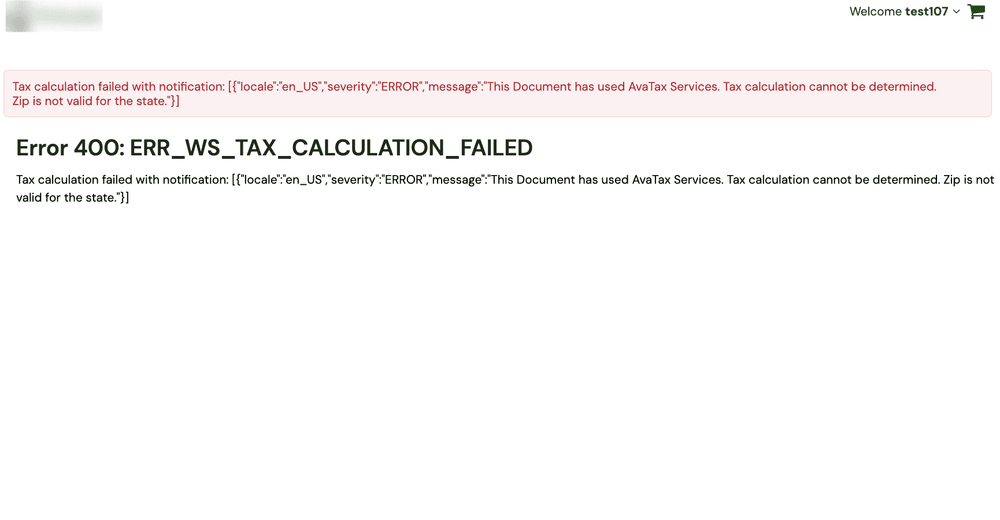
For US transactions, address quality matters. SuiteTax may use ZIP+4 and other address data.
A bad ZIP code can create a surprising amount of trouble. We have seen stranger things.
Common nexus problems include:
- Missing nexus records
- Incorrect nexus setup
- Wrong effective dates
- Missing subsidiary tax setup
- Old rules that no longer match the business
SuiteTax can determine which nexus applies during tax calculation. It still depends on correct records.
Your tax team decides where the legal nexus exists. Your NetSuite team reflects that decision in the system.
What to Do When Tax Integrations Fail
If an outside tax engine stops working:
- Check the integration connection.
- Review login or authentication details.
- Check errors in both systems.
- Test a simple transaction.
- Review address and item data.
- Contact the provider if needed.
Avoid using manual tax as a long-term fix. It can hide the real issue.
Advanced Sales Tax Scenarios: SaaS, Digital Goods & Services
Software companies often face harder tax rules. Digital products can receive different treatment in each state.
Taxing Digital Goods and Subscriptions
SaaS tax rules vary by state. Some states tax certain software services.
Others may exempt them or apply different rules. The product must be classified correctly first.
For NetSuite for software and IT, the setup may include:
- Separate rules for SaaS and physical products
- State-level tax rules for subscriptions
- Customer exemption rules
- Clear product classifications
Your tax team should confirm the correct treatment. NetSuite can then apply those rules.
Services-Based Tax Considerations
Many professional services are not taxed in many states. There are still important exceptions.
Some states tax certain data, repair, telecom, or digital services.
Document the tax treatment for each service type. Then make sure NetSuite matches that decision.
Handling Complex Tax Jurisdictions
Multi-state businesses should watch for:
- Home rule states: Local areas may control their own tax rules.
- Origin vs. destination sourcing: Tax location rules can differ by state.
- Marketplace laws: Marketplaces may collect tax for certain sales.
- Product rules: Tax treatment can vary by item type.
- Local taxes: City and district taxes can change the final rate.
Tax law can be complicated. Your NetSuite setup should make it easier to manage.
Why Accurate Sales Tax Configuration Is Crucial for Your Business Growth
Good tax setup does more than reduce risk. It also helps your company grow without leaving cleanup behind.
Avoiding Penalties and Audits
State auditors may review several parts of your tax process.
They can look at unpaid tax, exemptions, registrations, sourcing, and nexus history.
Problems can lead to back taxes, interest, and penalties. The amount depends on the facts.
There is no single percentage that applies to every company. The better goal is a process you can explain and support.
Protecting Your Bottom Line
Manual tax work takes time from your finance team. Much of that work can be repetitive.
Automation can reduce rate checks and transaction review. It can also make reporting easier.
The amount of time saved will differ by company. A three-state business has different needs than a 30-state business.
The better question is simple. How much tax work could your system handle for you?
Building Customer Trust Through Transparency
Customers notice incorrect tax charges. They also notice when you ask for more money later.
Clean tax processes reduce those conversations. They also give your team more consistent answers.
How Anchor Group Can Help with NetSuite Sales Tax Configuration
Sales tax setup is one of those areas where small details matter. A wrong nexus or tax rule can stay hidden for months. That is where an experienced NetSuite Consultant can help.
At Anchor Group, we work with distributors, manufacturers, and software companies. We help teams set up NetSuite and clean up old problems. We also spend a surprising amount of time on weird edge cases. That is part of the job.
Tax projects often uncover old data issues. A migration may have left outdated tax records behind. Customer addresses may also be incomplete. Sometimes nobody remembers why a tax rule exists. We have seen this movie before.
If you are planning a SuiteTax project, start with a FREE 30-minute NetSuite fix. We can review the NetSuite side of the issue. Then we can help you decide what needs attention.
We are Midwestern born and bred. That means we would rather give you a useful answer than sell you extra software. If SuiteTax fits, we will say so. If another tax tool makes more sense, we will explain why. You bring the business. We will bring the magic.
Frequently Asked Questions
What is sales tax nexus in NetSuite, and how does it affect my business?
Nexus is the legal link that creates a tax duty in a state. NetSuite uses nexus records when it calculates tax. Your tax team must first decide where nexus exists. NetSuite then needs records that match those decisions. Wrong or missing nexus setup can produce incorrect tax results. Review both sales activity and physical presence on a regular schedule.
Can NetSuite automate sales tax calculations, or do I need third-party software?
SuiteTax can automate tax calculation for many NetSuite users. It can also provision supported US tax records. An outside tax engine may help with harder product rules or filing needs. These tools can also support large exemption programs. The best choice depends on your tax footprint. Native SuiteTax may be enough when your rules and filing process remain manageable.
How often should I review and update my sales tax configurations in NetSuite?
Review tax reports against your GL accounts each month. Check sales by state at least once each quarter. Also review employees, warehouses, and inventory locations. Check exemption records and item tax rules each year. Major business changes should trigger another review. Your tax team may recommend more frequent checks in states where your activity is close to a nexus threshold.
What are the common pitfalls to avoid when setting up sales tax in NetSuite?
Do not enable SuiteTax without proper sandbox testing. The change cannot be reversed after activation. Other common problems include bad addresses and missing nexus records. Wrong item tax rules can also create bad results. Tax schedules are not required for every item. Review items that use default nexus rules before go-live so your team knows how each product will behave.
How does NetSuite handle sales tax for international transactions or digital goods?
SuiteTax supports tax setup for many countries and tax systems. International transactions may involve VAT or GST rules. Digital goods need extra review because tax treatment varies by location. SaaS can also receive different treatment across states. Your tax team should classify each product first. NetSuite can then apply the correct tax rules or connect with an outside tax engine.