SuiteCommerce Plugin
Edit SuiteCommerce My Account Menu
Give every customer the My Account menu they actually need. By Anchor Group SuiteCommerce Developers
Not every customer needs every tab. Edit SuiteCommerce MyAccount Menu gives your team control over which My Account options different users see—and what those tabs are called. Hide Settings from junior users. Show Invoices to accountants. Give Buyers Reorder Items. Rename “Estimates” to “Quotes” because that's what your company has called them for forever. All without touching code.

Take Control of SuiteCommerce MyAccount
Out of the box, SuiteCommerce MyAccount doesn't give administrators much control over which menu options appear.
Don't accept returns? The Returns tab may still be sitting there. Your company says “Quotes” instead of “Estimates”? SuiteCommerce has opinions.
Edit SuiteCommerce MyAccount Menu fixes this by letting you control which tabs display, what they're called, and which NetSuite Roles can see them.
What the SuiteCommerce Extension Can Do

Control which tabs appear in the SuiteCommerce My Account menu
-
Rename tabs to match the terminology your company actually uses
-
Show different My Account menus to different users at the same company
-
Hide sensitive or unnecessary areas from lower-permission Roles
-
Show features such as Invoices or Reorder Items only to users who need them
-
Enable selected functionality for specific customers
-
Configure the experience without editing code
-
Extend the standard app with entirely new tabs or custom content if needed
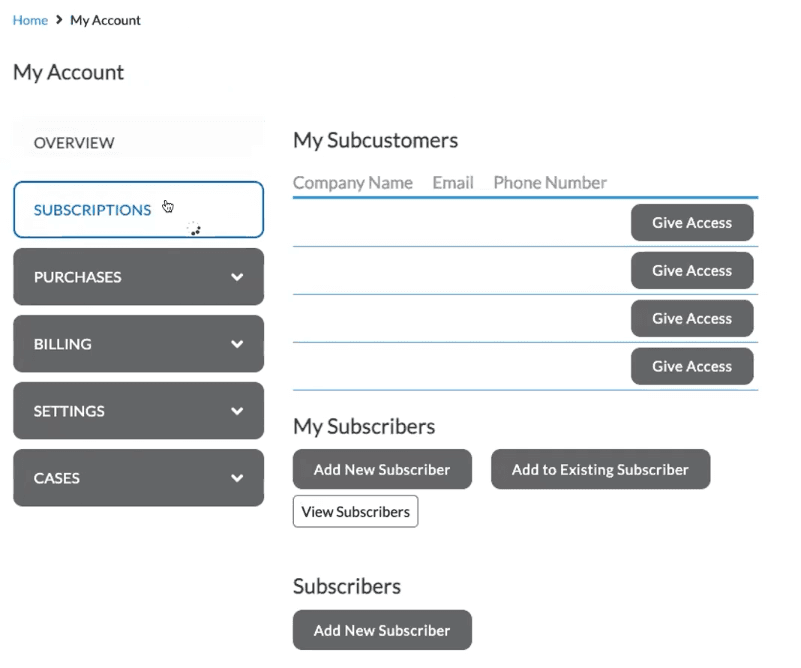

Build Better SuiteCommerce Business Portals With Role-Based Menus
This extension makes SuiteCommerce business portals more useful by letting the My Account experience change based on the Role of the person who's actually logged in.
Why this matters:
- Choose to hide or display certain SuiteCommerce My Account tabs based on user Role
- Hide ‘Payment Methods’ and ‘Settings’ from Junior-level Roles for security
- Expose ‘Invoices’ to Accountants and ‘Reorder Items’ to Buyers

Role-Based SuiteCommerce B2B Experiences
This extension gets particularly useful in SuiteCommerce B2B environments where one customer company may have several people using the portal for completely different reasons.
Why this matters:
- Accountants – Show Invoices and Account Balance.
- Buyers – Show Reorder Items and purchasing-related functionality.
- Junior users – Hide Payment Methods, Settings, or other areas they don't need.
- VIP customers – Expose features your standard customers don't receive.
The existing app is specifically designed to map My Account tabs to NetSuite Roles so each Contact can get an experience that makes sense for their job—a simple NetSuite SuiteCommerce B2B feature that can make a fairly big difference once customer accounts have more than one person using them.

Rename SuiteCommerce My Account Tabs to Match Your Business
Why this matters:
Edit SuiteCommerce My Account Menu lets you rename tabs so the terminology inside SuiteCommerce My Account matches the language your customers encounter everywhere else. It’s a small detail, but one that customers notice.

Remove My Account Features You Don't Actually Use
More menu options don't automatically make a better customer experience.
Why this matters:
- If your business doesn't use a particular feature, the extension lets you remove it from My Account instead of leaving customers to wonder what it does—or why clicking it gets them nowhere useful
- Trim down the feature set in My Account for quicker customer access to what matters most

Create a Consistent Customer and Brand Experience
By controlling the names and availability of My Account tabs, you can create more consistency across the rest of the branded customer experience.
For SuiteCommerce portals, this makes My Account feel more like part of your website instead of a standardized account area somebody bolted onto the back.

A SuiteCommerce Customization and SuiteCommerce Advanced Customization Without the Code Editing
Instead of asking your team to modify code every time you want to change a tab or adjust visibility, the extension gives administrators a configurable framework for managing the My Account menu.
It works with SuiteCommerce and SuiteCommerce Advanced and uses native platform behavior to give you more control over the layout and contents of My Account.
So if your question is:
“What can be changed on SuiteCommerce?”
The answer is quite a bit—including what customers see after they log in.
Need More Than Hiding and Renaming Tabs?
Maybe changing the menu is only step one.
This standard SuiteCommerce extension handles tab visibility, naming, and Role-based menu control. But Anchor Group can extend it further through SuiteCommerce customization.
This could include:
- Adding entirely new My Account tabs
- Showing custom content based on the logged-in user
- Creating more advanced Role-specific experiences
- Adding functionality to individual tabs
- Connecting additional customer-specific workflows to My Account
- New tabs and role-dependent custom content
Our SuiteCommerce developers can handle these additional SuiteCommerce customizations without turning every little My Account change into a complete storefront rebuild.
FAQs

It's a SuiteCommerce extension that lets administrators hide, display, and rename My Account tabs and control their visibility based on a user's NetSuite Role.
Yes. You can determine which My Account tabs appear and assign their visibility to particular Roles.
Yep. That's one of the main reasons the extension exists.
Different Contacts can receive different My Account experiences based on their assigned NetSuite Roles.
Yes. You can change tab names to match the terminology your company and customers already use. So if your business says “Quotes” and SuiteCommerce says “Estimates,” you no longer have to spend the rest of your natural life explaining the distinction.
Yes. The current product specifically identifies hiding Payment Methods and Settings from junior-level Roles as a use case.
What's next?
Make your day-to-day work easier and get back to what matters most with this SuiteCommerce extension, built by the Anchor Group development team to streamline your workflow and simplify daily tasks. Reach out below and let’s get you rolling.



Need something a little different?
If you’re not seeing the exact fit you need, no worries—we also build affordable custom solutions to fit your business, your workflows, and the way your team actually works.
Reach out and let’s build a solution that fits like it ought to.
