One of our clients wanted to display the number of days an invoice has been open on their NetSuite invoice PDF. Here's how we accomplished it!
Date
September 10, 2026
Read
7 min
One of our clients wanted to display the number of days an invoice has been open on their invoice PDF. There is a native field called days open {daysopen} that is a search field only. Here's how we were able to get that field to appear on the company's invoice PDFs, as requested!
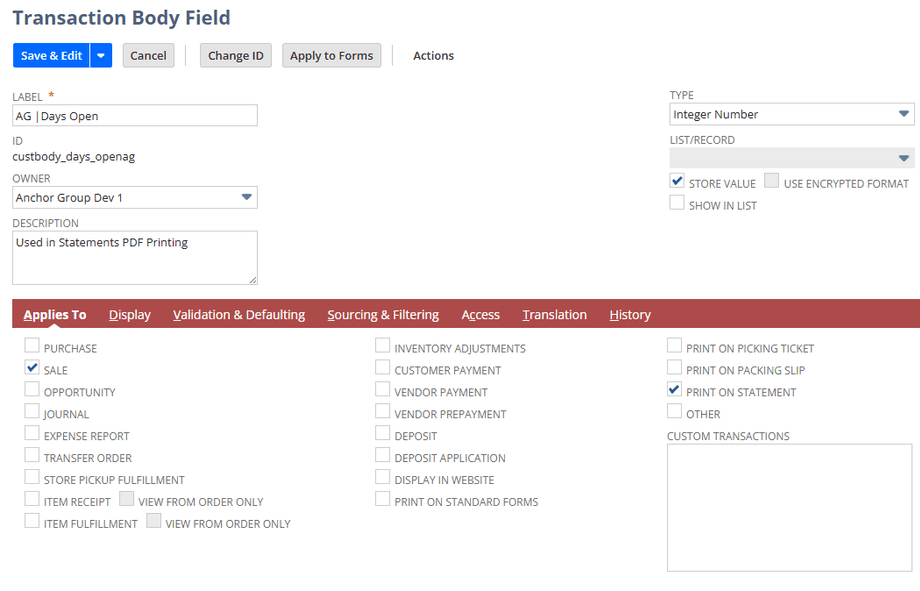
Step 1: Create a custom field called AG | Days Open with the following settings:
Type - Integer Number
Check the Store Value checkbox
Warning: Do NOT create the custom field as Days Open - you will confuse yourself later when searching/sourcing.
Step 2: On the "Applies to" tab of your custom field:
Check the Sale checkbox
Check the Print on Statement checkbox - (If you do not click print on statements, this field will NOT be able to be used on statement.)
Step 3: On the Display tab of your Custom Field, write Help text such as the following to indicate the purpose of the field:
"Shows the number of days open. This is sourced from a daily Mas Update (AG | Days Open Filler)"
Create a Saved Scheduled Mass Update
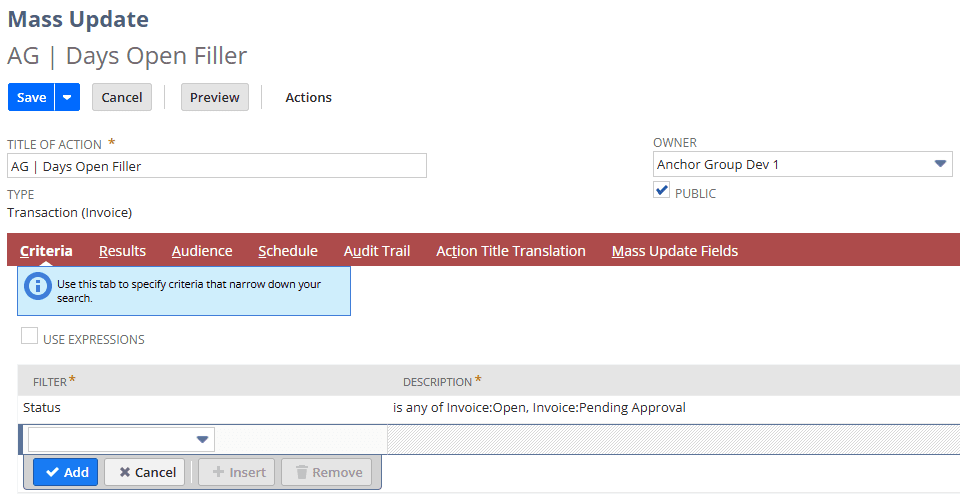
Step 1: Use the following criteria in your saved scheduled Mass Update to set your new field with the native days open field.
Filter - Status
Description - is any of Invoice:Open, Invoice:Pending Approval.
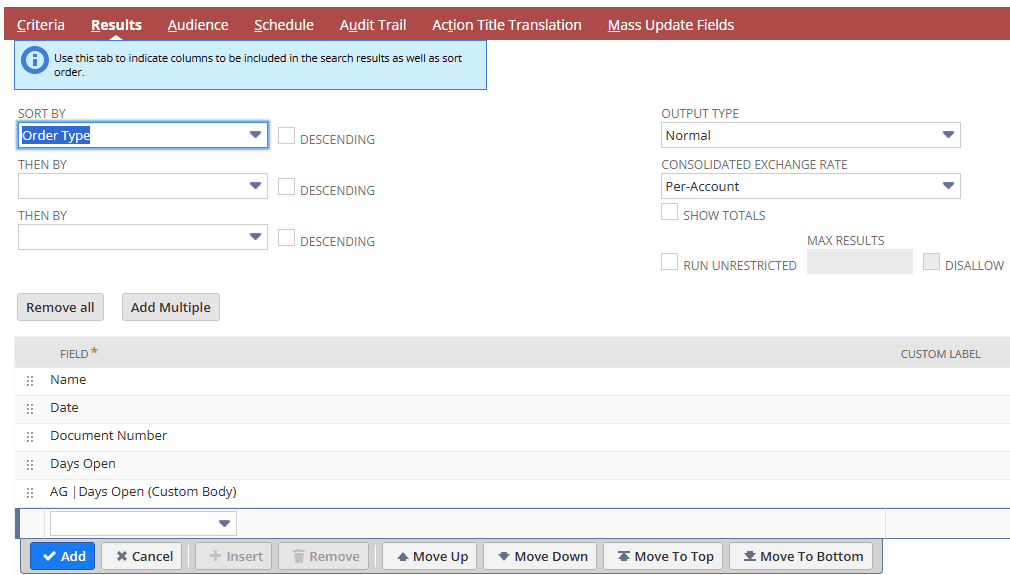
Step 2: Establish the Results for your Mass Update with "Sort by" set to Order Type and the following fields included:
Name
Date
Document Number
Days Open
"AG | Days Open (Custom Body)"- From step 1 above.
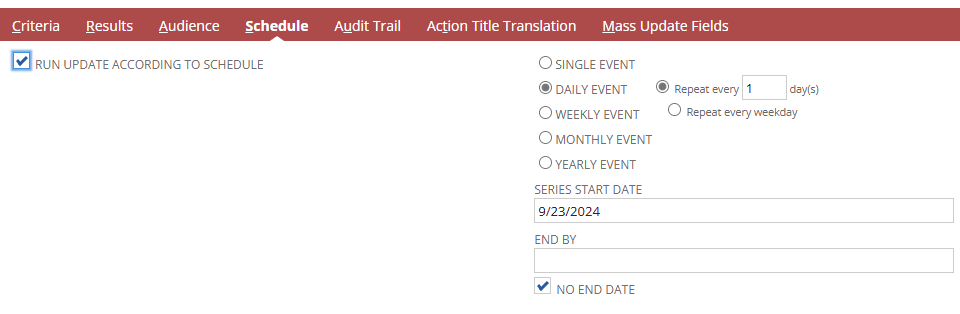
Step 3: On the Schedule tab, set the following:
Check the "Run Update According to Schedule" checkbox.
Select Daily Event
Set to Repeat every 1 day(s)
Set the series start date according to your use case.
Check the "No End Date" checkbox.
Step 4: On the Mass Update Fields Tab, check Apply beside the Days Open field.
Formula - (daysopen)
Note: Downside with a LOCK PERIOD
One downfall of this process is that if the Invoice is in a LOCK PERIOD, the Mass update will no longer update our custom field. If this is something that would cause problems in your specific use case, contact our team for assistance with how you might be able to work around this.
Got stuck on a step in this article?
We like to update our blogs and articles to make sure they help resolve any troubleshooting difficulties you are having. Sometimes, there is a related feature to enable or a field to fill out that we miss during the instructions. If this article didn't resolve the issue, please use the chat and let us know so that we can update this article.
If you have general questions about NetSuite or more specific questions about how our team can support your business, contact us. Anchor Group is a certified Oracle NetSuite Alliance Partner and Commerce Partner equipped to handle all kinds of NetSuite and SuiteCommerce projects. We offer services across the United States and beyond, so whether you are located in Fresno, Dallas, or somewhere in between, we've got you covered.
Are you trying to edit a NetSuite Advanced PDF and can’t get that ONE tricky field to pull through from the invoices into your payment record? Never fear; I struggled so you wouldn’t have to.