SuiteCommerce Plugin
Edit SuiteCommerce My Account Menu
SuiteCommerce MyAccount Customization | Role-Based Customer Portal Navigation
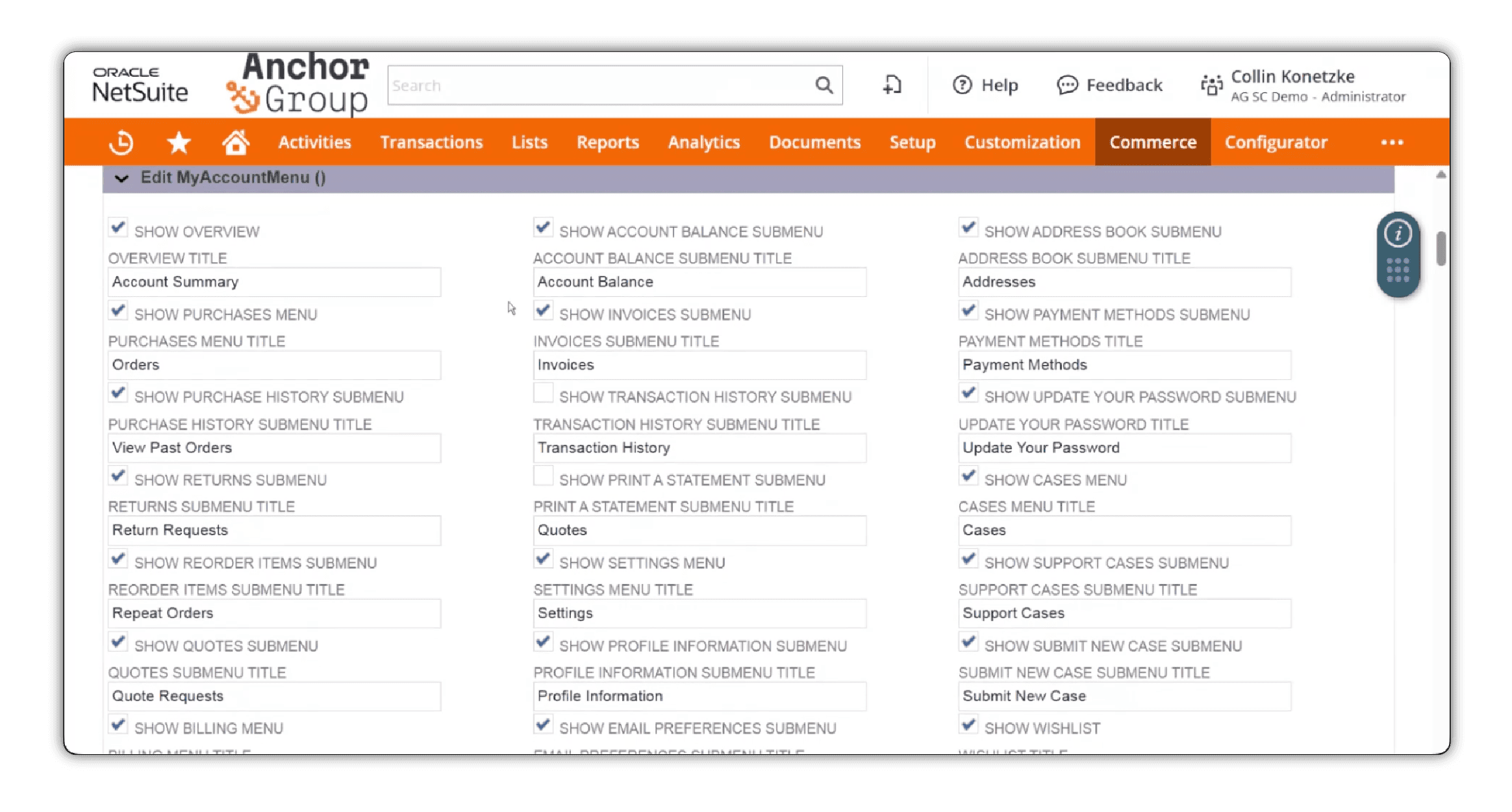
Not every customer needs every tab, and not every person at the same company needs the same menu. Our Edit SuiteCommerce My Account Menu extension lets you customize which tabs appear in your customer portal, what they're called, and which NetSuite roles can see them. Show Invoices to accounting contacts, give buyers quick access to Reorder Items, hide unnecessary settings from junior users, rename “Estimates” to “Quotes” because that's what your customers actually call them. A more useful SuiteCommerce B2B customer portal, all without touching code.
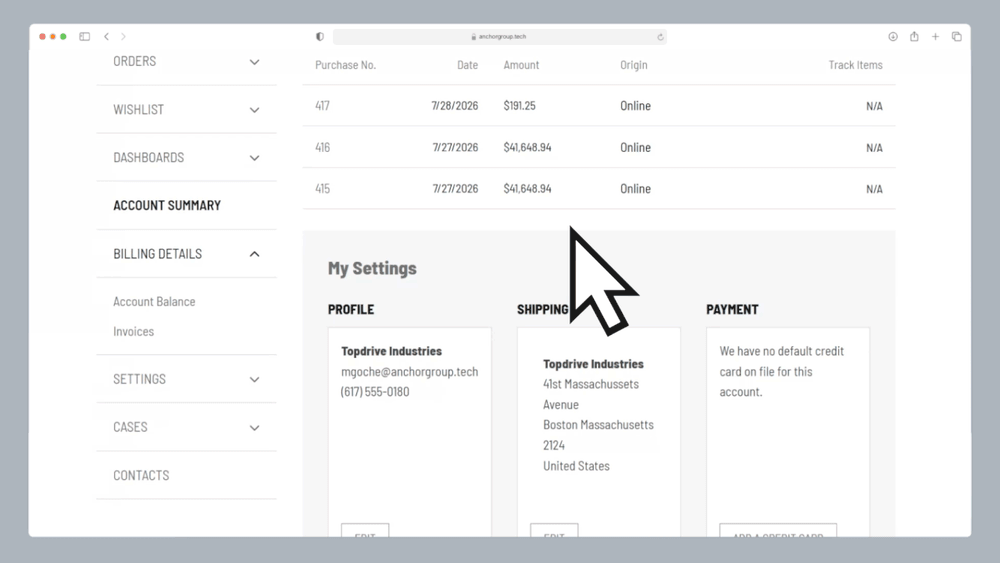
Customize SuiteCommerce MyAccount Navigation for Your Customers
Natively, SuiteCommerce MyAccount gives customers access to account information, orders, invoices, settings, and other self-service functionality. But we know the default navigation doesn't always match the way your business or your customers work.
Don't accept returns? That Returns tab may be unnecessary. Have customers who only need to reorder products? They probably don't need to navigate through every account setting to find what they're looking for.
This Edit SuiteCommerce My Account Menu extension gives administrators more control over the customer-facing navigation to rename tabs, adjust visibility based on NetSuite roles, and simplify the menu to help customers find the information and functionality relevant to them.
Finally, a SuiteCommerce menu customization that makes your customer portal feel like it was designed for your business.
What the SuiteCommerce Extension Can Do

Customize SuiteCommerce My Account tabs: Choose which existing tabs appear in the customer-facing navigation
-
Rename SuiteCommerce menu items: Adjust labels to match your company's terminology and customer expectations
-
Configure role-based navigation: Display different MyAccount menu options based on assigned NetSuite roles
-
Personalize B2B customer portal menus: Show accountants, buyers, and other contacts the navigation options relevant to their responsibilities
-
Hide unnecessary menu options: Remove unused features or hide selected tabs from designated roles
-
Configure customer-specific menu experiences: Enable selected navigation functionality for particular customer configurations
-
Manage menus without code changes: Make supported tab naming and visibility adjustments through the extension's configuration
-
Extend SuiteCommerce MyAccount functionality: Add new tabs, content, or more advanced experiences through additional SuiteCommerce development
Who This SuiteCommerce MyAccount Menu Extension Is For
B2B Businesses With Multiple Customer Roles
In NetSuite SuiteCommerce B2B environments, a single customer account may have purchasing managers, accountants, department heads, and other employees using the same portal for completely different reasons.
With SuiteCommerce role-based navigation, businesses can tailor MyAccount menus to the responsibilities of each user.
Why It Matters:
- Show purchasing-related functionality to buyers and billing-related features to accounting contacts
- Simplify SuiteCommerce MyAccount navigation for users with different responsibilities
- Reduce unnecessary menu options for junior-level employees
- Give customers a more relevant, personalized B2B account experience
- Configure menu visibility based on designated NetSuite roles
Wholesale Distributors With Repeat Buyers
For wholesale distributors and manufacturers, customers often return to their SuiteCommerce B2B customer portal to reorder products, review previous purchases, or manage account information.
They shouldn't have to navigate through features they rarely use to complete a routine purchase.
With this SuiteCommerce MyAccount customization, businesses can make relevant purchasing functionality easier to find.
Why It Matters:
- Make Reorder Items and purchasing-related navigation easier to access for designated buyers
- Hide unused account features that add unnecessary clutter
- Help customers navigate their online purchasing workflows more efficiently
- Create a more focused self-service experience for repeat purchasers
- Tailor SuiteCommerce navigation to the way wholesale customers actually buy

Businesses With Customers Managing Invoices and Payments
For many B2B customers, logging into SuiteCommerce isn't always about placing another order; sometimes they just need to review an invoice, check an account balance, or access billing information.
This SuiteCommerce My Account Menu extension lets businesses tailor navigation for accounting contacts so relevant financial features are easier to find.
Why It Matters:
- Make Invoices and Account Balance navigation visible to designated accounting roles
- Reduce unrelated purchasing or account-management options for finance-focused users
- Simplify access to existing SuiteCommerce billing functionality
- Give customers a clearer path to the account information they need
- Improve the usability of your B2B customer self-service portal

Businesses Simplifying Their SuiteCommerce Customer Portals
More menu options don't automatically mean a better customer experience.
If your company doesn't accept returns or use certain SuiteCommerce features, leaving those tabs visible can create unnecessary confusion.
With SuiteCommerce menu customization, businesses can hide unused options and organize MyAccount navigation around the functionality customers actually need.
Why It Matters:
- Remove unnecessary SuiteCommerce MyAccount tabs
- Reduce navigation clutter in complex customer portals
- Help users find relevant features without sorting through unused options
- Simplify the customer-facing experience without rebuilding the storefront
- Adjust menus as your customer portal requirements change

Businesses With Branded or Customized Customer Portals
Your customers shouldn't have to learn a new vocabulary just because they're using SuiteCommerce.
Maybe your business calls them Quotes instead of Estimates. Or uses terminology specific to your industry that isn't reflected in the standard MyAccount menu.
The SuiteCommerce MyAccount extension lets you rename tabs to match your business language and can be extended to accommodate additional custom functionality.
Why It Matters:
- Match SuiteCommerce menu labels to your company's established terminology
- Create a more consistent experience between your website and customer portal
- Reduce confusion caused by unfamiliar or inconsistent menu labels
- Support customized navigation for additional SuiteCommerce MyAccount features
- Make the customer portal feel like a natural extension of your business
Build Better SuiteCommerce B2B Customer Portals With Role-Based Menus
Your accounting team and purchasing team don't use NetSuite the same way. Your customers probably don't either. That's why the Edit SuiteCommerce My Account Menu extension supports role-based navigation, where different contacts at the same customer company can see different menu options based on their assigned NetSuite roles.
For example:
- Accountants: Access Invoices and Account Balance navigation.
- Buyers: Access Reorder Items and purchasing-related options.
- Junior employees: See a simplified menu without unnecessary Settings or Payment Methods tabs.
- Designated customers: Receive navigation options for selected features available to their account.
The result is a more focused SuiteCommerce B2B customer experience, with fewer distractions and easier access to the relevant parts of MyAccount.
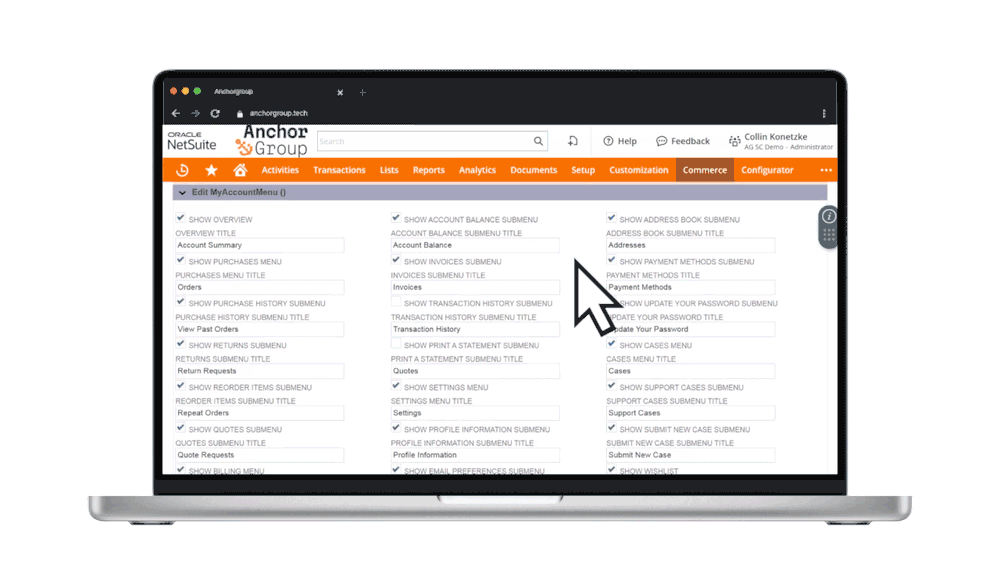

Rename SuiteCommerce MyAccount
Tabs to Match Your Business
Your company calls them Quotes. SuiteCommerce calls them Estimates.
Who's going to win that argument? (spoiler: SuiteCommerce will)
BUT—with SuiteCommerce MyAccount menu customization, you can override native label settings.
Rename menu tabs to use the terminology your customers already understand, making your customer portal more consistent with your website, internal processes, and customer communications.
It's a small adjustment that can make a meaningful difference in how intuitive your SuiteCommerce customer portal feels.
Remove SuiteCommerce MyAccount
Features You Don't Use
If a menu option doesn't support your customer workflows, why keep sending people there?
The Edit SuiteCommerce My Account Menu extension lets you hide unnecessary tabs or limit their visibility to designated roles, making it easier to simplify the menu without making broad changes to your storefront or removing the underlying NetSuite functionality.
Less clutter. More useful navigation.
Customize SuiteCommerce Navigation Without Editing Code
Making basic navigation changes shouldn't require another development project every time someone wants to rename a tab. The SuiteCommerce MyAccount extension provides configurable controls for supported tab visibility, labeling, and role-based menu experiences.
It works with SuiteCommerce and SuiteCommerce Advanced, allowing your team to tailor the customer-facing navigation around existing business requirements.
So when those requirements change, your navigation can easily change with them.

Adding More to Your SuiteCommerce Customer Portal?
Our Custom Records in SuiteCommerce MyAccount extension lets you display customer-specific NetSuite information, including warranties, memberships, and account documents. Pair it with Edit MyAccount Menu to create a more organized navigation experience around your expanded portal functionality.

Need More Than Standard SuiteCommerce Menu Customization?
Hiding and renaming tabs is only the beginning.
Our SuiteCommerce developers can extend MyAccount functionality to support more complex requirements, including:
- Adding entirely new MyAccount tabs
- Displaying custom content within selected tabs
- Creating more advanced role-specific experiences
- Connecting NetSuite Custom Records to customer-facing navigation
- Adding functionality to new or existing MyAccount sections
- Building customer-specific workflows within SuiteCommerce
The standard extension manages menu visibility, naming, and role-based navigation. Additional development can expand the functionality behind those menu items.
FAQs

Yes! Our Edit SuiteCommerce MyAccount Menu extension lets administrators hide, display, and rename menu tabs. You can also configure which options appear based on a user's assigned NetSuite role, creating a more personalized customer portal.
Yes. The extension supports SuiteCommerce role-based navigation, allowing different contacts at the same customer company to see different menu options. For example, accounting contacts can see billing-related tabs, while buyers see purchasing and reorder functionality.
Yep! That's one of the main reasons this extension exists.
You can hide unnecessary tabs or restrict their visibility to designated NetSuite roles. For example, businesses can hide Payment Methods or Settings from junior-level users, or remove the Returns tab if that functionality isn't needed.
Yes. You can change menu labels to match your company's terminology. For example, businesses that use "Quotes" instead of "Estimates" can update the corresponding menu label to create a more consistent customer experience.
Not by itself. The extension controls which navigation options appear to users. Access to underlying NetSuite records and functionality should also be governed by the appropriate NetSuite roles, permissions, and customer access settings.

What's next?
Your SuiteCommerce customer portal should work for your customers, not make them work around it. With Anchor Group's Edit SuiteCommerce My Account Menu extension, you can simplify navigation, personalize menus by role, and make the MyAccount experience more useful for B2B buyers, accountants, and other customer contacts. A few thoughtful menu changes can make the whole portal easier to use.


Need something a little different?
If you’re not seeing the exact fit you need, no worries—we also build affordable custom solutions to fit your business, your workflows, and the way your team actually works.
Reach out and let’s build a solution that fits like it ought to.
