SuiteCommerce Plugin
NetSuite Saved Searches in SuiteCommerce MyAccount
SuiteCommerce Customer Portal Reporting | NetSuite Saved Search Extension
If NetSuite knows it, your customers should be able to find it. (The parts you want them to see, anyway.) Anchor Group's NetSuite Saved Search MyAccount extension brings customer-specific ERP data directly into your SuiteCommerce B2B customer portal. Give customers self-service access to inventory, orders, account balances, pricing, and other relevant NetSuite Saved Search results, complete with filtering, drilldowns, and CSV exports. All the information your customers need, but with fewer requests of your team to go find it for them. (Win-win.)
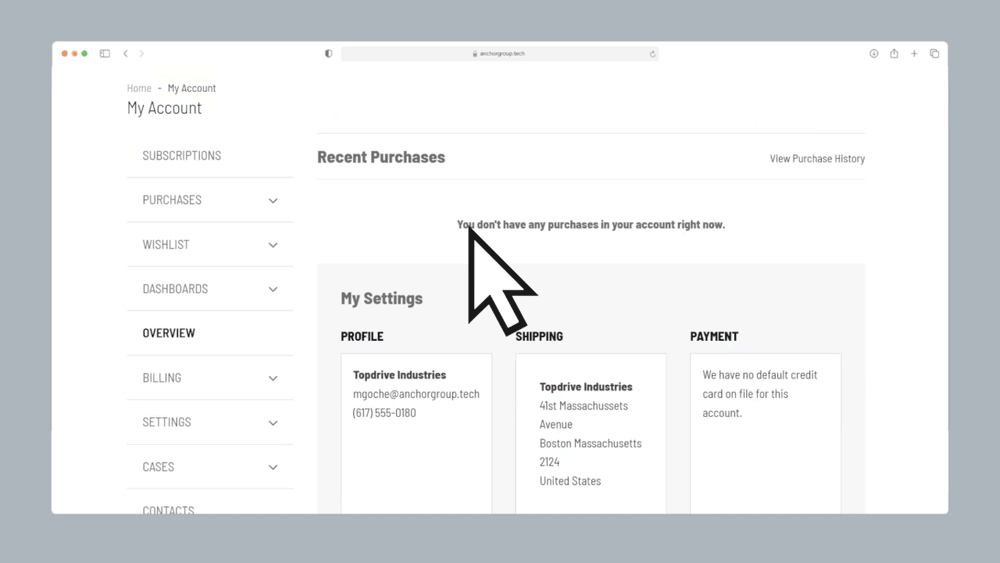
Turn NetSuite Saved Searches Into Customer-Facing Reports
SuiteCommerce MyAccount gives customers the basics: Orders, purchase history, account information. And sometimes that's plenty. Other times, (oftener times) your customer needs to know:
- What's available at my warehouse?
- What's backordered?
- What's my account balance?
- What did each of my end customers order?
- What products are actually available to my account?
This SuiteCommerce Saved Search extension lets you take the results of a NetSuite Saved Search and display them directly inside My Account, including drilldown functionality. (Handy.) Pair with Sonar Integrated AI Assistant for NetSuite to develop your Saved Searches for you.
What the SuiteCommerce Saved Search Extension Can Do

Display NetSuite Saved Searches in SuiteCommerce: Surface customer-specific ERP data directly inside MyAccount
-
Customer-specific report filtering: Configure NetSuite Saved Search criteria so logged-in customers see the records intended for their accounts
-
Customizable SuiteCommerce MyAccount tabs: Add a navigation tab with a label that makes sense to your customers
-
Multiple NetSuite Saved Search reports: Configure the order and visibility of several searches within the customer portal
-
Searchable and sortable results: Allow customers to find specific information within their reports and sort by available columns
-
NetSuite Saved Search drilldowns: Configure summary columns that link to more detailed report views
-
CSV report downloads: Let customers export their displayed Saved Search data for further review
-
Configurable report layouts: Control visible columns, sorting, pagination, and drilldown behavior for each search
-
NetSuite customer reporting: Display account-specific inventory, pricing, orders, balances, or other supported ERP information
-
Pair with Sonar Integrated AI Assistant for NetSuite to develop your Saved Searches for you to use in this app
-
SuiteCommerce Advanced compatibility: Extend customer reporting functionality across supported SuiteCommerce and SuiteCommerce Advanced environments
Turn SuiteCommerce MyAccount Into a Real Business Portal

B2B Businesses Offering Customer Self-Service Portals
Enhance your SuiteCommerce business portals and turn your SuiteCommerce from “a place where customers buy things,” into “a place where customers manage their relationship with us.”
For businesses using NetSuite SuiteCommerce B2B ecommerce, the Saved Search MyAccount extension provides a way to share customer-specific ERP information directly inside the portal customers already use.
Why It Matters:
- Give customers self-service access to relevant NetSuite reports and account information
- Reduce repetitive requests for order, pricing, and account data
- Allow customers to search, sort, and download reports without contacting support
- Create a more useful SuiteCommerce customer self-service portal beyond standard purchase history
- Keep customer-facing reporting connected to existing NetSuite data

Wholesale Distributors Managing Inventory and Backorders
Wholesale customers often need more than a general "In Stock" or "Out of Stock" message.
They may need to know what's available at a particular warehouse, which products are backordered, or what inventory is associated with their account.
With NetSuite inventory Saved Searches, distributors can make appropriately filtered inventory and backorder information accessible directly through SuiteCommerce MyAccount.
Why It Matters:
- Display relevant NetSuite inventory reports inside the customer portal
- Allow buyers to review warehouse stock and backorder information when included in configured searches
- Reduce manual inventory inquiries handled by customer service and sales teams
- Give wholesale customers more information when planning purchases
- Support better-informed B2B purchasing decisions

Businesses With Complex Customer Ordering Structures
Not every B2B company has one customer, one location, and one straightforward order history. Some businesses manage orders across multiple locations, departments, projects, or end customers.
The SuiteCommerce Saved Search extension can display configured order data and allow customers to filter their reports to find the transactions relevant to their needs.
Why It Matters:
- Display NetSuite sales order data relevant to specific customer accounts.
- Help buyers search for orders associated with particular projects or end customers.
- Allow customers to drill into detailed order information.
- Reduce the need for custom reports to be manually prepared and emailed.
- Make complex ordering relationships easier to review through SuiteCommerce.


Businesses With Customer-Specific Pricing and Product Catalogs
Wholesale buyers don't always see the same products or pay the same prices.
For companies maintaining account-specific catalogs and negotiated pricing in NetSuite, giving customers an organized way to review that information can improve their purchasing experience.
The SuiteCommerce MyAccount Saved Search extension can display customer-specific product and pricing reports based on configured NetSuite Saved Search criteria (see our SuiteCommerce MyAccount guide for more information).
Why It Matters:
- Display customer-specific product catalogs and pricing information
- Allow customers to download relevant product and pricing reports as CSV files
- Make large account-specific catalogs easier to review and search
- Reduce requests for manually prepared customer price lists
- Support a more personalized NetSuite B2B ecommerce experience

Customer Service and Account Management Teams
Your account managers know NetSuite has the answer.
The problem is that customers often don't have a convenient way to get that answer themselves.
With NetSuite customer portal reporting, your team can configure commonly requested information as Saved Searches and make those results available through SuiteCommerce.
Why It Matters:
- Reduce repetitive customer requests for reports already available in NetSuite
- Give account managers more time to focus on customer relationships
- Provide customers with a consistent place to find commonly requested information
- Reduce manual CSV exports and emailed spreadsheets
- Improve customer self-service without creating a separate reporting system
Give Customers Direct Access to NetSuite ERP Data
Sometimes the best customer service is letting customers find the information themselves.
The NetSuite Saved Search MyAccount extension brings configured ERP data into SuiteCommerce, allowing logged-in customers to view relevant reports without needing direct access to your internal NetSuite interface.
You control the Saved Search configuration and the criteria used to determine which records belong in each customer's view.
Whether you're sharing order details, inventory information, pricing, or account data, your customers can access the information through a familiar portal rather than waiting for your team to send another spreadsheet.

Make NetSuite Saved Search Reports Easier to Navigate
A long report is only useful if somebody can find what they're looking for.
The extension includes several ways to make NetSuite Saved Search results easier for customers to navigate.
- Search: Filter within individual result sets to locate relevant records.
- Sort: Organize report data by available columns.
- Drill down: Open detailed information from a configured summary column.
- Return to Summary: Move back to the main report view without starting over.
- Download: Export report results to CSV for further analysis.
Each Saved Search can have its own layout and display settings, letting your team tailor the experience around the information customers need most.

Build a More Useful SuiteCommerce Customer Reporting Portal
A customer portal should be more than a place to look up last month's orders.
With the SuiteCommerce MyAccount Saved Search extension, businesses can organize multiple customer-facing reports into a more useful reporting experience.
You can configure:
✔ Which NetSuite Saved Searches appear in MyAccount
✔ The order and visibility of available searches
✔ The columns displayed for each report
✔ Summary and detail views
✔ Search, sorting, and pagination behavior
✔ Custom tab names that match your business terminology
And because the underlying data comes from NetSuite, your team can continue managing the source information in the ERP it already uses.

Keep NetSuite Customer Reporting Relevant to Each Account
Not every customer should see the same information, which is why this extension supports customer-specific data filtering through configured NetSuite Saved Search criteria, allowing businesses to tailor report results to the logged-in customer.
For example, a wholesale distributor might create a Saved Search showing inventory information relevant to a particular customer, while another report displays that customer's orders or pricing.
The important part is configuring and testing the searches appropriately so each customer sees only the information they're authorized to access.
Customize Your SuiteCommerce MyAccount Reporting Experience
Anchor Group's SuiteCommerce developers can help configure more complex Saved Searches or develop additional functionality around your business requirements, including:
- Advanced customer-specific report criteria
- Custom summary and drilldown experiences
- Additional NetSuite data relationships
- Business-specific report layouts
- More sophisticated customer reporting interfaces
- Integration with other SuiteCommerce MyAccount extensions
You can also pair the solution with Sonar Integrated AI Assistant for NetSuite to help develop Saved Searches that can be configured for use within the extension.
FAQs

Yes. Anchor Group's NetSuite Saved Search MyAccount extension allows businesses to display configured NetSuite Saved Search results directly inside their SuiteCommerce customer portal. Customers can view relevant account data through searchable, sortable reports with optional drilldowns and CSV exports.
Yes. The extension uses configured NetSuite Saved Search filtering criteria to display results relevant to each logged-in customer. For example, searches can be configured to show customer-specific orders, pricing, inventory, or account information.
These filters should be tested to confirm the correct records are visible to each customer.
Yes. The extension includes CSV export functionality, allowing customers to download the Saved Search results available through their SuiteCommerce MyAccount portal.
This can be particularly useful for account-specific product catalogs, pricing lists, and other customer reporting needs.
Yes! Customers can search within configured result sets and sort report data by available columns. This makes large NetSuite reports easier to navigate without needing to export the information first.
Yep, the extension supports configurable summary columns that link to more detailed report views. Customers can also use the Return to Summary option to navigate back to the main report.

What's Next?
If your customers keep asking for data your team already has in NetSuite, maybe it's time to stop delivering it one report at a time. With Anchor Group's NetSuite Saved Searches in SuiteCommerce MyAccount extension, you can give customers direct access to relevant ERP data, reduce manual reporting requests, and turn your customer portal into a more valuable self-service resource. The data's already there. Let's make it useful.









Need something a little different?
If you’re not seeing the exact fit you need, no worries—we also build affordable custom solutions to fit your business, your workflows, and the way your team actually works.
Reach out and let’s build a solution that fits like it ought to.
