SuiteCommerce 2025.2 Security Updates: CAPTCHA, Email Verification, and More
Learn about the security features introduced in SuiteCommerce 2025.2.0, including CAPTCHA, email-domain blocklisting, and email verification, plus existing storefront access controls and customization options.
Date
October 23, 2026
Read
7 min
One question we regularly hear from SuiteCommerce customers at Anchor Group is: How can we protect our website, product information, and customer accounts from bots, spam registrations, and malicious activity?
SuiteCommerce includes several native security settings, and the 2025.2.0 release introduced additional features to help store administrators manage these risks.
This guide covers the security options available before 2025.2.0, the enhancements introduced in that release, and situations where additional SuiteCommerce customization may be useful.
SuiteCommerce Security Options Available Before 2025.2.0
Before the 2025.2.0 update, SuiteCommerce already offered several ways to restrict access to a storefront.
You can find these settings in the Website Setup record under Commerce > Websites > Website List.
Require Login for Pricing
The Require Login for Pricing setting allows you to display products on your storefront while restricting pricing visibility to authenticated customers.
Benefit: This can be useful for B2B ecommerce stores where prices should only be available to approved customers.
Limitation: Restricting pricing visibility does not prevent automated registrations, spam submissions, or other malicious activity. It also should not be treated as a way to protect all product information.
Password Protect the Entire Site
This option restricts storefront access to users who have the required login credentials.
Benefit: It can help businesses limit storefront visibility to authorized users.
Limitation: Visitors cannot freely browse public pages or products without authenticating. This may not be appropriate for stores that depend on public product discovery or new customer acquisition.
Password protection also does not eliminate every possible form of automated abuse.
For stores where frequent authentication creates friction, additional customization may help improve the login experience while maintaining appropriate access controls.
Require Login or Restrict New Customer Registration
Depending on your business model, you may choose to require customers to log in or restrict the creation of new customer accounts.
Benefit: These settings can help control who is permitted to register, access customer-specific functionality, or complete certain storefront actions.
Limitation: Restricting registration may not be appropriate for businesses that need to accommodate new customers or guest shoppers.
The right configuration depends on whether your storefront serves existing account holders, new customers, or both.
SuiteCommerce 2025.2.0 Security Enhancements
The SuiteCommerce 2025.2.0 release introduced three additional security features:
SuiteCommerce CAPTCHA
SuiteCommerce Email Domains Blocklist
SuiteCommerce Email Verification
These features are available for supported SuiteCommerce, SuiteCommerce Advanced, and SuiteCommerce MyAccount implementations.
The settings are managed through the SuiteCommerce Configuration record under Commerce > Websites > Configuration. Select your website and domain to configure the relevant options.
1. SuiteCommerce CAPTCHA
CAPTCHA helps distinguish human users from automated activity by requiring users to complete a challenge before certain actions.
SuiteCommerce 2025.2.0 introduced native support for Google reCAPTCHA v2 and hCaptcha.
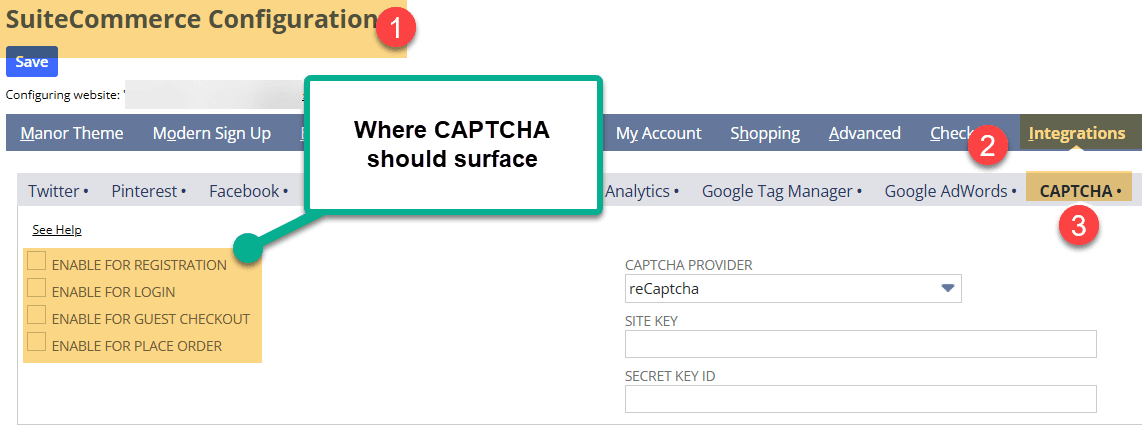
Administrators can configure CAPTCHA for supported storefront interactions, including:
Customer registration
Login
Guest checkout
Order placement
Benefits
CAPTCHA can help deter automated account creation, suspicious login activity, and certain types of fraudulent checkout behavior.
It also gives administrators control over which supported interactions require a challenge.
Limitations
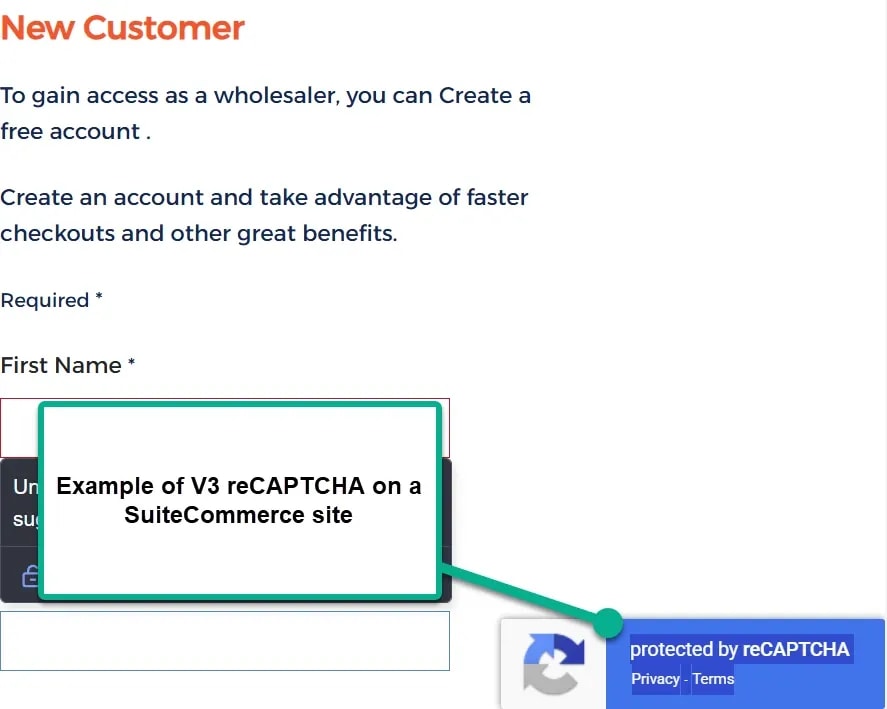
Native SuiteCommerce CAPTCHA supports Google reCAPTCHA v2 and hCaptcha, rather than Google reCAPTCHA v3.
Custom forms, custom landing pages, or separately installed extensions may require additional integration work if they do not use the supported native flows.
CAPTCHA also introduces an additional step for shoppers, so it is worth considering where challenges provide the most value.
Configuration
Navigate to Commerce > Websites > Configuration, select your website and domain, and open Integrations > CAPTCHA Settings.
Configure the desired interactions, select the CAPTCHA provider, and enter the required provider credentials.
The private CAPTCHA key should be stored securely using NetSuite's supported API Secrets functionality.
2. SuiteCommerce Email Domains Blocklist
The SuiteCommerce Email Domains Blocklist helps prevent users from registering or proceeding through supported checkout flows with email addresses from untrusted domains.
For example, if example.net is on the blocklist, a user attempting to register with [email protected] would be prevented from continuing with that address.
The feature checks email domains against a combination of NetSuite's predefined blocklist and any custom domains added by the administrator.
Benefits
Helps reduce registrations using unwanted or disposable email domains.
Allows administrators to maintain a custom list of blocked domains.
Supports protection during registration and certain guest checkout interactions.
Limitations
Blocking an email domain does not prevent someone from attempting registration with another domain.
Administrators may also need to maintain their custom blocklist as new sources of unwanted registrations appear.
The native feature should not be assumed to protect unrelated custom forms, contact forms, or other integrations without testing those submission flows.
Configuration
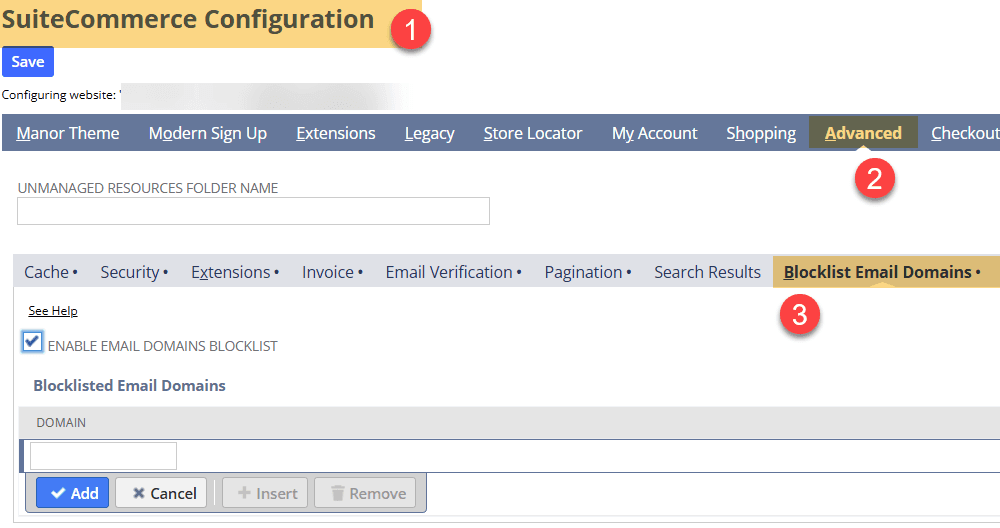
Navigate to Commerce > Websites > Configuration, select your website and domain, and open Advanced > Blocklist Email Domains.
Enable the feature and add any custom domains you want to block.
3. SuiteCommerce Email Verification
SuiteCommerce Email Verification adds another step to customer registration and guest checkout by requiring users to confirm access to their email address.
When enabled, the feature sends a verification code that the shopper must enter before completing the supported process.
Benefits
Helps confirm that customers can receive messages at their provided email addresses.
Reduces certain types of fake account creation.
Gives administrators control over verification messages and code expiration.
Limitations
Verification emails may occasionally be filtered into spam or junk folders.
Administrators should also consider the interval between code requests. Allowing requests too frequently can create opportunities for abuse, while excessively long intervals may frustrate legitimate customers.
Email verification confirms access to an email inbox, but it does not establish that a shopper or transaction is legitimate.
Configuration
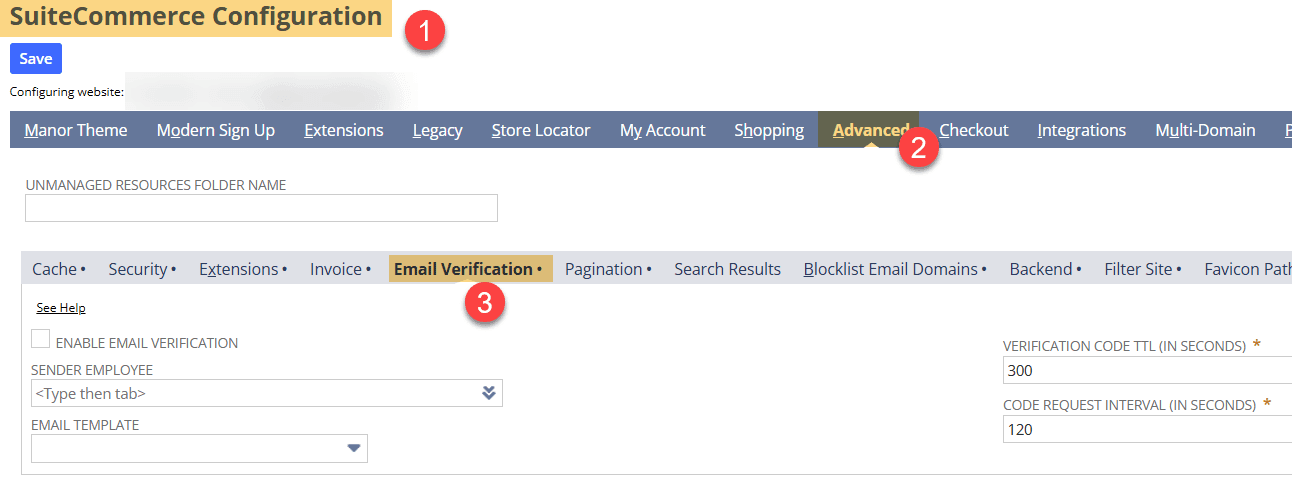
Navigate to Commerce > Websites > Configuration, select your website and domain, and open Advanced > Email Verification.
Enable email verification and configure the available settings:
Sender Employee
Email Template
Verification Code TTL (In Seconds)
Code Request Interval (In Seconds)
Test the registration and guest checkout experience to confirm that verification messages arrive and that the process works as expected.
4. Improved Security for Public Pricing
The 2025.2.0 release also addressed an issue involving the Require Login for Pricing setting.
Previously, quantity pricing information could appear in search engine results for some SuiteCommerce stores even when the setting was enabled.
The release included a fix intended to prevent unauthenticated shoppers from accessing those pricing details through search results.
If your storefront restricts pricing to logged-in customers, this is another reason to review the security changes included in the release.
When Native SuiteCommerce Security Features Aren't Enough
The security features introduced in SuiteCommerce 2025.2.0 provide additional options for protecting standard storefront interactions.
However, some businesses have requirements that extend beyond those native settings.
For example, a store may need to:
Add CAPTCHA to a custom landing page or contact form.
Implement Google reCAPTCHA v3 rather than the natively supported CAPTCHA providers.
Apply additional IP-based or domain-based restrictions.
Protect custom registration processes or other storefront functionality.
Anchor Group has developed SuiteCommerce customizations to address requirements such as these.
Anchor Group reCAPTCHA Customization
For businesses that need CAPTCHA functionality outside the standard SuiteCommerce configuration, custom development may provide additional options for protecting forms and customer interactions.
Anchor Group IP Blocking and Domain Blacklisting
Additional customization may also help businesses manage unwanted traffic or suspicious activity through IP-based restrictions or other validation rules.
The appropriate approach depends on how the storefront is configured and which interactions need protection.
Choosing the Right SuiteCommerce Security Settings
No single security setting addresses every type of automated abuse or fraudulent activity.
For a store experiencing fake customer registrations, email verification and email-domain blocking may be worth evaluating.
For automated activity involving login or checkout, CAPTCHA may provide another layer of protection.
Businesses that need to restrict access to product information or pricing should also review the existing Website Setup security options.
And if the problem involves custom forms, extensions, or integrations, additional development may be necessary.
The most useful starting point is to identify where the unwanted activity is occurring and determine which native SuiteCommerce settings apply to that interaction.
From there, you can evaluate whether the built-in options are sufficient or whether your storefront requires additional customization.
Comprehensive data compiled from industry research on cloud ERP security threats, breach costs, access management, and compliance requirements.
Organizations implementing cloud ERP systems like NetSuite face complex security landscapes where proper configuration determines business outcomes. With breach costs exceeding $4.8 million and human error driving 88% of incidents, understanding security statistics helps leaders make informed decisions about protection strategies, partner selection, and system management.
NetSuite roles and permissions are the role-based access controls that determine what each user can see, create, edit, approve, and administer in NetSuite. The best NetSuite roles and permissions setup in 2026 uses least-privilege custom roles, clear subsidiary and employee restrictions, and routine audits with Show Role Differences before changes reach production.
This is a guide for how to install Google reCAPTCHA on your SuiteCommerce or SuiteCommerce Advanced website in order to stop fraud orders caused by bots on your website.
While NetSuite does not currently offer a native solution for connecting Google reCAPTCHA to your SuiteCommerce site, you can still set it up and stop fraud bots from entering sales orders through your website. Anchor Group, a Certified Oracle NetSuite Commerce Partner, recently built a Google reCAPTCHA SuiteCommerce bundle that allows you to get all the benefits of Google reCAPTCHA Version 2 (V2), and it works with both SuiteCommerce and SCA!
Get a pre-built email verification and IP Blocking bundle that is used to help stop fraud bot attacks on your SuiteCommerce or SuiteCommerce Advanced store that are resulting in your payment processor to potentially shut down.
Lindemann is an authentic, down-to-earth, American company that has become a true force to be reckoned with in the chimney supplies market. Although doubtless most of that success is due to their own hard work and innovation, they also attribute much to the benefits offered by SuiteCommerce.