SuiteCommerce PDP Configuration: Where to Start (and What Actually Matters)
Use this guide to find the main SuiteCommerce Product Display Page (PDP) settings in NetSuite, including item record fields, SEO options, images, and Configuration Record controls.
Date
October 28, 2026
Read
6 min
This article is not meant to be comprehensive but is meant to help you get your bearings.
If you’re configuring a Product Display Page (PDP) in SuiteCommerce and thinking, “Okay…where does this live in NetSuite?” this is your map.
The goals:
Make your store as efficient as possible.
Optimize native NetSuite functionality to make the most out of this important tool.
Stop duct-taping performance issues later.
Understand what controls are found where.
Configuring a SuiteCommerce PDP from the Item Record — Basic
In this example, we used a standard, non-matrix assembly item, though almost all item types can be surfaced to the PDP. On the Item Record, navigate to the following sections:
Sales / Pricing Tab
Make sure that the price level has a price filled out. If left blank, the user will not be able to add the item to the cart in SuiteCommerce.
Webstore Tab
Verify that the following item record fields are configured to make sure that the item properly surfaces on the Product Display Page (PDP).
Display In Web Site - This surfaces the item in the store.
Page Title of the Item - This is beneficial for both SEO and user experience.
Webstore Display Name - This is helpful when customers might not know your specific SKU number.
Detailed Description - This adds more context and detail to the specific item, helping the user learn more about your products. This typically surfaces under the item image.
URL Component - This is added in the URL of the page, and unless customized, matches the Webstore Display Name.
Associated Images - This verifies that the image file in the File Cabinet correctly links to the item record. If there is an image on this sublist, the image should surface in the PDP.
SuiteCommerce PDP SEO and Advanced Configuration
This section optimizes your page performance and improves SEO ratings for your site from the PDP.
Item Record – Webstore Tab
Meta Tag HTML
This adds meta tags to the item page (PDP) and enables your website to be found via search engines.
The contents of this field do not surface to the front end of the page, but rather are written in the HTML framework of the page.
Search Keywords
This field allows alternative search terms that are used for the webstore search bar.
When joined with the Website Setup Record > Search Index – Search Fields, these can be determining factors for how customers find your products.
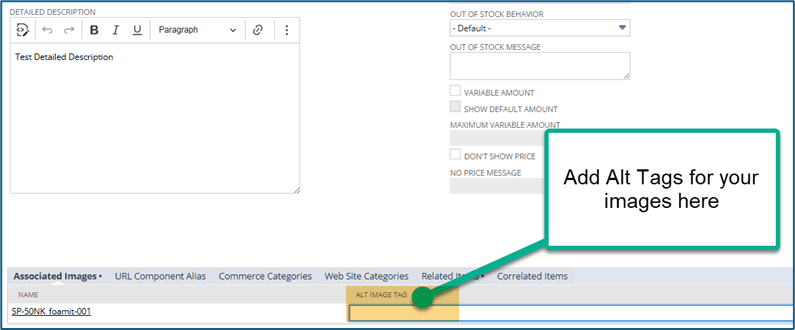
Alt Image Tag
Alt Tags surface when an image cannot display or is still loading. The search engines read these terms and enhance your page’s SEO.
When editing the item record in the webstore tab, you add text to the alt image tag in the array.
Alt Tags can also be added from the Image File in the File Cabinet! (Documents > File > File Cabinet) Select Edit on the image file and add directly.
Enhancing Detailed Descriptions
The Detailed Description field can support normal text input and HTML text. Knowing a little about HTML, you can add specific class names or meta descriptions.
Out Of Stock Behavior & Message
These fields allow you to set the default settings for this item’s behavior when there is no inventory available.
These settings can keep your customers informed about product availability.
Used in tandem with the Stock Notifications or product lead time bundles from NetSuite, these fields can be help organize the site.
Most of these advanced settings are not visible on the PDP, but can help fortify your page’s SEO rankings.
Configure Social Media Icons on the SuiteCommerce PDP
With the Admin or Store Manager role, navigate to the Configuration Record to control the social media icons on the PDP. These icons allow users to link your product to the respective platforms on their own accounts.
Step 1: To toggle these settings, navigate to the Configuration Record by clicking Commerce > Websites > Configuration.
Step 2: Enter your site and domain and hit Enter.
Step 3: Select the Integrations tab and whichever icon you would like to view first.
Step 4: The Enable checkbox allows the icon to surface on the Product Display Page. Toggle this checkbox if you would like to show or hide the specific icon.
There are additional settings on these pages. Check the field help if you would like more information!
Other tactics can improve your site’s SEO rankings and page performance. Please reach out if you would like to learn more!
Got Stuck on a SuiteCommerce PDP Step?
We like to update our blogs and articles to make sure they help resolve any troubleshooting difficulties you are having. Sometimes, there is a related feature to enable or a field to fill out that we miss during the instructions.
If this article didn't resolve the issue, please use the chat and let us know so that we can update this article.
Need Help With SuiteCommerce?
If you have general questions about SuiteCommerce or more specific questions about how our team can support your business as you implement NetSuite or SuiteCommerce, feel free to contact us anytime. Anchor Group is a certified Oracle NetSuite Alliance Partner and Commerce Partner equipped to handle all kinds of NetSuite and SuiteCommerce projects, large or small.
We are a premium SuiteCommerce agency that creates powerful customer portals. Unlike our competitors, we have already solved your problems.
Getting your NetSuite fields to not show up on your SuiteCommerce website is easy. This is a short guide on how to hide fields on the product listing page and product detail page of your SuiteCommerce website.
On the SuiteCommerce stores, the Product Display Page buttons “Add to Shopping Cart”, “Add to Wishlist” and “Add to Quote” are not functioning. Let's resolve it!
Lindemann is an authentic, down-to-earth, American company that has become a true force to be reckoned with in the chimney supplies market. Although doubtless most of that success is due to their own hard work and innovation, they also attribute much to the benefits offered by SuiteCommerce.