Contact Us

SuiteCommerce Plugin

SuiteCommerce Multi-Cart

Improve the SuiteCommerce shopping experience via multiple carts. By Anchor Group SuiteCommerce Developers.

Give SuiteCommerce buyers as many carts as they need—then let them share, organize, move, merge, and purchase without turning one active cart into a catch-all for every project.

16_Multi_Dynamic_Cart_top_gif

Feature Overview

Natively, SuiteCommerce allows one active shopping cart. Wishlists can hold products for later, but they don’t provide the richer purchasing workflow businesses often need for active orders.  Multi-Cart gives customers a dedicated SuiteCommerce cart management experience where they can create and name as many carts as needed.

What the SuiteCommerce Extension Can Do

  • orange circle icon with transparent checkmark in the middle

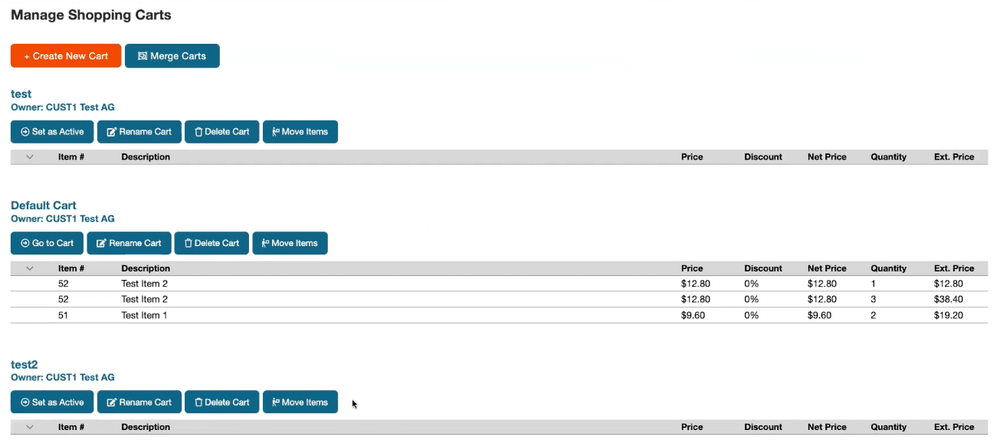
    Create unlimited named carts in SuiteCommerce.

  • orange circle icon with transparent checkmark in the middle

    Move products from one cart to another

  • orange circle icon with transparent checkmark in the middle

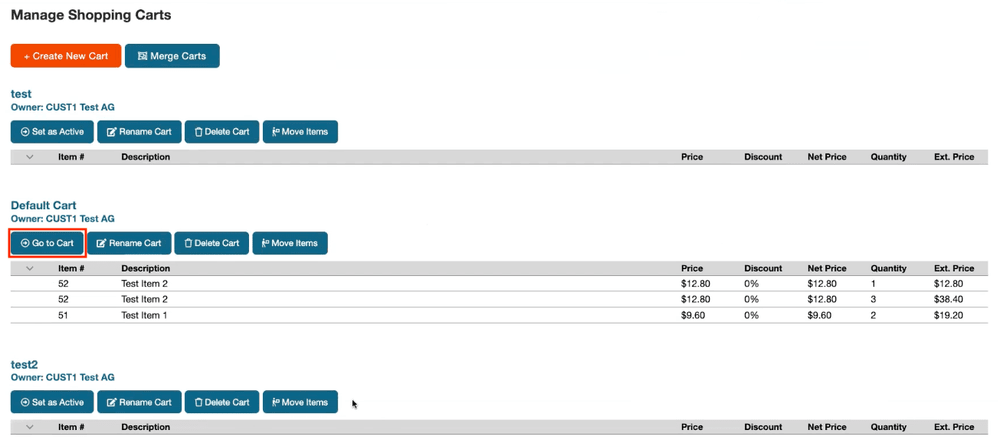
    Set a selected cart as the active cart when the customer is ready to buy

  • orange circle icon with transparent checkmark in the middle

    Share carts with other Customers or Contacts

  • orange circle icon with transparent checkmark in the middle

    Show live pricing updates for items stored in each cart

  • orange circle icon with transparent checkmark in the middle

    Merge multiple carts before Checkout

  • orange circle icon with transparent checkmark in the middle

    Support collaborative cart building

  • orange circle icon with transparent checkmark in the middle

    Make repeat and similar ordering easier

  • orange circle icon with transparent checkmark in the middle

    Organize purchasing by project, job site, client, department, or location

  • orange circle icon with transparent checkmark in the middle

    Pair with Contact Management Solution for shared purchasing across Contacts on the same Customer account.

  • orange circle icon with transparent checkmark in the middle

    Add approval workflows or NetSuite dashboard reporting through additional customization

Create Multiple Carts in SuiteCommerce

Customers can keep projects and repeat purchases separate while they’re being built, collaborate with other buyers, then merge or activate the cart they’re actually ready to order.

For example, that might mean carts for:

  • Madison Job Site
  • Corporate Office
  • October Restock
  • Client – Miller Project

Name them whatever makes sense. The important part is that the buyer doesn’t have to treat every pending purchase like one giant order. 

SuiteCommerce multi-cart manage carts.

A Better NetSuite B2B Ecommerce Cart Experience

NetSuite B2B ecommerce is where SuiteCommerce Multi-Cart starts making considerably more sense than a consumer-style wishlist.

In NetSuite B2B ecommerce, buyers are often buying for:

  • A department
  • A client
  • A project
  • A location
  • A franchise
  • A job site

(Possibly all of the above before lunch.)

SuiteCommerce Multi-Cart was explicitly built for companies needing separate carts across departments, projects, locations, or clients. For SuiteCommerce B2B, this gives shoppers a much more realistic way to organize purchasing before they’re ready to place the final order.

Build Separate Carts for Every Project or Job Site

SuiteCommerce Multi-Cart is ideal for project-based purchasing, where a contractor or project buyer may need to build separate purchase lists for several jobs at once.

Multi-Cart lets them create a dedicated cart for each project, job site, client, or event, then keep adding items as the project develops.  

For example, instead of:

“Cart 1”

you get:

“Milwaukee Office Renovation” and “Madison Distribution Center” and “Johnson Project – Phase II”

16_Multi_Dynamic_Cart_bottom_gif

Build Department Orders Separately

Large organizations often have multiple people buying under one customer account. Rather than asking all of those departments to work inside one active cart, each group can build its own purchase list separately, making SuiteCommerce Multi-Cart great for department-based purchasing, including separate monthly carts and independent cart building by Contacts.  

Share SuiteCommerce Carts With Other Contacts

SuiteCommerce Multi-Cart lets carts be shared between Customers or Contacts, allowing multiple authorized users to participate in building the same order.  

When paired with Anchor Group’s Contact Management Solution, Contacts tied to the same Customer can participate in shared cart workflows.  

Move Items Between SuiteCommerce Carts

Changed your mind about where an item belongs?

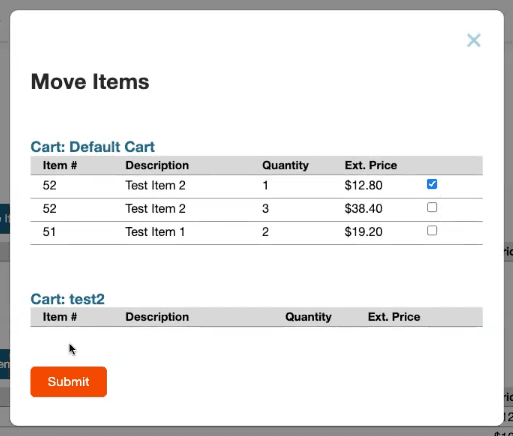
The SuiteCommerce Multi-Cart interface lets buyers move items from one SuiteCommerce cart to another through a simple selection experience:  

Select the items → Choose the destination cart. → Continue with your day.

Far less exciting than deleting and rebuilding half the order. (Which is exactly what we want.) 

SuiteCommerce multi cart move items.

Merge Multiple Carts Before Checkout

Separate carts are useful while customers are organizing the purchase, but they don’t necessarily need to stay separate forever.

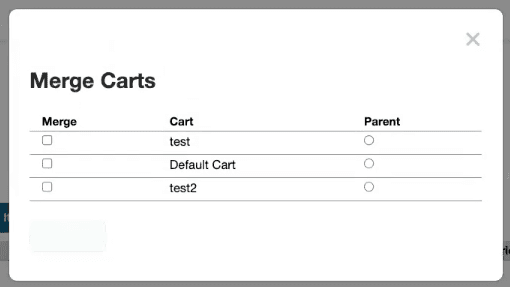
Multi-Cart lets customers select multiple carts, choose a parent cart, and merge the items together when they're ready—especially useful when combining purchases gives the business an opportunity to reduce fulfillment or shipping costs.

SuiteCommerce multi-cart merge carts.

SuiteCommerce Checkout Optimization for Complicated B2B Orders

Scenario: The customer can have many saved carts, but only one needs to go to Checkout right now.

When a customer is ready to purchase, they simply set the desired cart as Active and continue through the normal SuiteCommerce Checkout flow. After Checkout, that cart and its contents are removed from the saved-cart experience.  

Keep Saved Cart Pricing Up to Date

A saved cart shouldn’t become a time capsule.

This app displays live pricing updates for items in each cart so buyers can see changes rather than relying on whatever price existed when they first added the item—particularly useful for B2B buyers who may spend days or weeks building a project purchase.

Build Better Repeat Orders

Some customers place highly similar orders over and over, which is another place where named carts can earn their keep.

Instead of rebuilding the same working purchase list from scratch every time, buyers can use separate carts to organize recurring purchasing needs and similar orders.

  • For a franchise, that could mean a cart pattern for each store
  • For a department, monthly supplies
  • For a contractor, a standard project buy-list

Not quite a reorder button, but moreso a much more useful workspace for the next order.

Multi-cart SuiteCommerce icon.

Give Franchise Managers a Cart for Every Location

For Multi-location and franchise organizations, SuiteCommerce Multi-Cart allows owners or managers to create separate carts for individual franchise locations, collaborate with local staff, and preserve location-specific ordering context.  

One login can oversee multiple buying processes, local team members can help build the correct order, and each location remains organized.

A SuiteCommerce Extension Built for Collaborative Purchasing

Authorized users can see the carts they have access to, create new carts, and take actions against existing carts, making Multi-Cart a particularly useful SuiteCommerce extension for buying processes where several people, accounts, departments, or projects are involved before an order is actually ready to submit. 

Need More Than the Standard Multi-Cart Workflow?

The existing app covers the main multi-cart functionalities, but purchasing rules have a habit of getting company-specific. Anchor Group’s SuiteCommerce developers can extend the solution through additional SuiteCommerce customization for requirements like:

  • Department-based approval workflows
  • Cart merging/deletion approvals
  • NetSuite dashboard reporting by department
  • Additional customer/Contact sharing rules
  • More complex cart access permissions
  • Other purchasing workflows around your customer hierarchy 

FAQs

rocket launch

What's Next?

One cart works great when there’s one order. Your B2B customers rarely have that luxury. Give them separate carts for every project, department, location, or client—then let them share, merge, and buy when the order is actually ready.

Your Trusted Partner for ERP and Ecommerce

David C

One of the best consulting groups that I have worked with.

David C.

Whitmer Public Safety Group

Evan Sturman Medical Innovations

It’s pretty amazing how much automation we’ve been able to incorporate.

Evan Sturman

CEO / Medical Innovations

I’m more excited working with them than anybody else.

Omar Sader

Systems Administrator / Perfume Price

Scott Gersten On Time Supply

I feel very heard.

Scott Gersten

Anchor Group Customer / Ontime Supply

Anchor Group is, hands down, the best NetSuite consulting team I’ve ever worked with.

Taylor Patton

Google Review / Spike Brewing

Need something a little different?

If you’re not seeing the exact fit you need, no worries—we also build affordable custom solutions to fit your business, your workflows, and the way your team actually works.

Reach out and let’s build a solution that fits like it ought to.

enhanced_review_with_image_evan_stuman