SuiteCommerce Plugin
SuiteCommerce Child Customer "Impersonation"
Shop on Behalf of Child Customer Accounts Without Switching NetSuite Records
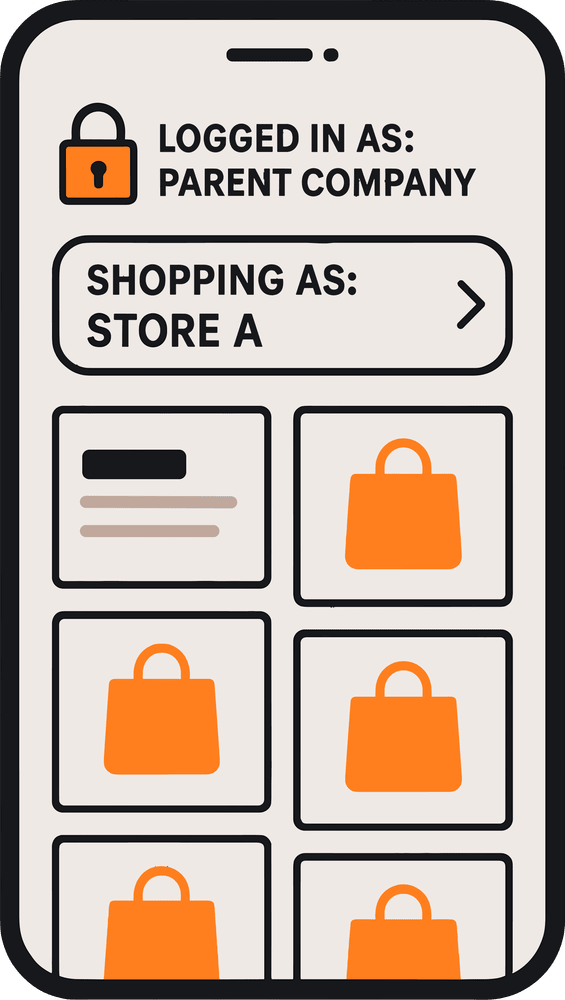
Give parent-company contacts a way to shop for their different locations through one SuiteCommerce login. Anchor Group's Child Customer "Impersonation" extension adds a customer selection menu to your storefront header. When a parent customer contact selects a child customer, the storefront displays that child's pricing and carries the selected context through checkout, including locking the shipping address to the child customer. The parent contact remains logged in throughout the process, making it easier to purchase on behalf of different locations.

Make Purchasing Across Child Customer Accounts Easier
Businesses with multiple locations often organize their NetSuite customers using parent and child customer records.
When a contact is responsible for purchasing across those locations, they may need to see different pricing and checkout information depending on which location they're ordering for.
Anchor Group's Child Customer "Impersonation" extension addresses that need by adding a selection menu to the SuiteCommerce header.
A parent customer contact can switch between child customer storefront views without signing out of their parent account. The selected child's pricing is displayed, and its shipping address is locked during checkout.
The selected child customer context also carries through checkout into the resulting sales order.
Important distinction: This extension changes the shopping view but does not actually switch NetSuite customer records. For functionality that switches between customer records, see Anchor Group's SuiteCommerce Multi-Account Login solution.
SuiteCommerce Child Customer "Impersonation" Features

Child customer selection menu: Add a header menu that allows parent customer contacts to select which child customer they're shopping on behalf of.
-
Parent account login: Let contacts shop for different child customers while remaining logged in to the parent account.
-
Child customer-specific pricing: Display the selected child customer's price levels when switching storefront views.
-
Child customer checkout information: Carry the selected child customer context through the checkout process.
-
Locked shipping address: Restrict the shipping address during checkout to the selected child customer's address.
-
Sales order context: Carry the selected child customer selection through to the resulting sales order.
-
Cart clearing warning: Alert shoppers that changing child customer views will remove the items currently in their cart, giving them the opportunity to cancel the switch.

Who This SuiteCommerce Extension Is For

Multi-Location Businesses with Centralized Purchasing
When one person manages purchasing for several offices, branches, or facilities, they need a straightforward way to place orders for the correct location.
Child Customer "Impersonation" allows a parent customer contact to select the appropriate location's storefront view while remaining logged in.
Why It Matters:
- Shop for multiple locations through one parent account.
- Select the appropriate child customer before ordering.
- Display the relevant location's pricing.
- Keep the shipping address associated with the selected location.

Franchise Groups Managing Location-Specific Orders
Franchise organizations may have multiple locations that operate under a parent customer relationship while maintaining different pricing or shipping requirements.
The extension helps contacts select the appropriate child customer store view before making purchases.
Why It Matters:
- Support purchasing across multiple franchise locations.
- Display child customer-specific pricing.
- Help prevent orders from being shipped to the wrong location.
- Reduce the need to repeatedly sign in and out to shop for different locations.

B2B Sellers with Parent-Child Customer Relationships
Businesses selling to organizations with parent and child customer hierarchies may need to accommodate buyers who purchase on behalf of individual subcustomers.
The extension adjusts the shopping experience according to the selected child customer while preserving the parent login.
Why It Matters:
- Support parent-company contacts shopping for subcustomers.
- Display pricing associated with the selected child customer.
- Carry child customer context into checkout and the sales order.
- Provide a more convenient B2B ordering experience.
Switch Between Child Customer Store Views
Show the Appropriate Pricing for Each Child Customer
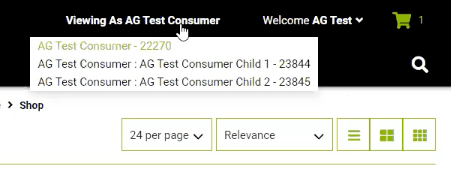
The extension adds a customer selection menu to your SuiteCommerce storefront header. When a parent customer contact selects a child customer, the storefront displays the price levels associated with that child customer. The selected view also carries through checkout, where the child customer's shipping address is locked. This allows contacts to shop for different locations without switching the underlying NetSuite customer record.
Warn Shoppers Before Clearing Their Cart
Help Customers Avoid Losing an Order in Progress
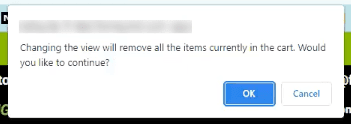
Switching between child customer views affects the contents of the shopping cart. If a shopper attempts to change views while items are in their cart, the extension displays a warning explaining that those items will be removed. The shopper can cancel the switch and finish checking out before changing to another child customer. This makes the behavior clear before the customer loses their current cart contents.
SuiteCommerce Partner, 200+ Apps
Get SuiteCommerce App Development Services
Anchor Group is a NetSuite consulting services company that has talented SuiteCommerce developers in house servicing clients across many industries. Get an idea of how 2000 plus hours of experience builds up IP for the NetSuite ecosystem and some examples of apps like the Child Customer "Impersonation" app that take SuiteCommerce to the next level.
SuiteCommerce Child Customer "Impersonation" FAQs

The extension lets a parent customer contact select different child customer storefront views within SuiteCommerce. The selected view displays child customer-specific pricing and carries relevant information through checkout while the contact remains logged in to the parent account.
No. Child Customer "Impersonation" changes the storefront view and associated checkout behavior without actually switching NetSuite customer records.
For functionality that switches between linked customer records, Anchor Group offers a separate SuiteCommerce Multi-Account Login extension.
Yes. A parent customer contact can use the storefront header menu to select a child customer and shop using that child's applicable pricing and checkout information.
Yes. When a shopper selects a child customer store view, SuiteCommerce displays the price levels associated with the selected child customer.
The shipping address is locked to the selected child customer's information during checkout.

Make Multi-Location Purchasing Easier in SuiteCommerce
Give parent-company contacts a simpler way to shop for their different locations. Let customers select child customer storefront views, see location-specific pricing, and carry the appropriate information through checkout without repeatedly logging in and out. Anchor Group can help you determine whether Child Customer "Impersonation" or a full customer-account switching solution is the better fit for your business.



Need something a little different?
If you’re not seeing the exact fit you need, no worries—we also build affordable custom solutions to fit your business, your workflows, and the way your team actually works.
Reach out and let’s build a solution that fits like it ought to.
