
This article provides the best steps to follow in a Versapay integration with NetSuite. Versapay will complete most of the workload; however, there are a few critical steps that support this process and ensure the site can process online orders.
Your team will likely complete some of the steps without our support. However, you can always contact our SuiteCommerce team for guidance on this process!
Versapay Payment Processor

A SuiteCommerce webstore requires a payment processor, payment methods (and corresponding visuals), and the website setup record to be properly configured to process online orders successfully.
This article will focus on the Versapay Payment Processor. Though there are many payment processors, Versapay is one of the more common Payment Processors used in modern NetSuite sites.
Versapay Integration
Two helpful requests to ask of a Versapay analyst are:
- “Please ensure that the Versapay integration is hooked up to the correct SSP that the website will use.”
- “Please provide any applicable Versapay documentation for NetSuite integration.”
Versapay should install the necessary bundles, including the Versapay SuiteApp. It should also create the Versapay Payment Processing Profile.
The Versapay bundle will not show as activated in the extension manager, so the best way to validate its installation is to follow the path: Customization > SuiteBundler > List. Search for Versapay, and if it is installed properly, it will show a green check mark under Status.
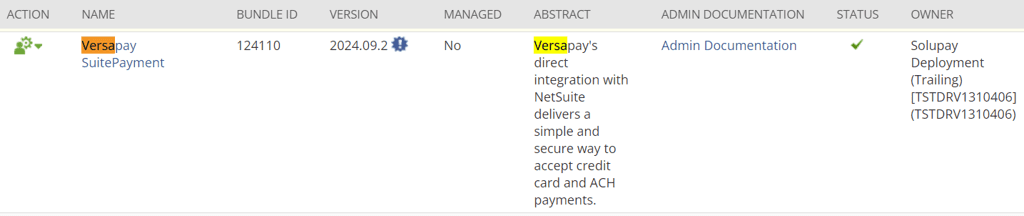
Customization > SuiteBundler > List > Search for Versapay to validate that the bundle is installed.
To verify that the SuiteApp is installed, navigate to Setup > Accounting > Payment Processing Profiles. If already configured, the Add Profile button will surface, as shown in the screenshot below.
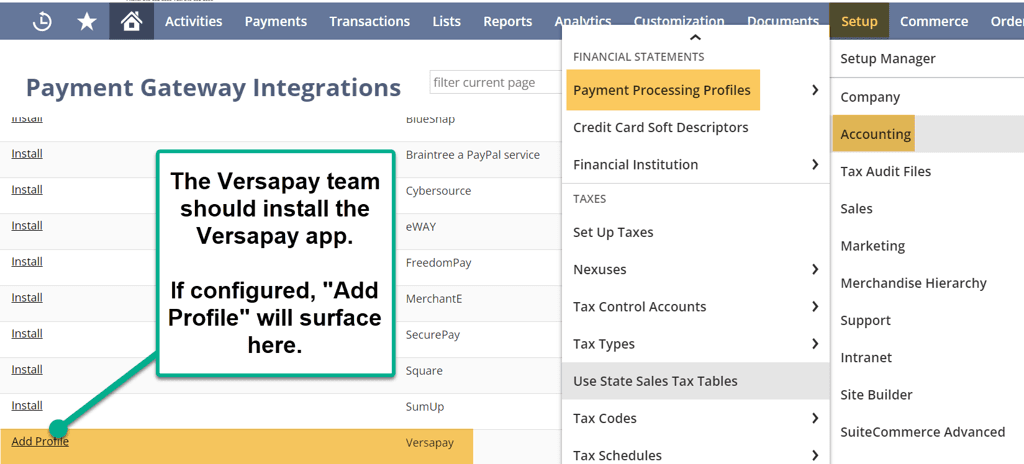
Lastly, select the proper website in the Versapay Payment Processing Profile and verify that the NetSuite bank accounts are listed correctly.

Test the site with an online sales order to validate the Payment Processing Profile functions.

Pat on the back, NetSuite hero, you did it!
Related Articles:
- BigCommerce NetSuite Connector Payment Method Troubleshooting
- NetSuite Commerce Category Troubleshooting Methods
Got stuck on a step in this article?
We like to update our blogs and articles to make sure they help resolve any troubleshooting difficulties you are having. Sometimes, there is a related feature to enable or a field to fill out that we miss during the instructions. If this article didn't resolve the issue, please use the chat and let us know so that we can update this article!
Oracle NetSuite Alliance Partner & Commerce Partner
If you have general questions about SuiteCommerce or more specific questions about how our team can support your business as you implement NetSuite or SuiteCommerce, feel free to contact us anytime. Anchor Group is a certified Oracle NetSuite Alliance Partner and Commerce Partner equipped to handle all kinds of NetSuite and SuiteCommerce projects, large or small.

Tagged with Solutions, Integration