How to Stop Excel From Automatically Converting CSV Data
Learn how to stop Excel from automatically converting CSV data, including long serial numbers, item codes, and other identifiers exported from NetSuite saved searches.
Date
October 23, 2026
Read
2 min
Sometimes when opening a CSV file or pasting data from NetSuite into Excel, certain values are automatically converted into a different format. This can be frustrating, especially when the conversion changes important information that is difficult or impossible to recover from the converted values.
For example, you have a CSV export from a NetSuite saved search with item serial numbers that are 15+ digits long, and Excel automatically converts those to scientific notation, so you can’t make edits to other parts of the file and save because now many or all of your serial numbers are wrong.
Excel can also lose precision when treating long identifiers as numbers, so changing the cell formatting afterward may not restore the original values.
Other examples are item numbers/codes, lot numbers, and vendor names/codes.
How to Disable Automatic Data Conversion in Excel
There is an option to disable automatic data conversions in Excel!
You can find this setting in Excel's Data options.
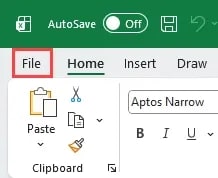
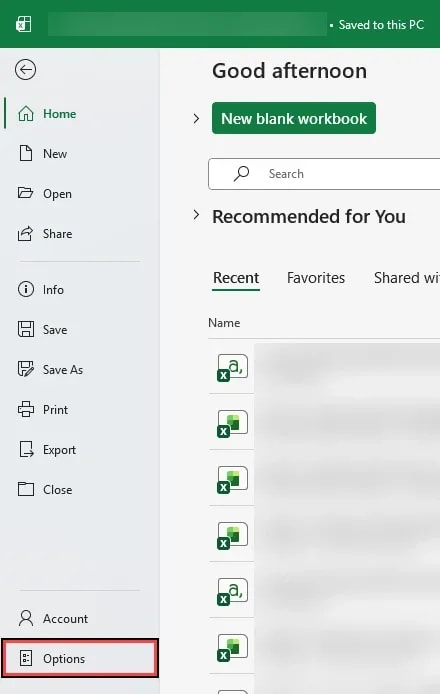
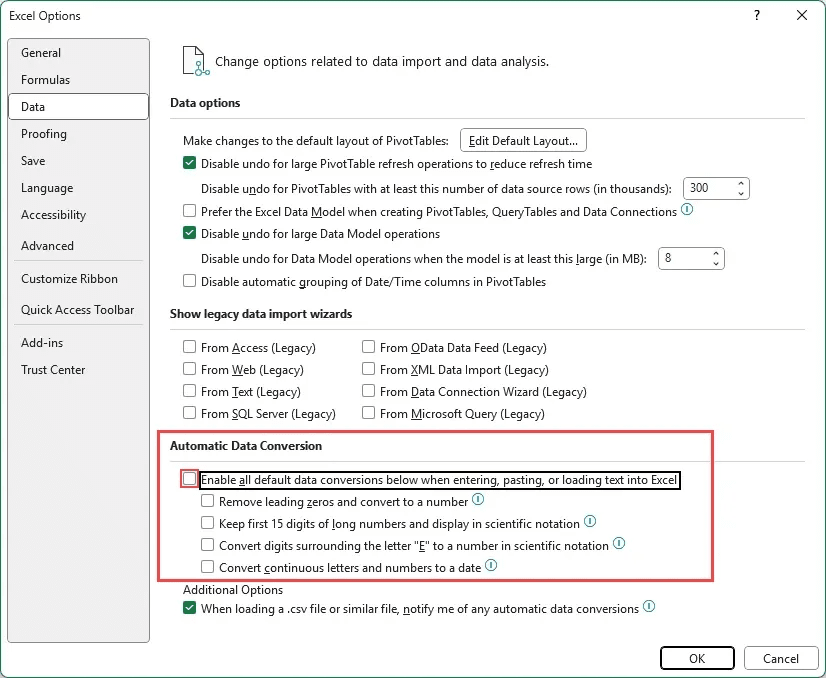
Step 1: In Excel, click File > Options > Data.
Step 2: Under the Automatic Data Conversion heading, uncheck Enable all default data conversions below when entering, pasting, or loading text into Excelto disable the listed conversions, or uncheck individual options based on your preferences and use case.
Step 3:Save your changes and reopen or reimport the original CSV file to check whether Excel now preserves the values as expected.
Important:This setting helps prevent future automatic conversions. It does not recover digits, leading zeros, or other information that Excel has already changed. If the original values were altered, return to the original NetSuite export rather than relying on the modified file.
This is especially useful when working with NetSuite saved search exports, item identifiers, serial numbers, and other values that need to remain exactly as exported.
NetSuite offers several ways to export data, including CSV downloads, Saved Searches, SuiteQL, and SuiteAnalytics Connect. Saved Searches work well for routine reporting, while SuiteQL and SuiteAnalytics Connect better support larger or more complex data needs.
Deciding the right ERP system to use is a challenging task, but once you decide to purchase it, you will need to know some key details to get moving. Here are 13 things you need to know about NetSuite before or after you purchase the system.
In this episode, Michael and Caleb break down the three most important things NetSuite users should be doing to start 2026 strong. From auditing your processes and leveraging integrations to implementing customer portals that actually save time.
Medical Innovations built the operational foundation to scale without adding headcount—and they're using automation, integrations, and AI to move faster than competitors hundreds of times their size. (Yes, really.)