Resolve: NetSuite Patch Causing “Not Allowed” SuiteCommerce Error
NetSuite recently pushed live a security patch. Unless you apply it, your SuiteCommerce site will display “Not Allowed” permissions errors.
Read the Article

If your SuiteCommerce storefront displays an ERR_TOO_MANY_REDIRECTS error, the browser may be caught in a redirect loop.
In one troubleshooting case, a SuiteCommerce Standard storefront's homepage failed to load, even though other pages on the same website were accessible.
The cause was an incorrect redirect record in NetSuite. Here's how the issue was identified and resolved.
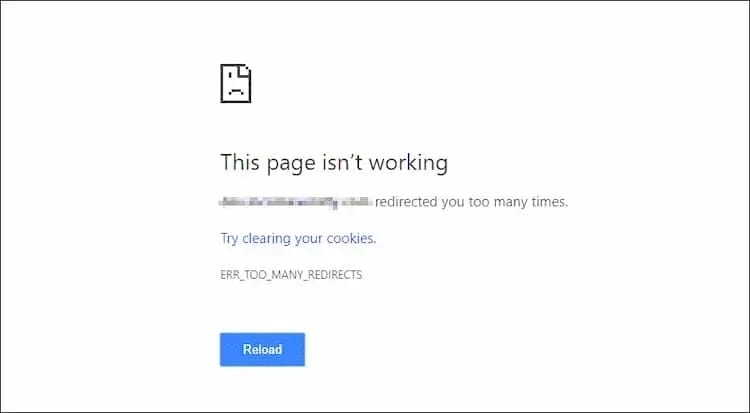
When a user attempted to access the storefront homepage, the browser displayed the following message:
“domain.com redirected you too many times.”
Error code: ERR_TOO_MANY_REDIRECTS
The behavior was specific to the homepage:
/search, loaded successfully.Because other pages were working, the investigation focused on redirects affecting the homepage rather than assuming the entire storefront was unavailable.
The ERR_TOO_MANY_REDIRECTS error occurs when a browser encounters too many consecutive redirects.
For example, one redirect might send a visitor from URL A to URL B, while another sends the visitor back to URL A.
Instead of reaching the intended page, the browser continues following the redirects until it stops the process and displays an error.
Redirect loops can have different causes. In this particular SuiteCommerce case, the problem involved a redirect record pointing to the wrong version of the storefront URL.
Navigate to:
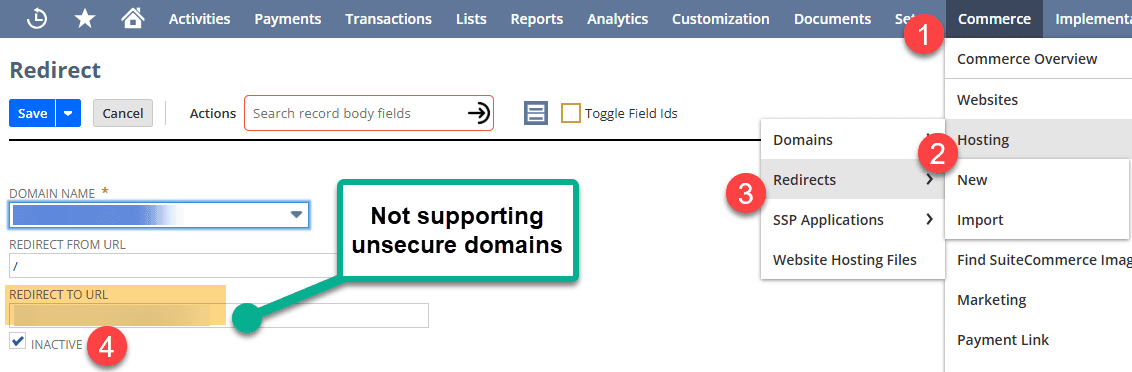
Commerce > Hosting > Redirects
Review the redirect records associated with the affected storefront.
Look for redirects involving the homepage or the URL that produces the error.
Open the relevant redirect record and review its destination.
In this case, the redirect pointed to the HTTP version of the storefront:
http://example.com
Rather than the intended HTTPS version:
https://example.com
The incorrect destination contributed to a redirect loop that prevented the homepage from loading.
Important: An HTTP destination does not automatically cause a redirect loop in every environment. The problem depends on how the storefront and other redirect rules interact.
After identifying the problematic record, we determined that it was no longer needed.
We selected Inactive on the redirect record and saved the change.
If you encounter a similar issue, confirm that a redirect is incorrect or unnecessary before disabling it. A legitimate redirect may still be needed for other URLs or website functionality.
After saving the change, return to the storefront and refresh the page.
A hard refresh can help ensure you're not viewing a previously cached response.
Common shortcuts include:
Ctrl + Shift + RCommand + Shift + RIn our case, the homepage loaded successfully after the faulty redirect was inactivated.

Test the affected homepage and any related URLs to confirm the redirect loop has been resolved.
Not every redirect affecting a SuiteCommerce storefront originates from a NetSuite redirect record.
Redirects may also be configured through a domain registrar's forwarding service, a CDN, or another web infrastructure provider.
If the redirect records in NetSuite appear correct, review any external forwarding or redirect rules associated with the domain.
Your provider's documentation can help you locate those settings.
If you need to create or update numerous redirects, NetSuite may support importing the relevant redirect records through CSV, depending on the record type and configuration.
This can be useful when managing larger sets of URL changes, such as those associated with a website migration.
However, bulk changes should be reviewed carefully to avoid creating conflicting rules or redirect loops.
An ERR_TOO_MANY_REDIRECTS error doesn't necessarily mean your entire SuiteCommerce storefront is unavailable.
In this case, the homepage failed while another storefront page continued working. That distinction helped narrow the investigation to an incorrect redirect record.
Reviewing the redirect destination under Commerce > Hosting > Redirects and inactivating the unnecessary record resolved the problem.
If you encounter a similar issue, start by identifying which URLs fail, inspecting the applicable redirects, and testing any changes before assuming the problem is sitewide.
Related Articles
Tagged with Troubleshooting