You spend hours each week packing boxes. Orders pile up while you print labels, count stock, and answer shipping questions. Your warehouse starts to feel messy. Each new sale creates more manual work. This often happens when a growing store outgrows its first shipping setup. BigCommerce gives you several ways to fix the problem.
You can ship orders yourself, use a 3PL, or combine both methods. If you also use an ERP like NetSuite, BigCommerce Development Services can help connect the systems.
Key Takeaways
- BigCommerce supports static shipping methods and real-time carrier rates
- 3PL setup time depends on the provider and store setup
- Ask each 3PL about its pick accuracy goals
- Multiple carriers can help you compare rates and control costs
- Some retail accounts require an EDI-ready fulfillment setup
- ERP connections can reduce manual stock updates and overselling
Understanding BigCommerce Fulfillment: What It Is and Why It Matters
Ecommerce fulfillment covers the work that happens after a customer buys. It includes picking products and packing them for shipment. It also includes labels, carrier handoff, stock tracking, and returns.
For BigCommerce stores, fulfillment can happen three ways:
- Self-fulfillment: You store and ship products yourself
- Third-party logistics (3PL): A partner stores and ships your products
- Hybrid: You ship some products while a 3PL handles others
Your best option depends on order volume, product type, and growth plans. Many stores start by shipping orders themselves. They move to a 3PL when storage and packing take too much time.
BigCommerce can connect with 3PL systems through apps and APIs. Orders can move from the store to the warehouse. Tracking details can move back into BigCommerce. Stock data can also update across connected systems.
Navigating BigCommerce Shipping: Options, Strategies, and Optimization
Shipping setup starts with your shipping origin. In BigCommerce, go to Settings and then Shipping. Add the address where your orders ship from. This address helps BigCommerce calculate carrier rates. It may also appear in parts of your shipping setup.
Next, create shipping zones. You can build zones by country, state, or ZIP code. Many stores start with domestic and international zones. Some stores also add local or regional zones. This can help when shipping choices change by location.
Available Shipping Methods
BigCommerce supports several basic shipping choices:
- Free shipping: Free delivery with optional order limits
- Flat rate: One set shipping price per order
- Weight or order total: Rates based on cart size or weight
- In-store pickup: Pickup from a physical store
You can also show live carrier rates from USPS, UPS, and FedEx. BigCommerce supports real-time shipping quotes from these carriers and others. Customers can then see shipping choices during checkout. Rates can change based on the order and delivery address.
Shipping Cost Optimization Tips
Shipping costs can eat into margins fast. A few basic changes can help keep them under control.
- Compare carriers by package size and destination
- Negotiate rates when shipping volume grows
- Set free shipping limits that protect margins
- Check regional carriers for nearby deliveries
Tracking also matters. Connected carriers and shipping apps can send tracking data back to BigCommerce. That saves your team from copying numbers by hand. It also gives customers faster order updates.
In-House Warehousing for BigCommerce: Managing Your Inventory
Running your own warehouse gives you more control. You choose where products sit and how orders get packed. You also control quality checks. This can work well for stores with custom products or special packing needs.
Setting Up Your Warehouse
A useful warehouse space needs a few basic areas:
- Receiving area: Count and log new stock
- Storage zones: Group products by type or pick speed
- Packing station: Keep boxes, scales, and labels nearby
- Shipping staging: Hold packed orders before pickup
Good layout matters. Workers should not cross the warehouse for every item. Place popular products close to packing areas. Keep aisles clear and labels easy to read.
When Self-Fulfillment Makes Sense
In-house shipping may work well when:
- Your team can handle the current order volume
- Products need special handling or custom work
- You need close control over local shipping
- 3PL fees do not fit your margins
Your time is still a real cost. Hours spent packing orders cannot be spent elsewhere. As the store grows, that tradeoff becomes harder to ignore. Hiring staff or moving to a 3PL may make more sense.
For stores running their own warehouse, NetSuite Services can help connect inventory and order data. This can reduce spreadsheet work and improve stock visibility.
A fulfillment center can take over much of your shipping work. You send stock to the warehouse. The warehouse stores your products and fills orders. It can also handle packing, shipping, and some returns.
What to Evaluate
Compare these areas before choosing a fulfillment center:
- Location: Nearby warehouses may cut delivery time
- Integration: Check how it connects with BigCommerce
- Product fit: Some 3PLs serve certain product types
- Order minimums: Ask about monthly volume rules
- Fees: Review storage, receiving, and shipping charges
Do not choose a 3PL based on shipping cost alone. Poor data flow can create more work than it removes. Ask how orders, stock, returns, and tracking move between systems. Those details matter once order volume rises.
Geographic Strategy
Warehouse location affects shipping time and cost. A West Coast warehouse can serve western buyers faster. The same warehouse may take longer to serve East Coast buyers. Some brands split stock between several locations. That setup can shorten delivery times. It can also make stock planning harder.
Brands that import goods may benefit from warehouses near major ports. This can reduce the distance goods travel after arrival. The best location depends on your supply chain. It also depends on where most customers live.
The Power of 3PL for BigCommerce: Streamlining Order Fulfillment
A 3PL handles much of the daily shipping work. Your team can spend more time on sales, products, and customers. The 3PL stores inventory and fills orders. It may also handle returns and special packing.
How 3PL Integration Works
BigCommerce can connect with 3PL systems through apps, APIs, and webhooks. An API lets two systems share data. The exact setup depends on the provider. Some connections use apps, while others need custom work.
A common order flow looks like this:
- A customer places an order
- The order moves to the 3PL
- The warehouse picks and packs it
- Tracking data returns to BigCommerce
- The customer gets a shipping update
Much of this process can run without manual entry. Setup time still depends on the store and provider. Large catalogs may take more work. Custom fields and special shipping rules can also add setup steps.
3PL Comparison Table
| Feature |
Basic 3PLs |
B2B-Ready 3PLs |
| Order minimums |
Varies |
Varies |
| EDI support |
May be limited |
Often available |
| Pick controls |
Varies |
Scanning often available |
| Retail support |
May be limited |
Often stronger |
| Best for |
DTC brands |
Wholesale and DTC |
Strong Fit for 3PL
- Your team cannot keep up with packing
- You want less daily shipping work
- Fast delivery matters to buyers
- You plan to sell through retailers
May Not Be the Best Fit
- Products need custom assembly
- Order volume changes often
- You need same-day local delivery
- Fulfillment fees hurt your margins
Inventory Management for BigCommerce Fulfillment
Good fulfillment starts with correct stock data. Overselling can lead to canceled orders and unhappy customers. Low stock visibility can also hide products you could still sell. The goal is clear inventory data across each sales channel.
BigCommerce can track stock at the product level. You can turn inventory tracking on for each item. You can set the current stock count. You can also create low-stock alerts. BigCommerce reduces available inventory as products sell. This works well for stores with a simple setup.
Things get harder when you sell through several channels. Your store, marketplaces, and wholesale orders may use the same stock. Without shared data, one channel may sell stock that another already used. That creates overselling problems.
Integration Options
Several systems can add more inventory tools:
- Finale Inventory: Supports channel sync and product kits
- Katana: Built for makers and manufacturers
- NetSuite: ERP software with inventory and order tools
Growing brands can connect BigCommerce with NetSuite through BigCommerce NetSuite Integration.
The goal is simple. One main system keeps the stock data that other channels use. That reduces separate stock records. It can also cut manual updates.
Integrating BigCommerce with ERP for Seamless Fulfillment
ERP integration connects your store with the systems behind it. This may include inventory, accounting, and warehouse tools. The goal is to stop entering the same data twice. Orders and stock updates can move between systems instead.
What ERP Integration Enables
- Order routing: Send orders to the right shipping location
- Inventory sync: Share stock data with connected channels
- Financial data flow: Send sales data into accounting workflows
- Customer data sync: Keep order records in connected systems
The exact flow depends on the systems you use. It also depends on how the connection was built. A system can be connected without every update being instant. That is worth checking during setup.
The NetSuite Connector
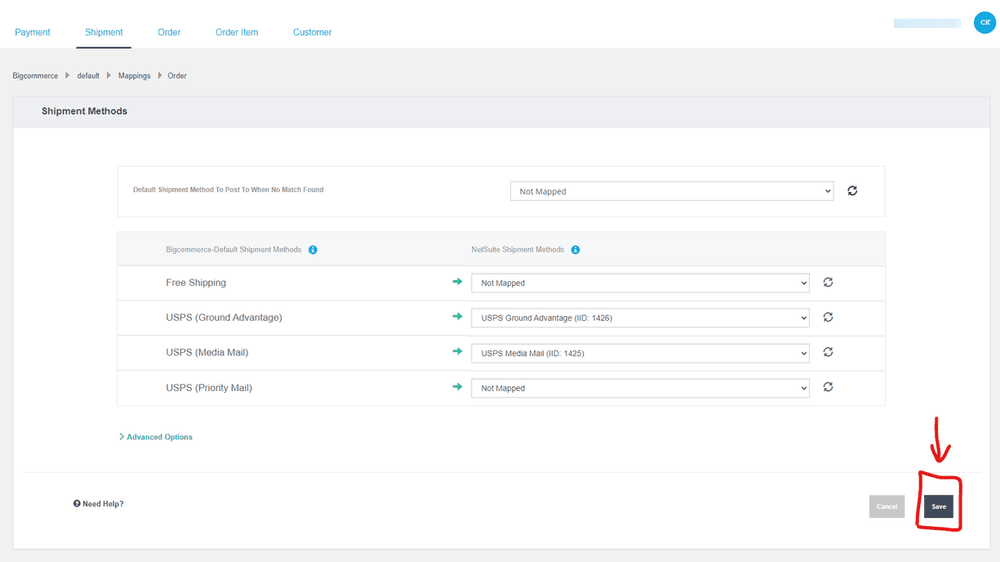
Oracle NetSuite Connector includes a connector for BigCommerce. It can move product and order data between the two systems. It also supports payment and shipping method mapping. These mappings help both systems understand the same values.
For example, a shipping method in BigCommerce needs the right match in NetSuite. A bad match can cause an order sync error.
More advanced stores may need extra work. Custom fields, special order flows, or several subsidiaries can add more setup. That is where an experienced BigCommerce Integration team can help.
Optimizing Warehouse Services: Maximizing Efficiency
Small warehouse changes can save a lot of time. Better picking and packing also reduce avoidable mistakes. The goal is not to make the warehouse fancy. It is to make daily work easier and more consistent.
Process Improvements
- Batch picking: Pick several orders during one trip
- Zone organization: Keep popular items near packing stations
- Barcode scanning: Reduce manual data entry
- Standardized packing: Use clear packing rules and box sizes
Measuring What Matters
Track a few basic numbers:
- Pick accuracy: Count picking mistakes
- Order cycle time: Track time before carrier pickup
- Inventory accuracy: Compare system stock with real stock
- Cost per order: Track total fulfillment cost
Barcode scans can reduce picking errors. Results still depend on the warehouse and its process. If errors rise, look at receiving and picking first. Poor labels and bad shelf locations can also cause problems.
Troubleshooting Common BigCommerce Fulfillment Challenges
Even a good fulfillment setup can have problems. Most issues come from bad data, missing settings, or broken connections. Here are several common problems and where to start.
Real-Time Rates Not Displaying
Check these common causes:
- Carrier login details are wrong
- Products do not have weight data
- Shipping zones do not match the order
Fix: Check the carrier settings first. Then review product weights and shipping zones.
Orders Not Syncing to 3PL
Start with the API or app connection. It needs permission to access the data used by the 3PL. Also check webhooks and field mappings. A broken endpoint can stop data from moving.
Fix: Review the connection settings and API access. Then test one order before changing anything else.
Inventory Overselling Across Channels
Overselling often starts with separate stock records. One channel sells an item before another system receives the update. That leaves two systems showing the same unit as available.
Fix: Use one main inventory source for connected channels. BigCommerce Implementation can help set up that structure.
Shipping Costs Eating Margins
Shipping rules get old. Carrier rates change, and your average package may change too. A rule that worked last year may not work now.
Fix: Review shipping costs on a set schedule. Compare what you paid with what the customer paid. Then update free shipping limits and shipping methods when needed.
How Anchor Group Helps BigCommerce Merchants
Good fulfillment takes more than shipping zones. Your store needs to share the right data with inventory systems, 3PLs, and ERPs.
Anchor Group works on those connections. As a BigCommerce Certified Partner, we help build BigCommerce stores that work with the systems behind them.
For NetSuite users, our BigCommerce NetSuite Integration services help reduce separate data sets. Orders can move from the store into NetSuite and then into fulfillment workflows. Inventory and shipping data can also move back to connected systems. That means less copying, fewer spreadsheets, and fewer mystery stock problems.
We work with wholesalers, manufacturers, and growing DTC brands. Many come to us after manual work starts taking over the day.
If your team keeps fixing stock counts or typing orders twice, the setup deserves another look. Technically working and working well are two different things.
Want to talk through the weird part of your setup? Our BigCommerce 30-minute fix can help you spot quick fixes and larger issues.
Frequently Asked Questions
What is the difference between warehousing and 3PL?
Warehousing means storing products in a building or storage space. You may own or rent that space yourself. A 3PL adds services beyond storage. It can pick products, pack boxes, ship orders, and handle returns. Some providers also support retail orders or product kits. A 3PL can reduce daily warehouse work when your team no longer wants to manage fulfillment alone.
How can I reduce shipping costs for my BigCommerce store?
Start by comparing carriers for each package type and destination. Do not assume one carrier is cheapest for every order. Review your box sizes because large packages can cost more. Set free shipping limits that protect your margins. You can also ask carriers about better rates as volume grows. BigCommerce shipping tools and connected apps can help compare options at checkout.
What are the benefits of integrating BigCommerce with NetSuite for fulfillment?
The main benefit is less repeated data entry between systems. Orders can move from BigCommerce into NetSuite through the connection. Stock updates can also move back to connected sales channels. Payment and shipping mappings help reduce sync problems. This gives your team a clearer view of orders and inventory. The exact data flow depends on how the connector is set up.
How do I choose the best inventory management software for my BigCommerce business?
Start with how many places you sell products. A simple BigCommerce store may only need the built-in inventory tools. Stores with several channels may need a central inventory system. Manufacturers may also need kits, assemblies, or production tools. Check how each option handles locations, returns, and stock updates. Choose a system that fits your current work without making daily tasks harder.
What should I look for in an ecommerce fulfillment center?
Start with warehouse location and how well the provider connects with BigCommerce. Ask how orders, stock, tracking, and returns move between systems. Review storage fees, order fees, and any monthly minimums. B2B sellers should ask about EDI if retail customers require it. Also review service targets for shipping and picking. Put important promises in the contract so everyone knows what to expect.