3 Tips to Speed Up a Search (SuiteCommerce & SuiteScript)
Both front-end (SuiteCommerce) and back-end (SuiteScripts) code often require searches. Here are three tips on speeding up your searches.
Read the Article

Our SuiteCommerce Standard customer has had many different SuiteCommerce partners, and had questions surrounding SSP Applications. From a high-level, SuiteScript Server Pages (SSP) could be thought of as an iteration on the SuiteLet for front end (store) pages while running SuiteScript on the back end (NetSuite) to generate dynamic content. Using a bad and oversimplified metaphor, SSP applications could be thought of as the highway between NetSuite, the Website Setup Record and the Domain Record.
This overview explains what SSP Applications are, where to find them in NetSuite, how they connect to SuiteCommerce records, and why their configuration matters.
Linking SSP Applications is a part of SuiteCommerce store setup. Linked here is more information.
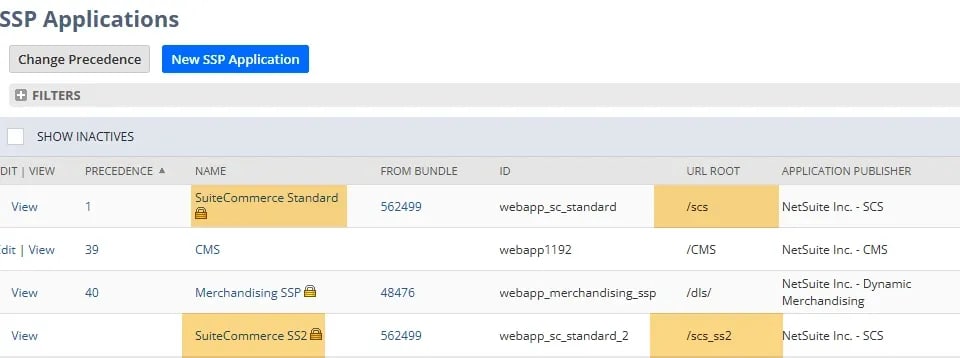
Link to the Domain and Link to the Site for both of these applications.
On most situations, you will not link to site for the SS2 Applications.


From a very high level, SSP’s act as connection points throughout the store to ensure that the user’s and store information is presented correctly.
When these are mismatched, odd and unclear error messages from NetSuite often surface. These errors are ambiguous on SuiteCommerce and are the opposite of clear.
This was the case for our customer, where the SSP Applications were mismatched. As a result, most extensions failed when migrating between sandbox - staging - production sites.
It is possible to customize SSP Applications on the storefront. Though not recommended for numerous reasons, one benefit could be deploying local files and test customization on a local environment.
There are many drawbacks on customizing SSP applications (NetSuite Upgrades/Enhancements don’t natively flow here, manually retooling the file structure in File Cabinet, extension inconsistency to name a few), we do NOT recommend customizing the SSP Application in almost any circumstance. This is because with the proper integration records in NetSuite, developing locally (the main benefit) can be done in the same environment using the native SSP Applications.
Related Articles
Tagged with Training