Basic Encryption in SuiteScript | Crypto & Encode
This article will walk through using the crypto and encode module to easily encrypt and decrypt data in NetSuite.
Read the Article

Using the https.post() method to send files presents a limitation. According to NetSuite documentation, while it is technically possible to transmit data using the multipart/form-data format, the N/https module does not allow for the content to be specified as multipart/form-data (see below):
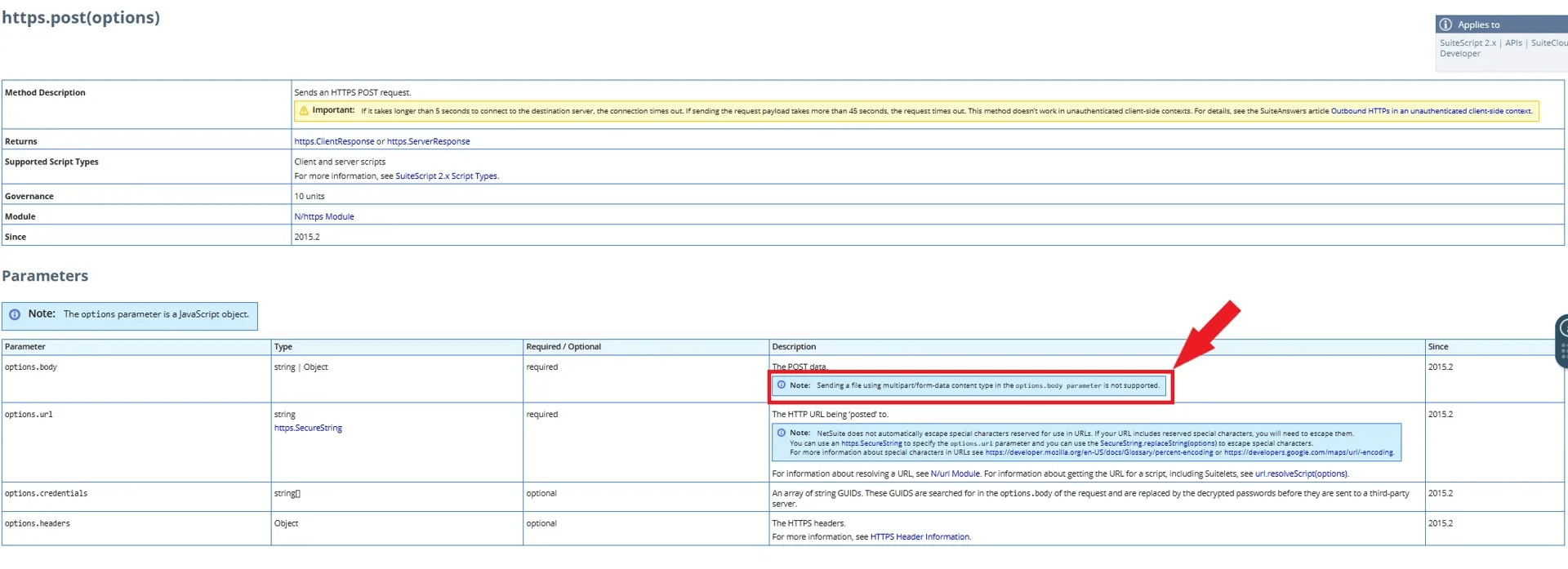
This means that while sending multipart/formdata is technically possible, it is not possible to specify the data as such when sending a file to an API requiring the file type.
While doing research on a potential workaround, I stumbled across the following Stack Overflow article: In NetSuite with SuiteScript 2.0 unable to send a file with HTTP POST request with a content-type multipart/form-data
Using the code from this article, I created a SuiteScript library that enables sending multipart/form-data via the N/https module.
Copy the code below and create a SuiteScript file to be placed in a desired file cabinet location.
/**
 * multiPartUpload.js
 *
 * @file - Generates Multipart/formdata content to be posted to an api based on the url, headers, and files passed in.
 *
 * @NApiVersion 2.1
 */
define(["require", "exports", "N/https", "N/file", "N/log"], function (require, exports, http, file, log) {
    Object.defineProperty(exports, "__esModule", {
        value: true
    });
    const types = {};
    types[file.Type.AUTOCAD] = 'application/x-autocad';
    types[file.Type.BMPIMAGE] = 'image/x-xbitmap';
    types[file.Type.CSV] = 'text/csv';
    types[file.Type.EXCEL] = 'application/vnd.ms-excel';
    types[file.Type.FLASH] = 'application/x-shockwave-flash';
    types[file.Type.GIFIMAGE] = 'image/gif';
    types[file.Type.GZIP] = 'application/x-gzip-compressed';
    types[file.Type.HTMLDOC] = 'text/html';
    types[file.Type.ICON] = 'image/ico';
    types[file.Type.JAVASCRIPT] = 'text/javascript';
    types[file.Type.JPGIMAGE] = 'image/jpeg';
    types[file.Type.JSON] = 'application/json';
    types[file.Type.MESSAGERFC] = 'message/rfc822';
    types[file.Type.MP3] = 'audio/mpeg';
    types[file.Type.MPEGMOVIE] = 'video/mpeg';
    types[file.Type.MSPROJECT] = 'application/vnd.ms-project';
    types[file.Type.PDF] = 'application/pdf';
    types[file.Type.PJPGIMAGE] = 'image/pjpeg';
    types[file.Type.PLAINTEXT] = 'text/plain';
    types[file.Type.PNGIMAGE] = 'image/x-png';
    types[file.Type.POSTSCRIPT] = 'application/postscript';
    types[file.Type.POWERPOINT] = 'application/vnd.ms-powerpoint';
    types[file.Type.QUICKTIME] = 'video/quicktime';
    types[file.Type.RTF] = 'application/rtf';
    types[file.Type.SMS] = 'application/sms';
    types[file.Type.STYLESHEET] = 'text/css';
    types[file.Type.TIFFIMAGE] = 'image/tiff';
    types[file.Type.VISIO] = 'application/vnd.visio';
    types[file.Type.WORD] = 'application/msword';
    types[file.Type.XMLDOC] = 'text/xml';
    types[file.Type.ZIP] = 'application/zip';
    function getContentType(f) {
        const mime = types[f.fileType];
        const charset = f.encoding;
        const ct = 'Content-Type: ' + mime + (charset ? ';charset=' + charset : '');
        log.debug({
            title: 'content for ' + f.name,
            details: ct
        });
        return ct;
    }
    function isFile(o) {
        return (typeof o == 'object' && typeof o.fileType != 'undefined');
    }
    function partIsBinary(contentType) {
        if (contentType.indexOf('text/') === 0)
            return false;
        switch (contentType) {
            case 'application/json':
                // check 'application/rtf' etc.
                return false;
            default:
                return true;
        }
    }
    /**
     * Creates a multipart upload
     * @param {string} url     to post to
     * @param {object} headers key/value of headers; include Auth headers if needed
     * @param {array} parts   array of {name:string, value:file|string}
     */
    function uploadParts(url, headers, parts) {
        const boundary = 'someuniqueboundaryasciistring'; //replace this with desired unique ascii string
        headers['content-type'] = 'multipart/form-data; boundary=' + boundary;
        // Body
        const body = [];
        parts.forEach(function (p, idx) {
            const partIsFile = isFile(p.value);
            body.push('--' + boundary);
            body.push('Content-Disposition: form-data; name="' + p.name + '"' + (partIsFile ? ('; filename="' + p.value.name + '"') : ''));
            if (partIsFile) {
                const ct = getContentType(p.value);
                body.push(ct);
                if (partIsBinary(ct)) {
                    body.push('Content-Transfer-Encoding: base64');
                }
            }
            body.push('');
            body.push(partIsFile ? p.value.getContents() : p.value);
            if (idx == parts.length - 1) {
                body.push('--' + boundary + '--');
                body.push('');
            }
        });
        log.debug('body.join()', body.join('\r\n'));
        // Submit Request
        try {
            const response = http.post({
                url: url,
                headers: headers,
                body: body.join('\r\n')
            });
            return response;
        } catch (e) {
            log.error({
                title: 'Failed to submit file',
                details: (e.message || e.toString()) + (e.getStackTrace ? (' \n \n' + e.getStackTrace().join(' \n')) : '')
            });
        }
    }
    exports.uploadParts = uploadParts;
});Reference the file in your SuiteScript define function as such:

You can then use the below example in your script to call the multipartUpload function and send the data.
 const files = [{
                        name: 'test-1.js',
                        value: file.load({
                            id: fileId
                        })
                    }];
                    const response = multipartUpload.uploadParts(requestUrl, {
                        'Authorization': `Bearer ${accessToken}`
                    }, files);
Important note: SuiteScript https.post() method sends file data encoded in Base64. The receiving API must be able to decode the Base64 payload in order to correctly read and process the file contents.
Related Articles
Tagged with Training


