Companies with multiple subsidiaries may want to track intercompany transactions in NetSuite. This article covers the basic setup, a transaction example, and naming conventions for intercompany customers and vendors.
Date
November 20, 2026
Read
2 min
NetSuite Intercompany Setup Basics
Context
Companies with multiple subsidiaries may want to track intercompany transactions. There is a lot you can set up to do that. This article covers the basics.
Basic Intercompany Setup
Start with these key elements for intercompany setup:
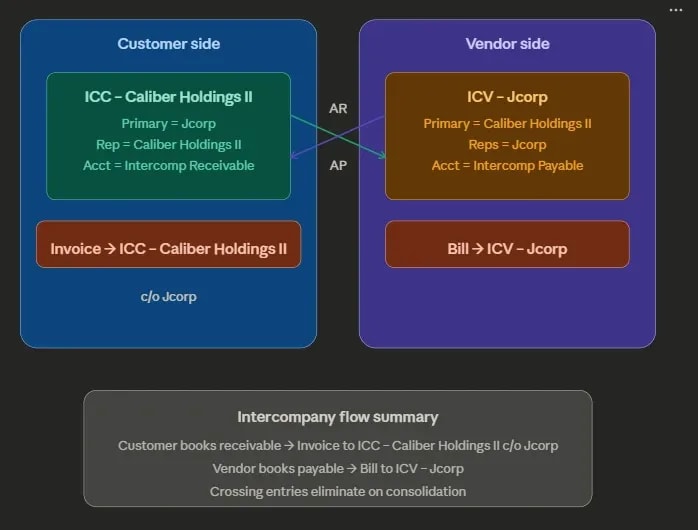
Primary Subsidiary — The subsidiary that the customer or vendor is doing business with.
Represents Subsidiary — The subsidiary that the customer or vendor is.
Accounts for Vendor and Customer — You will need to add accounts for intercompany setup.
Elimination Subsidiary — A special subsidiary that exists solely to remove (eliminate) intercompany transactions during consolidation. It doesn't represent an actual business entity — it's a bookkeeping construct.
c/o stands for customer of - AKA ICC - Calinber Holding II is a customer of JCorb
/o stands for customer of. In this example, ICC - Subsidiary B is a customer of Subsidiary A.
The transactions in this example look like this:
Invoice EXAMPLE-001
Cust = ICC - Subsidiary B Subsid = Subsidiary A - Rep Subsid = Subsidiary B Credit = 50100.00 COGS Construction Cost Debit = 11010.00 Intercompany Receivable
NetSuite OneWorld helps companies remove internal sales and balances from group financial reports. When this process fails, the cause is often a wrong account, missing flag, currency change, or late entry.
Deciding the right ERP system to use is a challenging task, but once you decide to purchase it, you will need to know some key details to get moving. Here are 13 things you need to know about NetSuite before or after you purchase the system.
In this episode, Caleb sits down with Lee Jacobs, Head of Product at Charted, to explore AP automation for NetSuite users. Learn how to automate vendor onboarding, invoice processing, month-end accruals, and approval workflows—plus the ROI math behind when automation makes sense for your business.