Best usage-based billing software in 2026
Usage-based and hybrid pricing have become mainstream monetization models, particularly for AI, infrastructure, and other consumption-driven software.
Read the Article

When managing projects in NetSuite, knowing the original budget is only part of the picture. You may also want to see how much of that budget has already been billed to the customer.
For example, if a project has a $50,000 budget and $20,000 has been invoiced, the project is 40% billed against its budget.
This information can help teams monitor billing progress, review project financials, and provide customers with greater visibility into their invoices.
In one Anchor Group customization project, the goal was to calculate the percentage of a project's budget that had been billed and make that information available on the project record, customer invoices, and NetSuite saved searches.
Here's how the solution was approached.
NetSuite Job records, often displayed as Projects, can be used to organize project work and related financial information.
However, a business may want a specific billing metric that isn't readily available in the format needed for its reporting.
In this case, the desired information included:
The goal was to bring these values together so they could be reviewed without manually calculating the percentage for every project.
The first step was identifying where NetSuite already displayed the relevant billing information.
On the Job record, the A/P – A/R Details subtab contained a summarized amount associated with invoices for the project.
Rather than independently rebuilding the invoice calculation, the customization was designed to retrieve that existing amount and place it into a custom project field.
The field was named Amount Billed.
This provided a value that could be used in a second calculation to determine the project's billing progress.
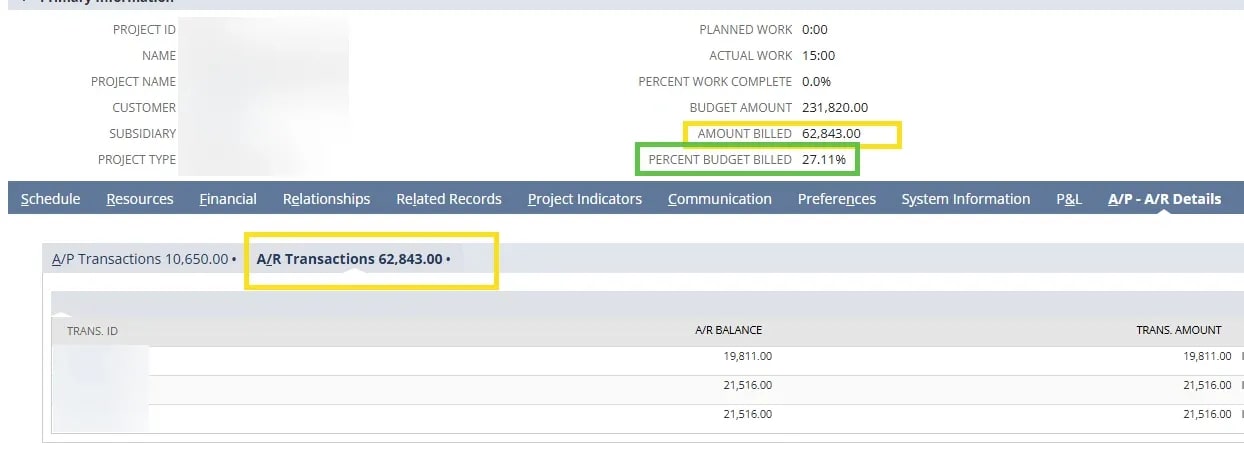
Once the Amount Billed value was available, the next step was comparing it with the project's budget.
The intended calculation is:
Percent Budget Billed = (Amount Billed ÷ Budget Amount) × 100
For example, consider a project with the following values:
| Metric | Amount |
|---|---|
| Project budget | $50,000 |
| Amount billed | $20,000 |
| Percent budget billed | 40% |
This percentage describes billing progress relative to the budget.
It does not necessarily represent project completion, profitability, or the percentage of work performed.
For instance, a project could be 40% billed while a different percentage of the actual work has been completed.
The calculation also requires a valid, nonzero budget amount. Projects with missing or zero budgets need to be handled separately to avoid division errors.
For this implementation, Anchor Group used a SuiteScript User Event script to populate the custom billing-progress fields.
The solution was designed to:
The result was a billing-progress metric available directly on the project record.
The specific script logic, field IDs, and execution conditions depend on the NetSuite environment.
For example, a production implementation needs to account for when billing totals change and how the custom fields should be refreshed.
It should also define how credits, adjustments, and projects without a budget affect the calculation.
Once the calculated percentage is available, it can also be used to provide additional information to customers.
In the original customization, the Percent Budget Billed field was made available for use on the invoice form and the PDF sent to the customer.
This gives customers a way to see how the invoiced amount relates to the overall project budget.
The exact display depends on the invoice form, PDF template, and how project-level values are made available to those templates.
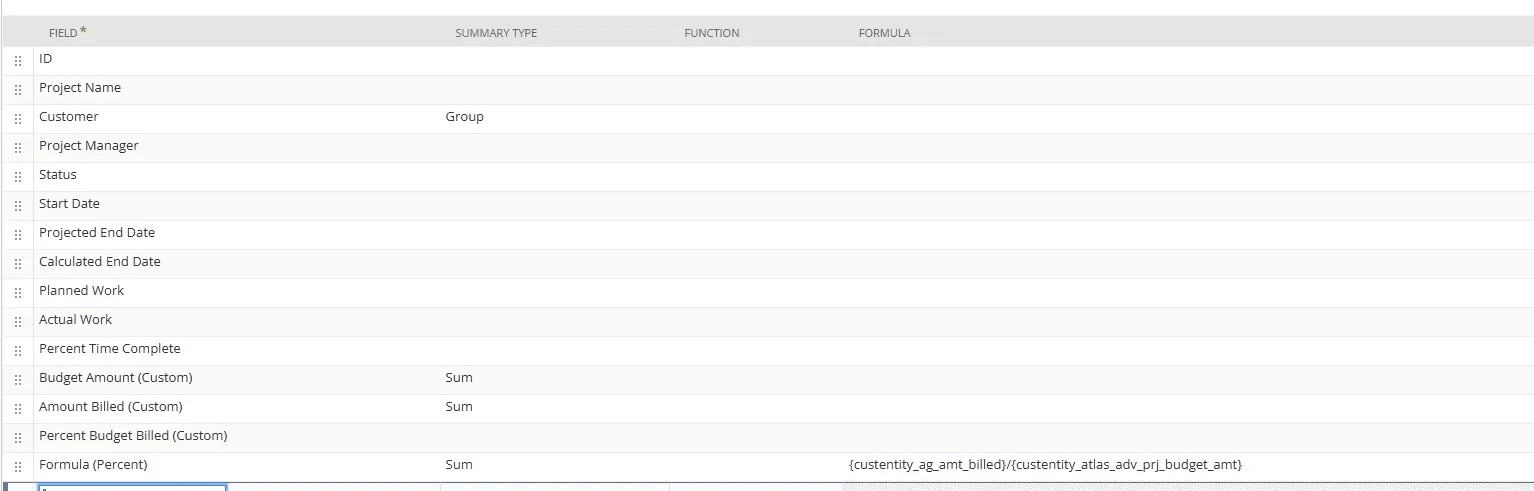
The custom billing fields can also support internal reporting.
For example, a project saved search could display:
This can make it easier to compare billing progress across multiple projects without reviewing each record individually.

For businesses managing numerous active projects, this kind of reporting can provide a more consistent view of billing status.
Before building a similar solution, it's important to define exactly what the percentage should represent.
Consider the following questions:
What counts toward Amount Billed?
Decide whether the calculation should reflect invoice totals, net invoiced amounts after credits, or another billing measure.
Which budget should be used?
Determine whether the percentage should use the original project budget or a revised budget that changes over time.
When should the calculation update?
A billing metric needs to stay current as invoices and other relevant transactions change.
Where will the value be displayed?
Project records, saved searches, and customer-facing invoices may require different field or template configurations.
These decisions help ensure that the resulting percentage is meaningful and consistent.
Tracking the percentage of a project budget that has been billed can provide useful visibility into project financials.
In this example, Anchor Group used an existing NetSuite project billing summary, custom fields, and a SuiteScript User Event script to make that information easier to access.
The calculated percentage could then be displayed on project records, incorporated into saved searches, and made available on customer invoices.
For businesses that manage projects and bill customers through NetSuite, a similar customization may help make billing progress easier to review and communicate.
Related Articles
Tagged with Training