Bulk Transform Estimates Into Sales Orders | NetSuite
Here is how to create a tool that allows for the bulk transformation of estimates into sales orders in NetSuite using inline editing.
Read the Article

When an order is placed through a SuiteCommerce website, it comes into NetSuite associated with the customer record that was logged in when the order was placed (exception: guest checkout). This is true even when you have more than one user (aka contact) that can log in to the website for that customer record. So how do you tell who at the company placed the order? Luckily, NetSuite has a way.
When you have a contact who logged in to the website and placed an order, the user who placed the order is tracked in NetSuite. This means there is no need to create any customization to capture this data (unless you want it noted somewhere other than where NetSuite places it). Here are the steps to find it:
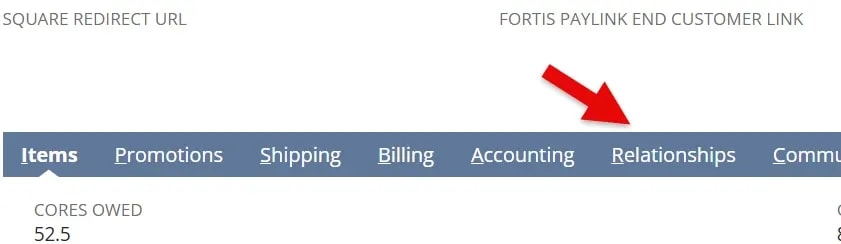

You have now found the user that placed the order.
If your business needs are such that this information needs to be present elsewhere on a Sales Order, some customization will be required to do this.
NOTE: if attempting to create a customization to populate a field on the sales order with the contact whose role is “order creator” on the sales order > relationships tab, this is NOT able to be accomplished via a workflow.
Another method is to go to the “communication” tab of the sales order and see which email address is specified in the “to be e-mailed” section.
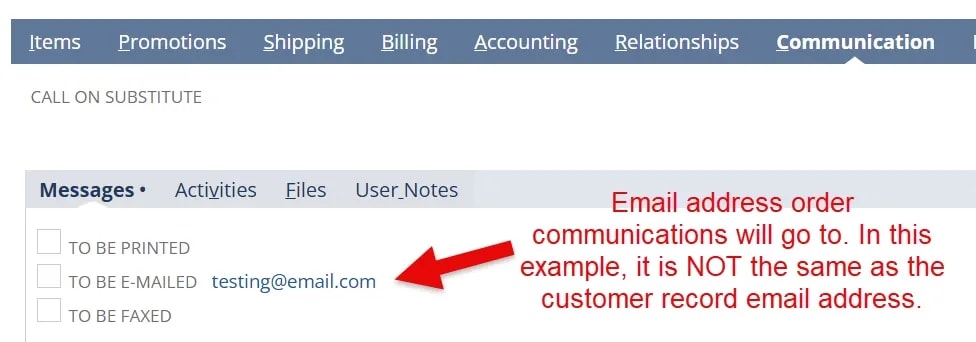
By default, the contact that placed an order is the email address that will receive the order email. If this is different than the email address on the customer record, you may want to consider changing the setting that controls if customers are cc’d on emails related to orders placed by contacts.
This setting applies to ALL orders and contact/customer records, so be sure you want it to be effective for all instances.
To change this setting, do the following:
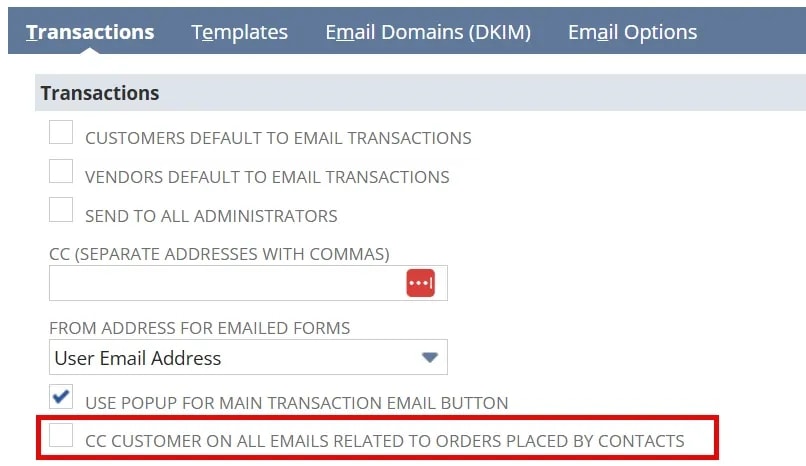
3. Click ‘Save’.
If you desire for only specific customers to receive a copy of contact orders, this will require a customization based on defined logic to determine which records should be cc’d on emails and which should not.
If you need to determine which contact placed an order, NetSuite offers a native way to do this through the “relationships” tab or “communication” tab of the sales order (though the relationships tab is clearer). There is also a setting to ensure customer record email addresses get a copy of all orders placed by contacts if this is desired or needed.
Related Articles
Tagged with Training