Creating a Vendor Bill from an Item Receipt via SuiteScript
This article will show how to recreate the auto-bill functionality of an item receipt in SuiteScript and explain how I discovered this solution.
Read the Article

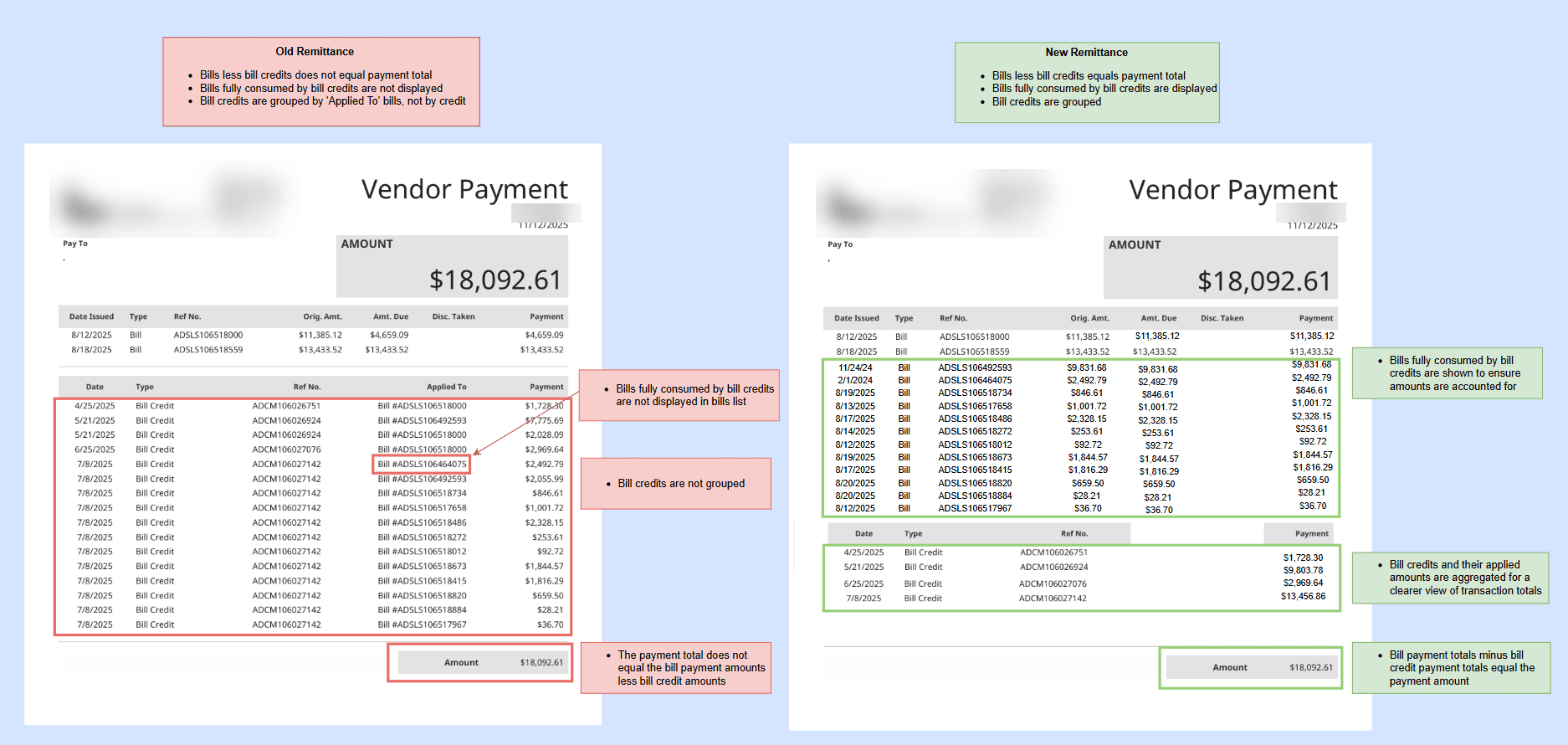
Utilize SuiteQL and custom JSON fields to extend NetSuite’s vendor payment and check PDF transparency, exposing all applied bills and credits—including those fully consumed by credits—directly within the PDF.
NetSuite provides a strong foundation for vendor payment and check PDFs, but certain scenarios - like bills fully offset by credits - can benefit from additional visibility.
By leveraging two custom JSON fields on the Vendor Payment record, and a user event script with SQL injected, we enhanced NetSuite’s standard behavior to make all applied bills and credits available to Advanced PDF Templates. The result is clearer, more complete payment documentation.
Once the data is on the record, Advanced PDFs can finally use it.
We query the credit application chain directly, leveraging a join on the applied credit table to access bill credit data:
JOIN AppliedCreditTransactionLineLink acl
    ON vp.id = acl.paymenttransaction
This reliably returns every credit applied to the payment and allows us to source additional native and custom fields inaccessible via the Advanced PDF Template alone.
This is a critical piece - a subquery, a union, and a join on the previous transaction table expose bills and bills consumed by credits on the payment:
FROM PreviousTransactionLineLink PTLL
                JOIN Transaction bill
                    ON bill.ID = PTLL.PreviousDoc
+
FROM Transaction vp
                JOIN AppliedCreditTransactionLineLink acl
                    ON vp.ID = acl.PaymentTransaction
                JOIN PreviousTransactionLineLink ptll
                    ON ptll.NextDoc = acl.NextDoc
By following both direct and credit-driven paths, we get a complete list of bills—and their true paid amounts.
SQL queries aggregate the results, and the script updates the payment record on save to store the data in the two JSON fields:
 var consumedBillsJson = JSON.stringify(consumedBillsResults || []);
        record.submitFields({
            type: record.Type.VENDOR_PAYMENT,
            id: paymentId,
            values: {
                custbody_consumed_bills_json: consumedBillsJson ...
Once the JSON lives on the payment record, parsing it in Advanced PDFs is straightforward.
<#assign consumedBills = record.custbody_consumed_bills_json?eval />The same approach works for credits, checks, and any custom fields you include in the SQL.
(I would love to deploy in a demo environment and include the same mock-up below without sensitive data from a client)
Related Articles
Tagged with Troubleshooting, Financial Management, Training