NetSuite Saved Searches: A Complete Guide
In this article, we'll look at NetSuite Saved Searches and show you how to create and use them. Plus, we'll provide some tips on getting the most out of this feature.
Read the Article

A client wanted to create a search to catalog all product image files in the File Cabinet used on their webstore, meaning files with external URLs.
They ran into an issue: in a Document saved search, the URL field displayed only the internal NetSuite URL, even though the File record had an external URL.
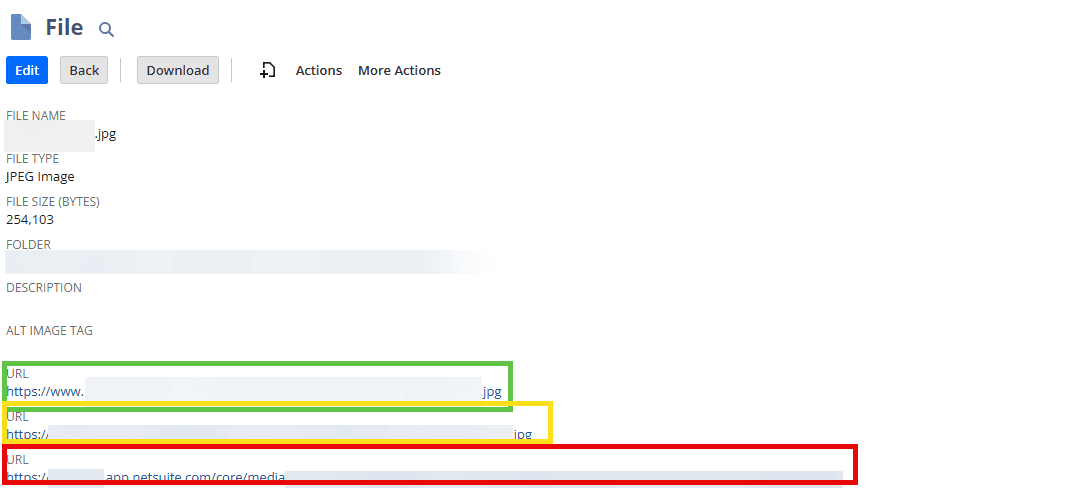
In the image below, three URLs appear on the File record:
The saved search could display only the third URL natively.
So, how could we display the external URL instead?
At first, I thought a Suitelet would be needed to drill into the File record and act as a proprietary saved search, preserving the results page and export features. That approach would have taken too much time and money, so I looked for another solution.
Could a workflow capture the correct external URL in a custom field shown in the saved search results? Unfortunately, custom fields and workflows couldn't be applied to File records for this approach.
Then I noticed the external URL followed a fixed format, with the hosted file name included.
Could I build a saved search formula to append the file name to the URL?
Yes! Since the file name was always in the URL, I could dynamically append it to the fixed URL using the CONCAT function, joining two strings into one.

This fixed the issue by replacing the {url} field and incorrect URL with a dynamic formula that displayed the external image URLs.
Digging a bit deeper and brainstorming different solutions saved the client up to 15 hours!
Related Articles
Tagged with Troubleshooting