Custom Personalized Catalog Views in SuiteCommerce
A SuiteCommerce customer with over 400,000 items needed to hide products from specific customer groups without enabling Inventory. Here's how we approached the customization.
Date
November 20, 2026
Read
4 min
SuiteCommerce offers native functionality called the Customer Segments Manager, which is part of Personalized Catalog Views (PCV). This feature allows NetSuite administrators to segment storefront items by customer group, controlling which items customers can view or purchase.
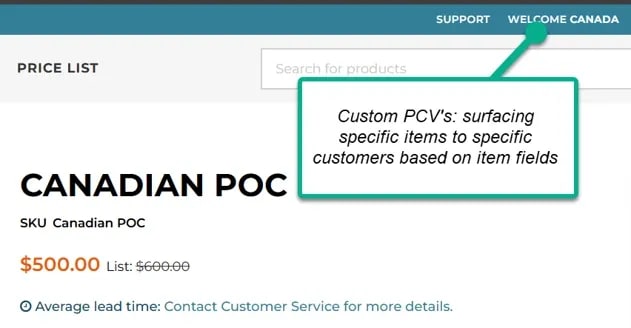
In our client's case, they were using SuiteCommerce Standard and had more than 400,000 items displayed on their webstore. They were expanding into Canada and wanted to show Canadian items only to Canadian customers.
We discovered two limitations with the native functionality:
The NetSuite administrator couldn't fully hide items except those that were unmapped.
The Inventory feature needed to be enabled for the native Personalized Catalog Views setup.
Our client was processing drop ship items and didn't retain their own inventory, so they didn't need the Inventory feature enabled.
Using native PCV wasn't practical for this implementation because it would have required extensive changes to their item data through CSV imports and mass updates.
The custom solution described below was developed to hide items entirely from specific customer groups without requiring that overhaul.
Custom PCV Extension Prerequisites
The following setup is required for this custom solution.
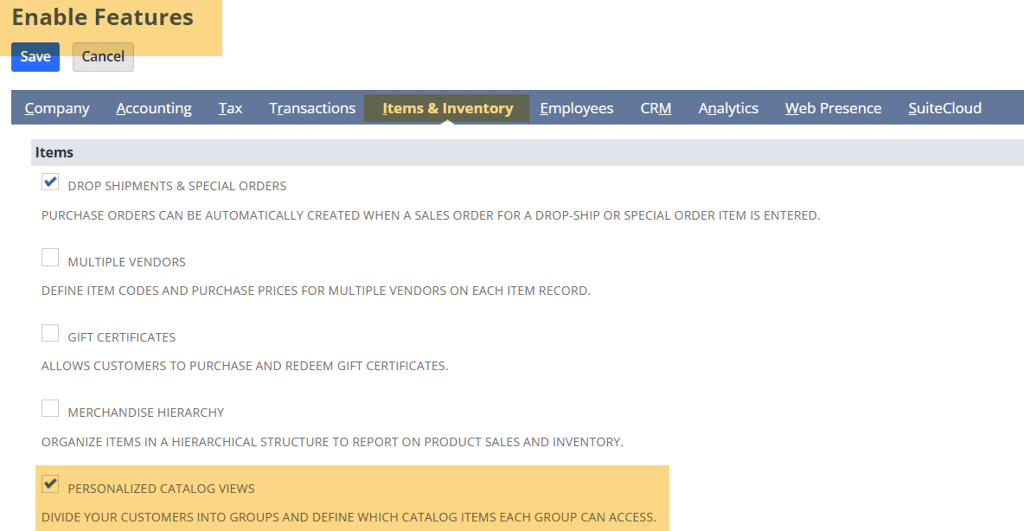
1. Enable Personalized Catalog Views
Navigate to:
Setup > Company > Enable Features > Items & Inventory
Check the Personalized Catalog Views checkbox.
2. Create an Item Segmentation Field
Create or identify a checkbox or list/record item field that distinguishes which item segment each product belongs to.
This field will be used as a facet on the storefront.
In our client's case, we used the item field Is Canadian Item.
Our initial solution was built with non-inventory items, but the approach can be used with any item type that can be displayed on the SuiteCommerce storefront.
3. Configure the Facet
Add the custom item field to the Website Setup record and Configuration record, following the standard SuiteCommerce facet setup process.
This allows the storefront to use the custom field for item segmentation.
4. Configure the Suitelet
The developer must configure the following Suitelet:
AG_SL_Customer_Segment_Lookup
Verify that the Suitelet can be run by external roles with elevated permissions.
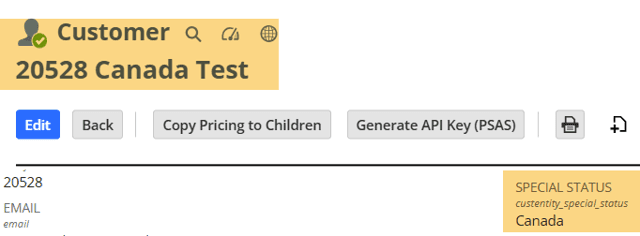
5. Create the Customer Segmentation Field
Add a custom entity field to identify Canadian customers.
In the original implementation, we used:
Field ID:custentity_special_status
Field type: Custom Entity List/Record Multiselect
Value: Canada
How the Custom PCV Extension Works
The custom extension enhances the storefront's item visibility behavior based on the configured customer and item segments.
High-Level Features
Allows items to be hidden from specific customer segments based on an item field.
Prevents users outside the designated segment from viewing those items, with error handling.
Enhances the native PCV flow without requiring the Inventory feature to be enabled.
The original implementation also includes a three-minute YouTube walkthrough demonstrating the extension.
Opportunities for Further Enhancement
There are a few ways this customization could be extended, both in NetSuite and on the storefront.
Validate Items on Sales Orders
Add a User Event SuiteScript to verify that all items on a Sales Order, at least in the webstore context, are appropriately segmented for the customer's group.
Require Segmentation Fields
Make the relevant fields required upon record creation to help ensure that items are assigned to the correct segments.
Support Multiple Custom PCVs
Enhance visibility through a dashboard that supports multiple custom PCV configurations at once.
When This Customization May Be Useful
This approach may be worth considering when:
A customer cannot enable the Inventory feature.
A store has thousands or hundreds of thousands of items.
Native Personalized Catalog Views don't meet the business's requirements for completely hiding items from particular customer groups.
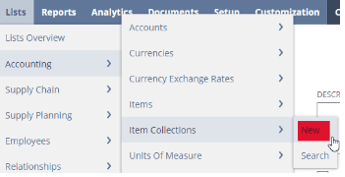
In this tutorial, we enable you to provide different customers with access to different items. You can divide your customers into groups and provide each group with access to a tailored selection of catalog items.
To create SuiteCommerce personalized catalog views (PCVs) via NetSuite CSV import, you need to complete a few different imports in a particular order as outlined in this tutorial.
The Personalized Catalog Views (PCV) feature enables you to provide different customers with access to different items. You can divide your customers into groups and provide each group with access to a tailored selection of catalog items. This is useful in many scenarios, particularly for B2B websites. On a SuiteCommerce Advanced (SCA) site, products display normally on the product landing page (PLP) when not logged-in to the website with a customer account. If you're having trouble viewing the PCV read Anchor Group NetSuite Consultants blog to find out more!
Lindemann is an authentic, down-to-earth, American company that has become a true force to be reckoned with in the chimney supplies market. Although doubtless most of that success is due to their own hard work and innovation, they also attribute much to the benefits offered by SuiteCommerce.