How CPC Signs Got NetSuite's Customer-Specific Pricing Working in BigCommerce B2B Edition
Read the Article

Customers use their BigCommerce account portal to review past orders, request returns, and manage details such as addresses, payment methods, and subscriptions. Making those tasks straightforward is part of creating a user-friendly experience. The options available will depend on your store's setup, so it helps to understand what's included and where you can make changes.
The features available in each section of the portal depend on your BigCommerce license and any additional apps you have installed. The two main starting points are Standard BigCommerce and BigCommerce B2B Edition.
With standard BigCommerce licensing, you can customize each tab of the customer account portal. The look and feel will depend on your chosen theme and any additional customizations. Here's what customers can do in each section.
The Order Review page gives customers a list of their orders, including order numbers and statuses, the number of products in each order, the dates the orders were placed, and when the order information was last updated.

Customers can open an order's Details page to see the shipping address, individual line items and their product pages, order subtotals, coupons, promotions, and the total.

The Returns page lists returned items and their details, including the request date, requested action, return reason, comments, and return status.

Customers can view past messages sent through BigCommerce and send messages to your business about a previous order.

The Addresses tab shows all addresses associated with the account a customer is logged into. Customers can edit or delete existing addresses and add new ones.

The Recently Viewed tab lists the items a customer has recently viewed. From this list, customers can add items to their shopping cart or open each item's product page.

Customers can view and edit their name, company, phone number, and email address in the Account Settings tab. They can also update their password, although the current password is not displayed.

The Subscriptions tab lets customers view and manage subscriptions connected to their account.
Customers can view all payment methods associated with their account, edit or delete existing methods, and add new ones.
Some customer account features are not included out of the box with standard BigCommerce licensing. These include the ability to:
If you want some or all of these features in your customer account portal, there are three options.
1. Get BigCommerce B2B Edition
2. Add BigCommerce Apps from the Marketplace
3. BigCommerce Theme Customization
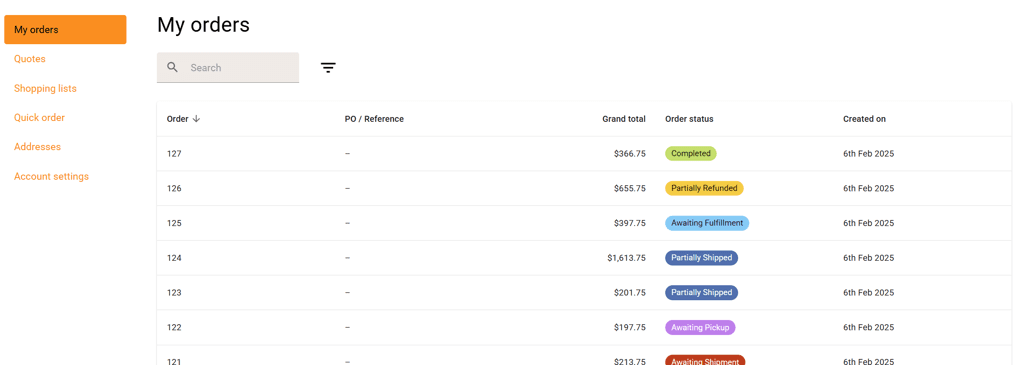
BigCommerce B2B Edition expands on the standard customer account experience with features such as quotes, shopping lists, and quick ordering. As with Standard BigCommerce, the look and feel depend on your theme and any additional customizations.
The Orders tab lists basic order information, including the order number, status, total, number of products, and date placed.
Customers can open an order to view its shipping address, payment information, line items, product pages, and status history. The Order Summary section shows the subtotal, shipping, fees, discounts, tax, and total price. Customers can also print an invoice from this section.
From the Details screen, customers can navigate between orders, reorder a previous order, or add a previous order to a saved shopping list.

The Quotes page lists previous quote requests and their statuses. Customers can also purchase from a quote once it is ready.
Customers can create, edit, delete, and copy shopping lists of saved items. They can add some or all items to their shopping cart using search, a SKU, or a CSV import. They can also search within a list and remove items directly.


The Quick Order tab lists previously purchased products, which customers can search or filter by date range. Customers can select some or all of the items displayed in the shopping cart. They can also add products to the cart using search, a SKU, or a CSV.

The Addresses tab shows all addresses associated with the logged-in account. Customers can edit or delete existing entries and use search and filters to find addresses.

Customers can view and update their name, company, phone number, and email address in the Account Settings tab. They can also update their password, although the current password is not displayed.

You can manage the information displayed in the customer portal based on user type. For example, you can hide payment information or quotes from specific users or from all users.

If you need features beyond those included with BigCommerce B2B Edition, you can add marketplace apps or explore custom development.
1. Add Apps from the BigCommerce Marketplace
2. BigCommerce Custom Development
BigCommerce's out-of-the-box functionality includes most of the features customers expect from an ecommerce site. Depending on your customer base and the experience you want to provide, you may need changes or additional licensing to meet your business needs.
Understanding the features available in each version, along with the options for apps and custom development, gives you a clearer picture of what you can change. An experienced BigCommerce consultant can help you explore which customer account portal modifications are feasible for your business.
Related Articles
Tagged with Training, B2B Ecommerce