Intro to NetSuite Advanced PDF Source Code Mode
Discover the power of editing Advanced PDF/HTML Templates using the Source Code mode!
Read the Article

Have you noticed words stretching across a table header in a NetSuite Advanced PDF/HTML template?
This formatting issue can occur when text wraps onto multiple lines inside a table header cell. The first line appears unusually spaced out, while the remaining lines display normally.
Fortunately, a small CSS adjustment may resolve the problem.
NetSuite Advanced PDF/HTML templates use the Big Faceless Organization (BFO) PDF rendering engine.
In some templates, text inside a table header can inherit alignment or justification behavior that causes words to spread across the available width.
The problem is especially noticeable when a header contains multiple words and wraps onto a second line.
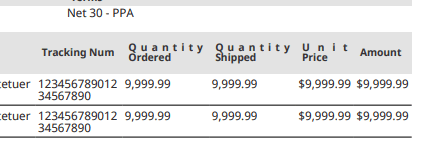
Applying alignment styling directly to the <th> element may not resolve the issue if the text is contained within a paragraph element.
Open the Advanced PDF/HTML template and locate its CSS styling section.
Add a rule targeting paragraph elements inside table headers:
th p {
    text-align: left;
}
This applies left alignment to paragraph elements within <th> cells.
If your existing template includes a rule that justifies text, the more specific th p selector may override that behavior.
For comparison, styling the table header alone may not affect the paragraph inside it:
th {
    text-align: left;
}
The important difference is that th p targets the paragraph element containing the text rather than only its parent table header.
After updating the template, save it and generate a new PDF using a record that previously displayed the spacing problem.
Check whether the header text now aligns normally.
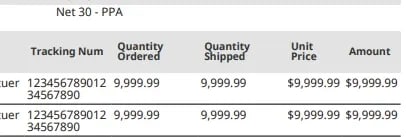
If the issue persists, review the template's existing paragraph styles and any rules applying justified alignment to table content.
When words appear stretched across a table header in a NetSuite Advanced PDF/HTML template, the problem may be caused by alignment styling on a nested paragraph element.
Targeting th p rather than only th can resolve the issue without changing the table's overall layout.
It's a small CSS adjustment worth testing before making broader changes to your PDF template.
Related Articles
Tagged with Troubleshooting