One of our SuiteCommerce clients wanted their Navigation Bar Header to open in a new page when clicked. The code typically used to achieve that goal is the data target, or target=_blank, and it can be added natively in some locations in SuiteCommerce.
The Navigation Header is a little different. This article walks through how to add that functionality to an active SuiteCommerce or SuiteCommerce Advanced site using native tools.

How Data Targets Work in NetSuite SuiteCommerce
One location where the data target (Target=_blank) surfaces natively is the footer from the Extension Manager. However, the Navigation Header does not have a native way to add data targets.
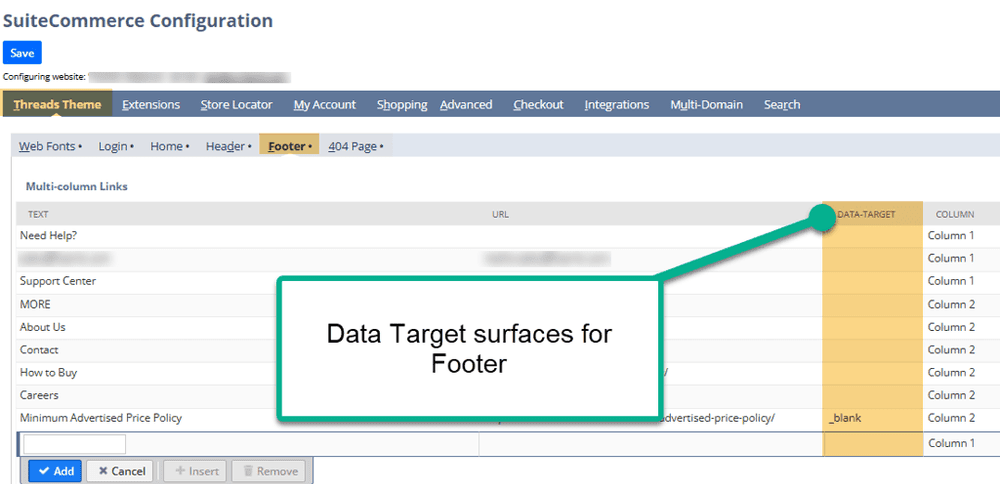
Data Targets in the Footer of the Configuration Record natively.
This article will demonstrate how to adapt a SuiteCommerce or SuiteCommerce Advanced store to open a new header tab using native tools.
The user must be the Store Manager or Admin. This is required to access the Configuration Record and Site Management Tools.
The Use Site Management Tools checkbox must be checked, and the Disable Site Management Tools checkbox must not be checked in the Configuration Record.

All features for Site Management Tools (SMT) need to be enabled. Please reference the SuiteCommerce documentation if you are uncertain whether you can use SMT.
Step 1: In the Configuration Record (Commerce > Websites > Configuration), navigate to the Layout tab and Navigation subtab.
Step 2: Add the Text, HREF, Level, Data Touchpoint, Data-HashTag, and class names to your new header tab.
Step 3: On the CLASS NAMES, be sure to customize the class of the element that you want to open in a new tab.
For more information on the page, please see this Oracle documentation.

This is a vital step to add the custom class for all tabs that are to open in a new page.
Step 4: Save the Configuration Record, cache invalidate the domain, and hard refresh (Ctrl + Shift + R) on the site. Return to the webpage and in the header, you should see the new tab!
Step 5: Hit Escape to enter SMT and add your NetSuite Credentials. Select the pencil to enter Edit Mode.
Step 6: Drag and drop a SMT HTML block onto an All Pages container.

Step 7: Name your SMT block and add the following code to call the custom class you created earlier.
Step 8: To customize your script, please update the green to match the Class Name from earlier, and update the blue highlight to the HREF location.

<script>
 require(['jQuery', 'Profile.Model'], function ($, ProfileModel) {
   'use strict';
   function addTargetBlank() {
     var contactLink = $('a.header-menu-shop-anchor-contact[href="https://www.foamit.com/contact/"]');
     if (contactLink.length && !contactLink.attr('target')) {
       contactLink.attr('target', '_blank');
     }
   }
   // Try once immediately
   addTargetBlank();
   // Then watch for changes every 500ms (for dynamic menu rendering)
   var interval = setInterval(function () {
     addTargetBlank();
   }, 500);
   // Stop after 10 seconds
   setTimeout(function () {
     clearInterval(interval);
   }, 10000);
 });
</script>
Step 9: Save and publish your SMT block and test out your new data target on your header!
And there you have it: your SuiteCommerce Navigation Header can now open the designated link in a new tab.
Got Stuck on a Step?
We like to update our blogs and articles to make sure they help resolve any troubleshooting difficulties you are having. Sometimes, there is a related feature to enable or a field to fill out that we miss during the instructions.
If this article didn't resolve the issue, please use the chat and let us know so that we can update this article.
Need Help With SuiteCommerce?
If you have general questions about SuiteCommerce or more specific questions about how our team can support your business as you implement NetSuite or SuiteCommerce, feel free to contact us anytime. Anchor Group is a certified Oracle NetSuite Alliance Partner and Commerce Partner equipped to handle all kinds of NetSuite and SuiteCommerce projects, large or small.