NetSuite App
Bulk-Email NetSuite Dunning
Invoicing / Accounts Receivable Solution for NetSuite ERP
This App was built as a convenient way for NetSuite users to follow up on invoices with their customers. With four levels of dunning, this solution automates follow-ups, removing friction from the collections process!
About the Bulk-Email NetSuite Dunning App
Bulk-email NetSuite Dunning was built as a convenient way for NetSuite users to follow up on invoices with their customers. With four levels of dunning, this solution automates follow-ups by scheduling emails at your desired frequency.
Bulk-email NetSuite Dunning removes friction from the collections process, improves customer experience, and can help shorten time-to-cash.

NetSuite Solution Features
- Choose between Manual or Automated
- Interactive screen to view open invoices
- Four levels of dunning to schedule automatic follow-ups
- Send invoice emails to multiple recipients
- Option to merge multiple invoices into a single PDF
- Custom filters to view open invoices based on attributes
- Metadata & analytics
Business Use Cases
- Recover more on unpaid invoices
- Bring automation to your collections process
- Follow up on open invoices with customizable templates
- Send bulk transaction emails with multiple attachments
- CC your own employees on bulk automated emails
- Unique email templates for 1st, 2nd, and 3rd follow-ups
- A great alternative if the NetSuite Dunning Letters module doesn't meet your needs!
About Bulk-email NetSuite Dunning
NetSuite's native email functionality allows you to send invoices to the primary email address on a customer record. Bulk-email NetSuite Dunning allows you to send invoice emails to multiple addresses! There is a manual version of this Bulk-email NetSuite Dunning solution, as well as an automated version, which allows you to set up rules so that dunning happens automatically in your account.
Manual Bulk-email Dunning
How to Create an Email List in NetSuite
With the manual option for Bulk-email Dunning, you can search for the invoices you want to send by selecting a number of filters.
Say you only want to view invoices for a certain customer, or perhaps you only want to view all invoices from a certain date. After choosing filters, the search will surface all the invoices that meet your criteria so that you can review them and send to the associated list of emails.

Sending Mass Email in NetSuite
NetSuite Email Invoice, Multiple Recipients
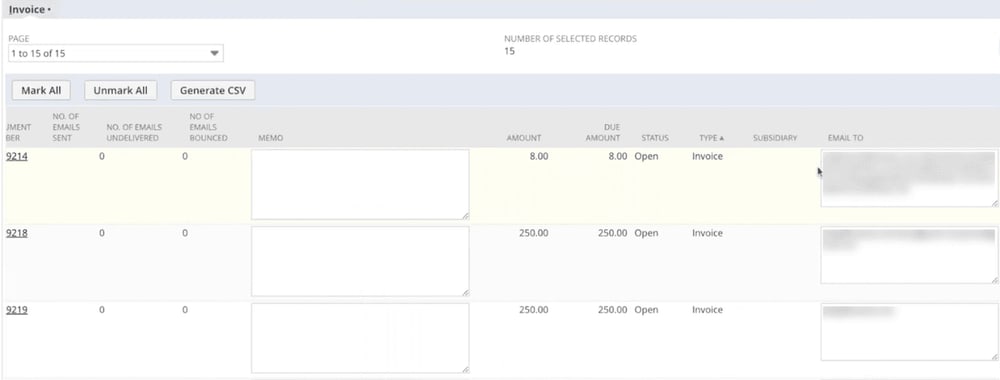
After setting up recipient email addresses for a customer, any invoices created for that customer will automatically have these bulk email addresses associated with them. This enables you to quickly review and send invoicing emails manually, without having to add the recipient addresses each time.
Send Multiple Email Attachments
Multi-Attach or Merge NetSuite Email Invoices
Send emails with multiple attachments by clicking a checkbox! If you have ten invoices open for a customer, this allows you to send them a single email with ten attachments, rather than sending ten emails.
As a further customization, you can merge attachments, and it will send a single email with a single PDF attachment containing all the invoices.

NetSuite Dunning Automation
Send Email Templates Automatically
If you don't need someone to review the invoices before they can be sent out, you can set up automated bulk-email invoices!
Specify when emails should be sent in relation to the invoice due date. You can also configure when the system should send follow-up emails and set up different templates for various dunning levels, as well as set threshold amounts.
Once all of your conditions are set up, it will automatically send out emails for invoices that meet the criteria.
Bulk-Email NetSuite Dunning FAQs

Bulk-Email NetSuite Dunning is an accounts receivable app that helps NetSuite users follow up on open and overdue invoices. It supports manual invoice outreach as well as automated dunning schedules, allowing businesses to send invoice emails to multiple recipients, use different follow-up templates, and reduce repetitive collections work.
Standard NetSuite email functionality generally relies on the primary email address associated with a customer record. Bulk-Email NetSuite Dunning expands that process by supporting multiple recipients, bulk invoice selection, multiple attachments, merged PDFs, configurable dunning levels, and automated follow-up rules.
The app can help businesses reduce manual invoice follow-up, maintain more consistent customer communication, send invoices to the right contacts, improve visibility into open receivables, and shorten the time between invoicing and payment.
Implementation time depends on whether the business chooses the manual or automated version and how much customization is required. Factors may include email templates, dunning schedules, invoice filters, recipient rules, thresholds, and attachment preferences.
Pricing depends on the selected version and the configuration or customization required.
What’s next
Make your day-to-day work easier and get back to what matters most with this NetSuite app to streamline your workflow and simplify daily tasks. Reach out below and let’s get you rolling.

Need something a little different?
If you’re not seeing the exact fit you need, no worries—we also build affordable custom solutions to fit your business, your workflows, and the way your team actually works.
Reach out and let’s build a solution that fits like it ought to.
