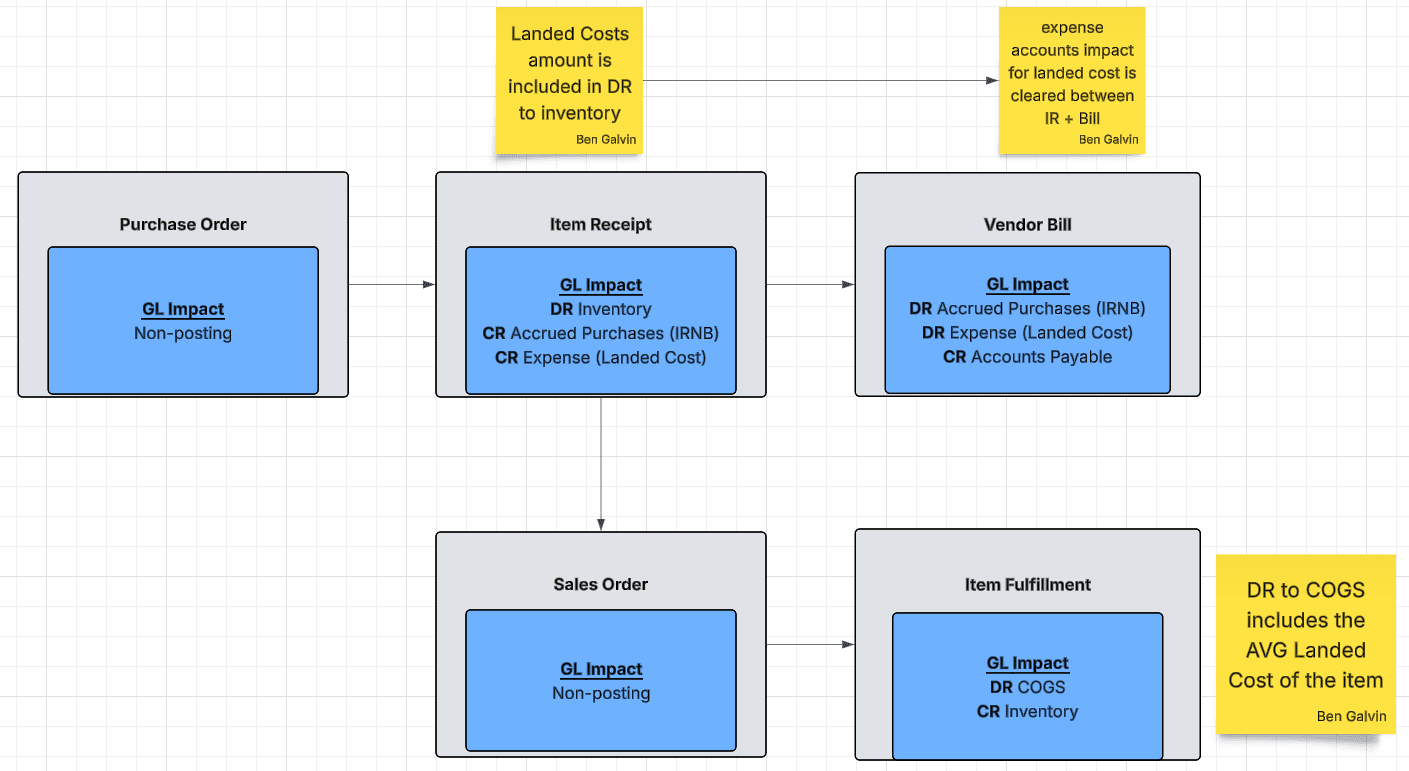
This article illustrates the effect of tracking landed costs on the GL impact of relevant transactions when using Average Costing and Advanced Billing/Receiving. I've also briefly outlined the pieces involved in landed cost configuration; for additional details, see the Oracle Help documentation.
Date
November 20, 2026
Read
2 min
Image shows flow chart of transaction GL Impacts including Landed Costs
Landed Cost Categories
Landed Cost Categories are created in Setup > Accounting > Accounting Lists > Cost Categories.
Cost Type: Landed
Expense Account: The expense account used to record landed costs.
NetSuite recommends creating specific expense accounts to track landed costs for easier audit trails.
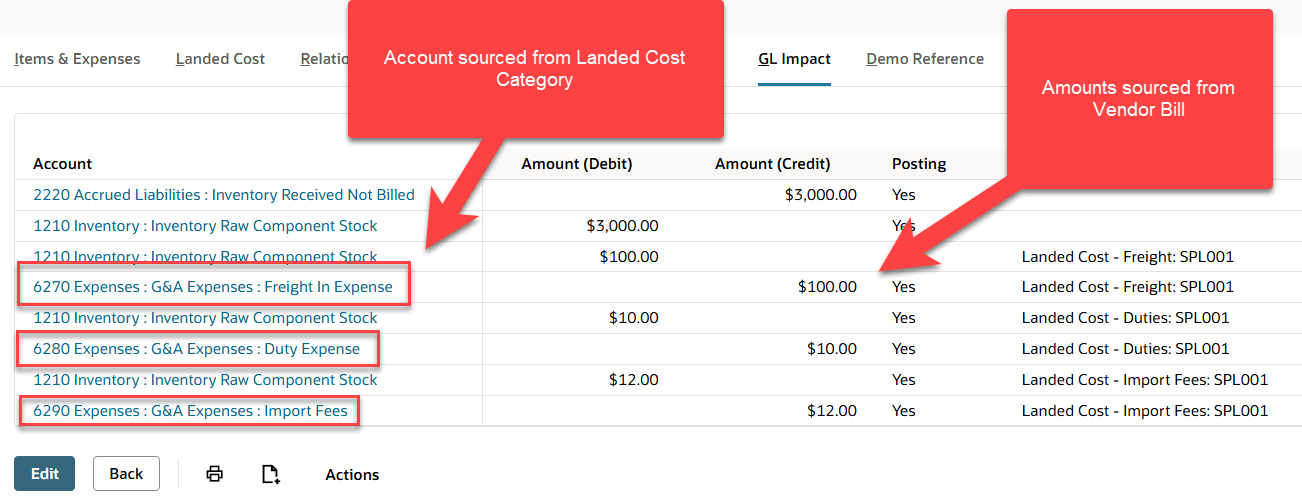
Landed Cost Categories are the link NetSuite uses to pull costs from Vendor Bill records onto Item Receipts for allocation. The expense account on the Landed Cost Category is then credited on the Item Receipt.
Image shows GL Impact Tab of an Item Receipt with amounts and accounts highlighted.
Landed Cost Items
You need to create Landed Cost Items to use on vendor bills. These items should share naming with the expense accounts they post to and the Landed Cost Categories linked to those accounts.
For example:
Landed Cost Category: Landed Cost - Freight
Expense Account: 6270 Freight in Expense
Landed Cost Item: Freight Landed Cost - Actual Freight
“Some bills, such as a separate freight bill, do not show an inventory item. Therefore, you must create landed cost item records to associate these expenses as landed costs.”
Bill records debit the expense account on the Landed Cost Item in order to clear the credit posted from the Item Receipt. This is why the account on the corresponding Landed Cost Category must be the same as the expense account on the Landed Cost Item; otherwise, there will be an imbalance.
To make a vendor bill line eligible for sourcing onto an Item Receipt, you must select the Landed Cost Category in the Landed Cost Category column of the item line on the Bill record.
A common issue when calculating landed costs in NetSuite is that companies receive landed cost amounts months after receiving inventory and have closed the accounting periods. Here's a workaround.
This article provides a baseline understanding of Landed Cost: What it is, Why companies need to track landed cost, and the steps to implement into NetSuite.
NetSuite landed cost is the native feature that allocates freight, customs duties, insurance, and other acquisition expenses directly to inventory items, ensuring each unit's recorded cost reflects the true total cost of getting that product to your warehouse, not just the vendor invoice price.