
This error surfaced when trying to add an item record to the cart on a SuiteCommerce website.
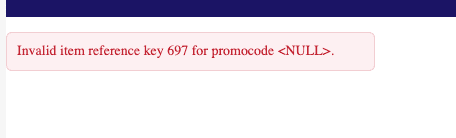
When testing the SuiteCommerce site in a Custom Customer Role, this user tried to add an item with an internal ID of 697 to the cart. Upon hitting the Add to Cart button, the above error message surfaced. The user was not able to add this item to the cart or purchase this item. There is little to no documentation from NetSuite on this error.
Steps to Trigger the Problem
Step 1: Navigate to the SuiteCommerce Store PLP or PDP. In this case, the error surfaced on the PLP.
Step 2: Select the item. In this case, select the item with the internal ID = 697.
To find the item record’s internal ID, check the following:
- Look for the Internal ID field on the Item Record.
- Install Zookeeper and open it on the Item Record.
- View the URL when on the item record. Look for “id=697” in the URL.
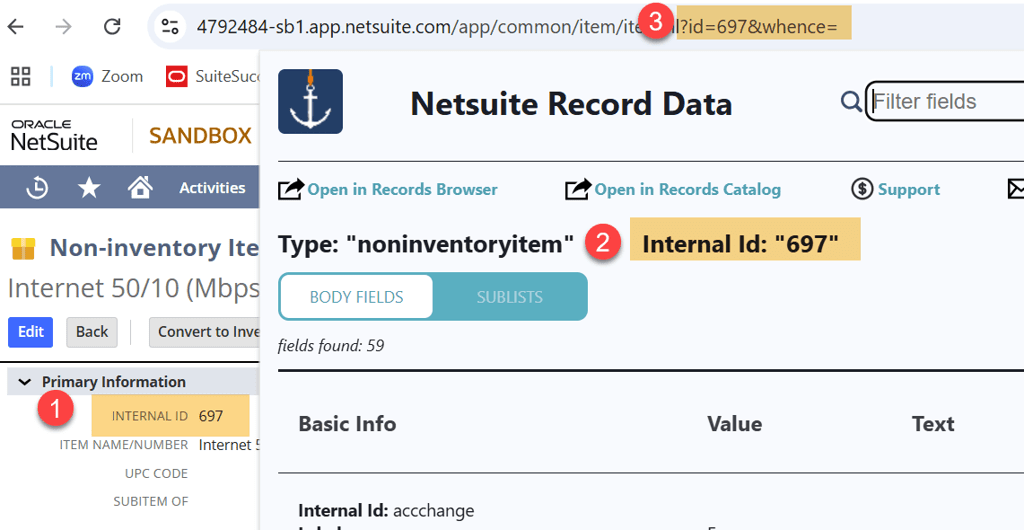
Step 3: Hit the Add to Cart button. The error will surface at this point.
Invalid item reference key 697 for promocode <null>Resolve the Null Error
In this instance, the links between the item subsidiary and webstore subsidiary are incorrect. Once corrected, the item can be added to the cart. Below are the steps taken to resolve the error:
Step 1: View the Item Record and navigate to the Subsidiary field.

Item Record > Subsidiary Field
Step 2: Navigate to the Website Setup Record (Commerce > Websites > Website List) on the Setup tab.
Step 3: Scroll to the bottom to view the subsidiaries associated with the webstore.
Step 4: Verify that the correct subsidiary is Online and Default.
Make sure to match the item’s subsidiary to the webstore subsidiary!
Step 5: Save the website setup record, complete a Cache Invalidation Request, commit a hard refresh (Ctrl + Shift + R) on the site, and you should be able to add the item to the cart!
Other Leads to Resolve the Error
Here are a couple actions to take if the earlier process does not resolve the error:
Toggle Promocodes
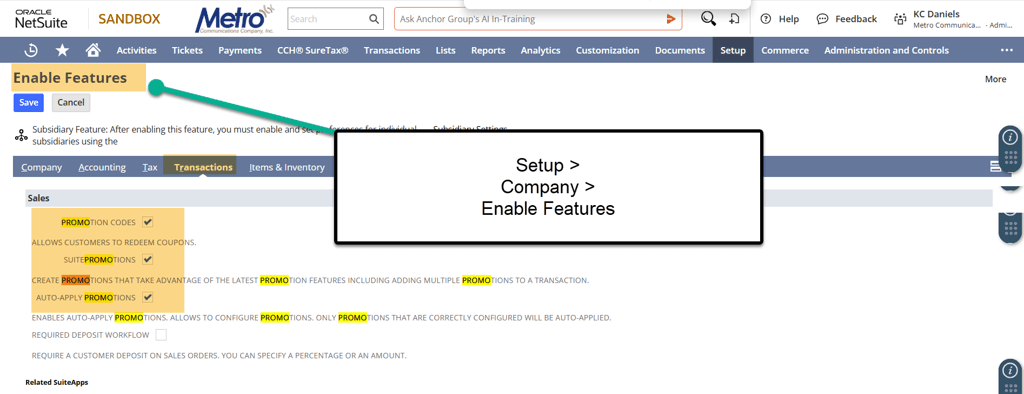
Toggle Promocodes as an Enabled Feature. Since the error message references promo codes, it would be natural to explore SuitePromotions to resolve.
Step 1: To toggle the promo codes on and off, navigate to Setup > Company > Enable Features. Go to the Transaction tab.
Step 2: Uncheck the Promotions Code checkbox and Save.
Step 3: Try the PLP in the SuiteCommerce Store and add the item to the cart.
Find the Value for the Price and Quantity
In order to add an item to the Cart, the LiveOrderModel requires at least the Item Internal ID, Price, and Quantity.
- Internal ID = we know this is being passed from the error message, “reference key 697”. The 697 refers to the item's internal ID.
- Price = View the process below to validate this field.
- Quantity = View the process below to validate this field.
Verify that the item has a Price.

Inventory Record > Sales / Pricing Tab
Step 1: From inspecting the SuiteCommerce webstore (right-click Inspect button), verify that the LiveOrderModel.js is passing the quantity when adding to the cart. Go to the Network tab and click on the LiveOrderModel.
Step 2: Open the Lines dropdown and verify that quantity is being passed.
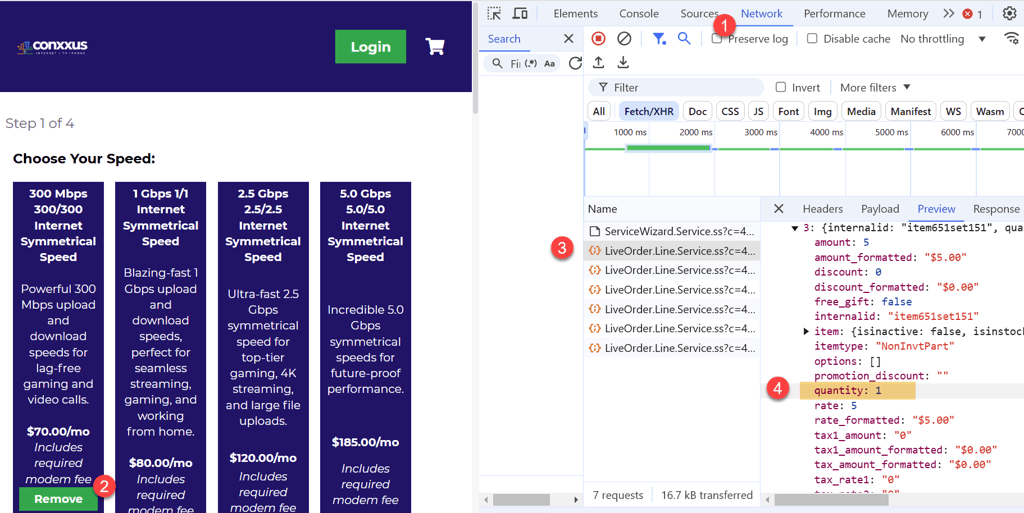
Step 3: Inspect the SuiteCommerce Page in the Network tab.
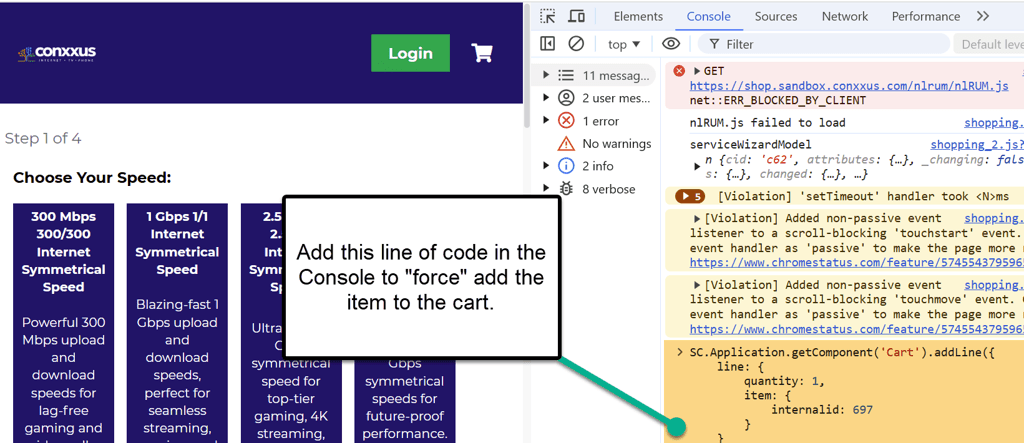
Force Add Items to the Cart
Lastly, try to insert this snippet of code to “force” add items to the Cart.
Step 1: Inspect the SuiteCommerce Page. Navigate to the Console tab
Step 2: Add the code referenced below and hit Enter. If possible, the store will add that item to the cart.
Step 3: Please change the Internal ID field below to match the internal ID of your item record.
Related Articles:
- Correcting Count Errors (NetSuite Physical Inventory Count)
- Work Order Prevents Commitment from Available Inventory
Got stuck on a step in this article?
We like to update our blogs and articles to make sure they help resolve any troubleshooting difficulties you are having. Sometimes, there is a related feature to enable or a field to fill out that we miss during the instructions. If this article didn't resolve the issue, please use the chat and let us know so that we can update this article!
Oracle NetSuite Alliance Partner & Commerce Partner
If you have general questions about NetSuite or more specific questions about how our team can support your business, contact us! Anchor Group is a certified Oracle NetSuite Alliance Partner and Commerce Partner equipped to handle all kinds of NetSuite and SuiteCommerce projects, large or small.

Tagged with Training, Troubleshooting