
You can have multiple domains on a single SuiteCommerce license. When we say a single SuiteCommerce license, this means that there is only one website setup record. Since there are key functionality settings in the website setup record for B2B or B2C, you may need to select an option that affects both domains. As a result of this, it could create a need for customization.
Example Customization as a Result of a Shared Website Setup Record
(For Multiple SuiteCommerce Domains)
Problem: The B2B website needs a login to view prices or add to a cart, but the B2C domain does not.
Solution: Even though there is an option to "log in to view price" on the website setup record, it can't be enabled, or it will be available on the other domain (as a result of sharing a SuiteCommerce license). To resolve this, it was necessary to leave that option unchecked and create an extension for "login to view price" that will only get activated on the B2B domain.
Different Product Catalogs for Multiple SuiteCommerce Domains
(On a Single Website Setup Record)
Another scenario that could come up is around the product catalog. Let's say that each domain has a slightly different set of products. This can get a bit tricky on a single SuiteCommerce license since the product catalog is tied to the website setup record.

Leverage Personalized Catalog Views (PCVs)
The best way to handle this is to leverage the native personalized catalog views (PCV), which allow us to create customer and item segments. The most important factor is that most of this functionality is tied to the user's login. This means that the B2C domain, which offers more functionality tailored to the logged-out user, needs to be the focus. The B2B product catalog will be where most segments are applied, since they will have to log in to view prices and add to cart anyway (at least in this client example).
Pro Tip: If your B2B domain doesn’t require the user to log in as a key component of functionality before adding to the cart, it will be very difficult to segment the product catalogs and it would be easiest to get a separate SuiteCommerce license to have a separate website setup record.
Let's break down the user stories and how to handle them for this scenario…
Preparation for Segments Manager
Create the dynamic saved searches to be used by the segments manager.
Step 1: Create unique identifiers for items, commerce categories, and customer records to differentiate between B2B and B2C. The client needs to update the data from there with the correct selections.
- Checkbox on Item Record (B2B Only, B2C Only)
- Checkbox on Commerce Category (B2B Only, B2C Only)
- Type field on Customer Record (is individual, is company)
Need a refresher on working with NetSuite saved searches? Check out our article NetSuite Saved Searches: A Complete Guide to find the info you need!
Step 2: Create saved searches for the segments manager
- Create a saved search for B2B-only commerce categories. (Criteria: B2B commerce category checked AND B2C commerce category not checked)
- Create a saved search for B2B-only items. (Criteria: B2B item checked AND B2C item not checked)
- Create a saved search for B2C-only commerce categories. (Criteria: B2C commerce category checked AND B2B commerce category not checked)
- Create a saved search for B2C-only items. (Criteria: B2C item checked AND B2B item not checked)
- Create a saved search for B2B-only customers. (Criteria: Type is company)
- Create a saved search for B2C-only customers. (Criteria: Type is individual)
- Unmapped (applies to both domains)
- Items
- Commerce Category
B2B SuiteCommerce User Stories
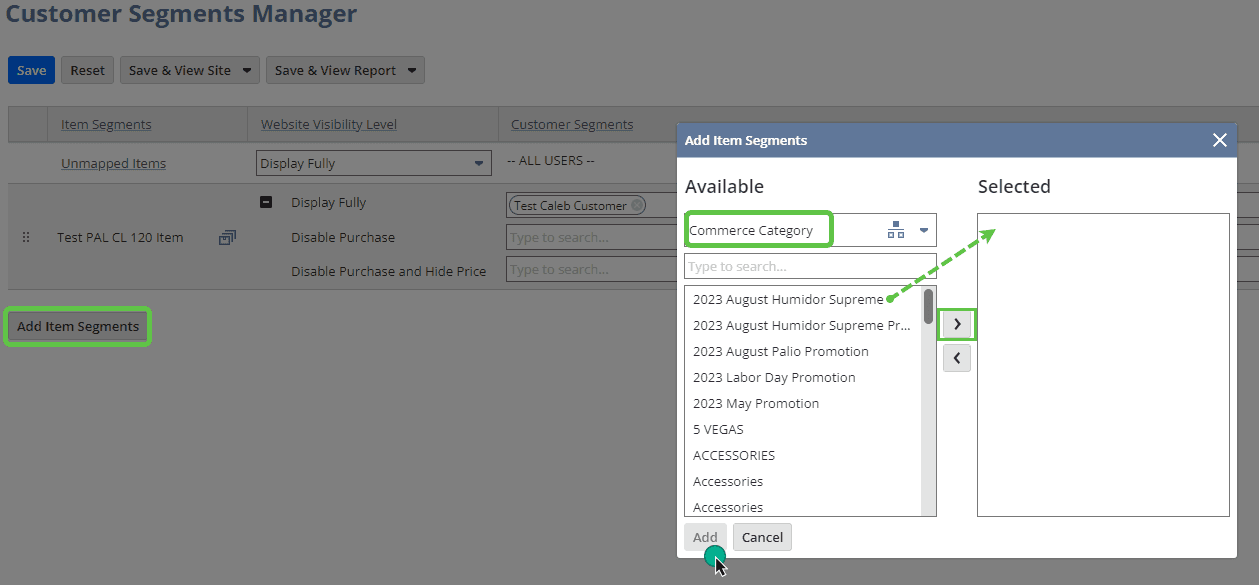
Story 1: Commerce Category (B2B Only)
Task: I want to create a commerce category that only appears on the B2B domain.
Expected results:
- When B2B customers log in, they will see the B2B-only commerce category.
- They will see all the shared categories when logged out, but are unable to view the price or add to the cart.
TIP: If you need to not auto-populate commerce categories in the header navigation, you could decide to manually set them rather than using the categories placeholder (Configuration > Layout > Navigation)
What you have to do: Just check the "B2B" checkbox on the commerce category.
Story 2: Shared B2B and B2C Commerce Category
Task: I want to create a commerce category that appears for both B2C AND B2B domains.
Expected results: Both B2B and B2C customers will see this commerce category while logged in and logged out state.
What you have to do: Just check the "B2B" and "B2C" checkboxes in the commerce category.
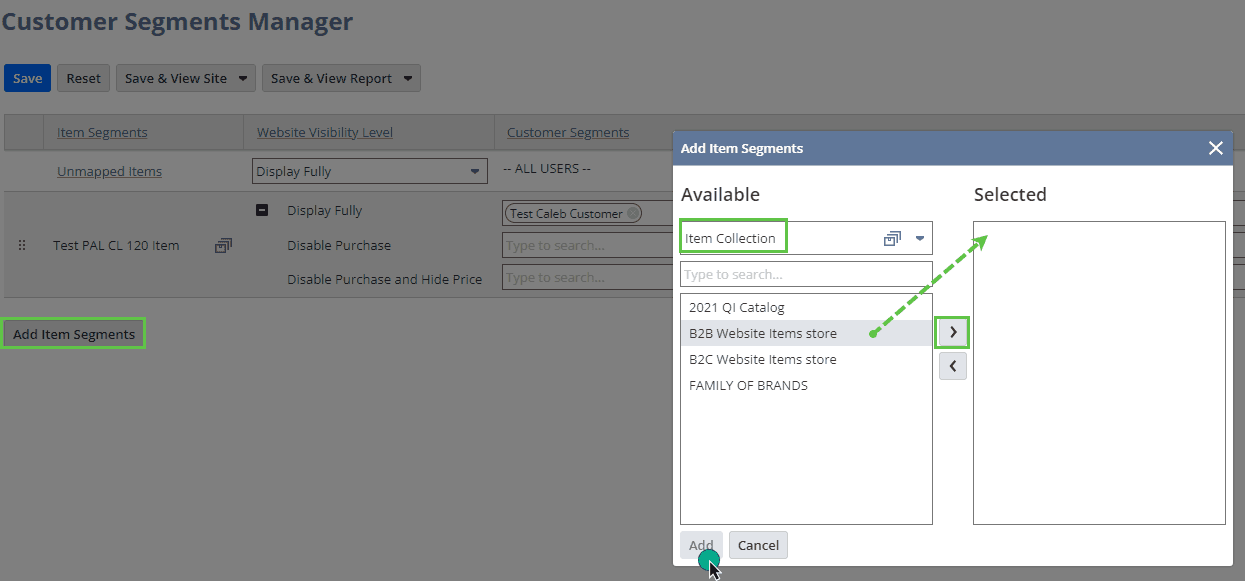
Story 3: Item (B2B Only)
Task: I want to create an item that only appears in the B2B domain.
Expected results: The item will show to B2B customers once they log in. But this item will not be shown until they log in.
What you have to do: Just check the "B2B" checkbox in the item record.
Story 4: Shared B2B and B2C Item
Task: I want to create an item that appears in both B2C AND B2B domains.
Expected results: The item will be visible on both domains while logged in and logged out.
What you have to do: Just check the "B2B" and "B2C" checkboxes in the item record.
B2C SuiteCommerce User Stories
Story 1: Commerce Category (B2C Only)
Task: I want to create a commerce category that only appears on the B2B domain.
Expected results: B2C-only commerce categories require the user to be logged in to view.
What you have to do: Just check the "B2C" checkbox on the commerce category.
Story 2: Shared B2C and B2B Commerce Category
Task: I want to create a commerce category that appears for both B2C AND B2B domains.
Expected results: Both B2B and B2C customers will see this commerce category while logged in and logged out state.
What you have to do: Just check the "B2B" and "B2C" checkboxes in the commerce category.
Story 3: Item (B2C Only)
Task: I want to create an item that only appears in the B2B domain.
Expected results: B2C only items require the user to be logged in.
What you have to do: Just check the "B2C" checkbox in the item record.
Story 4: Shared B2C and B2B Item
Task: I want to create an item that appears in both B2C AND B2B domains.
Expected results: The item will be visible on both domains while logged in and logged out.
What you have to do: Just check the "B2B" and "B2C" checkboxes in the item record.
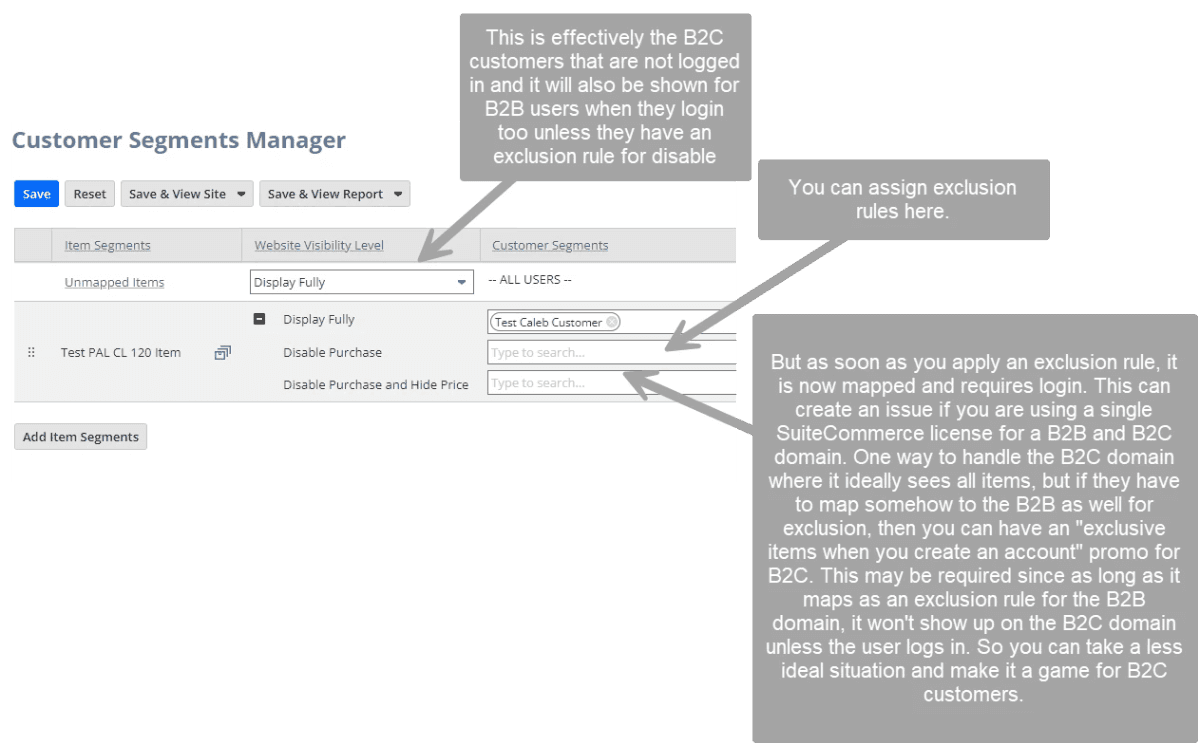
What Happens on Both Domains when an Item is Marked for 'Display in Webstore'?
Since they are part of the same website setup record, the item will be displayed on both websites. However, if you have an item mapped to a segment in personalized catalog views, it won't display until the user is logged into the appropriate personalized catalog view.
Related Article: Shared Open Graph on SuiteCommerce
Got stuck on a step in this article?
We like to update our blog posts and articles to ensure they help resolve any troubleshooting issues you are having. Sometimes, there is a related feature to enable or a field to fill out that we miss during the instructions. If this article didn't resolve the issue, please use the chat to let us know so we can update it!
Oracle NetSuite Alliance Partner & Commerce Partner
If you have general questions about SuiteCommerce or more specific questions about how our team can support your business as you implement NetSuite or SuiteCommerce, feel free to contact us anytime. Anchor Group is a certified Oracle NetSuite Alliance Partner and Commerce Partner equipped to handle all kinds of NetSuite and SuiteCommerce projects, large or small!

We are a premium SuiteCommerce agency that creates powerful customer portals. Unlike our competitors, we have already solved your problems.
Related Articles:
Tagged with Training, B2B Ecommerce