For businesses already using NetSuite ERP, SuiteCommerce MyAccount provides the fastest path to customer self-service without the complexity of building a full e-commerce platform. Whether you're a wholesale distributor managing hundreds of B2B accounts or a manufacturer looking to streamline reordering processes, implementing My Account features can transform your customer experience while cutting operational costs.
Key Takeaways
- Mid-sized B2B businesses can achieve substantial annual cost savings through customer self-service automation
- Basic implementations require 15-50 hours versus 100-250 hours for full SuiteCommerce upgrades
- Organizations can handle the majority of routine transactions through self-service portals
- Customer self-service delivers significantly fewer manual data entry errors
- Subscription-based companies can route the majority of subscription changes through automated portals
- Many organizations see payback within the first year for typical implementations
What Is Customer Self-Service in NetSuite SuiteCommerce?
SuiteCommerce MyAccount is NetSuite's dedicated customer portal solution that enables 24/7 account management without requiring staff intervention. Unlike a full e-commerce platform with shopping carts and checkout, MyAccount focuses exclusively on the authenticated customer experience—the "My Account" functionality that empowers customers to manage their existing relationship with your business.
Core Components of a SuiteCommerce My Account Portal
The portal consists of one Server-Side Processing (SSP) application providing:
- Order Management: View purchase history, track shipments, request returns, and reorder previous items
- Billing Operations: Access invoices, check account balances, make payments, and download statements
- Account Administration: Update profile information, manage multiple addresses, store payment methods
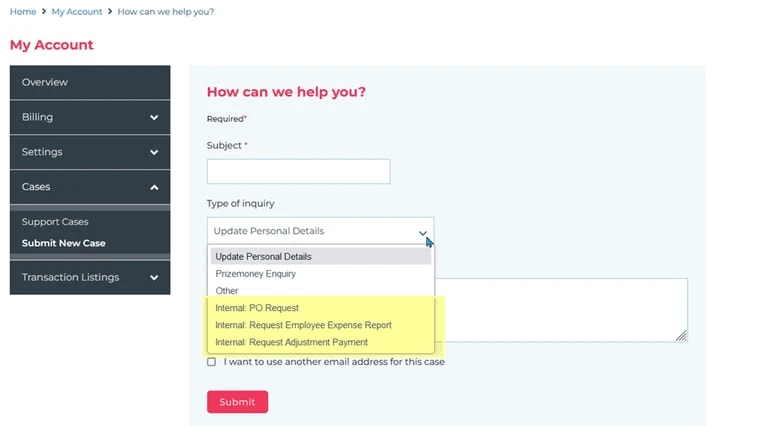
- Support Integration: Submit cases directly connected to NetSuite CRM
- Subscription Control: Manage recurring orders and SuiteBilling subscriptions
The architecture delivers real-time data synchronization with your NetSuite ERP backend, ensuring customers always see current information without manual updates or batch processing delays.
Self-Service vs. Traditional Customer Service Models
Traditional models require your team to field every inquiry through phone or email channels. When customers call asking "Where's my order?" or "What's my balance?", representatives must log into NetSuite, locate the account, pull the information, and relay it verbally. This process consumes significant time each week per customer service representative for routine inquiries.
Self-service portals flip this equation. Customers access their own data instantly, anytime, from any device. Your team handles only complex issues requiring human judgment—approvals, exceptions, technical problems. The result is faster customer service without increased headcount.
Planning Your My Account Feature Set for Maximum Adoption
Before configuring a single setting in NetSuite, map which features will deliver the highest adoption rates for your specific customer base. Start with the questions your team answers most frequently. Review support tickets, call logs, and email inquiries from the past 90 days to identify patterns:
High-Value Features for B2B Distributors:
- Invoice viewing and payment (addresses 40-50% of support volume)
- Order history with tracking links (eliminates "Where is my order?" calls)
- Reorder functionality for repeat customers
- Account balance and credit terms visibility
High-Value Features for Manufacturers:
- Real-time order status with production stage visibility
- Custom pricing and contract terms display
- Bulk reordering capabilities
- Return authorization workflow
High-Value Features for Subscription Businesses:
- Subscription management and upgrade options
- Payment method updates without calling support
- License key access and download capabilities
- Renewal date visibility and auto-pay preferences
The most successful implementations start with 3-5 core features, launch quickly, then expand based on actual usage data. Survey a representative sample of customers about their biggest frustrations with current processes. Wholesale distributors typically report different pain points than software companies or retailers. Consider mobile usage patterns as well—if your customers frequently work from job sites, warehouses, or field locations, mobile-responsive design becomes essential.
Setting Up NetSuite Roles and Permissions for Self-Service Access
The foundation of any successful portal implementation is proper security configuration through NetSuite roles and permissions.
Configuring the Customer Center Role
Go to Setup → Users/Roles → Manage Roles and locate the Customer Center role. This pre-configured role provides baseline permissions for customer portal access. However, you'll need to customize it based on your security requirements:
Critical Permission Settings:
- Lists > Items: View level (allows product browsing and reordering)
- Transactions > Sales Orders: View level (displays order history)
- Transactions > Invoices: View and Pay level (enables self-service billing)
- Transactions > Returns: Create level (allows return request submission)
- Support > Cases: Create and View level (support ticket functionality)
Restricting Access with Permission Levels
For B2B environments with sensitive pricing or customer data segmentation, configure additional restrictions:
- Subsidiary Restrictions: Limit visibility to specific NetSuite subsidiaries
- Department/Class Filters: Show only relevant transactions by department
- Price Level Assignment: Control which customers see which pricing tiers
- Personalized Catalog Views: Restrict product visibility by customer group
Enable the "Give Access" checkbox on individual customer records to activate portal access. This checkbox, combined with role assignment, determines who can log into your portal.
For advanced security scenarios like SSO integration or two-factor authentication, setting up OAuth 2.0 provides enterprise-grade authentication capabilities.
Configuring Core My Account Portal Functions in SuiteCommerce
With security established, configure the specific features customers will use daily.
Order History and Tracking Setup
In your website configuration settings, enable order history to display all historical transactions with configurable date ranges. Many businesses display 180 days of order history by default, balancing performance with customer needs. Enable tracking integration to automatically pull carrier tracking URLs from fulfillment records and provide real-time order status updates synchronized with NetSuite order processing.
For the reorder functionality that customers frequently request, enable the option that allows users to reorder items. This enables one-click reordering from previous purchases—a feature that drives significant repeat orders through self-service channels.
Invoice and Payment Management Configuration
Billing self-service delivers immediate ROI by reducing phone-based payment processing. Configure:
- Make a Payment Feature: Allows customers to pay open invoices via stored credit cards
- Payment Gateway Integration: Connect to NetSuite-approved processors for PCI compliance
- Partial Payment Support: Enable customers to pay portions of outstanding balances
- Statement Access: Provide downloadable PDF statements on demand
Organizations implementing billing self-service report faster invoice payment due to 24/7 accessibility versus business-hours-only phone payments.
Returns and Case Management Integration
Enable return authorization and support case creation to handle post-sale service requirements. Configure return request workflows so customers can initiate returns that route to approval queues, case submission forms that integrate directly with NetSuite's case management system, and status visibility so customers can track progress without calling support. These features integrate seamlessly with existing NetSuite workflows, so approvals and escalations follow your established business processes.
Implementing Advanced Self-Service Features for B2B Customers
B2B environments require capabilities beyond basic consumer portals, particularly for organizations managing complex account hierarchies.
Multi-User Account Management for Organizations
Enterprise customers often need multiple employees accessing the same account with different permission levels. Configure account hierarchies for parent-child relationships representing organizational structures, role-based access with different permissions for buyers, approvers, and administrators, approval workflows for purchase orders before order submission, and spending limits as transaction amount restrictions by user role.
For companies requiring sophisticated approval chains, NetSuite workflows automate the routing logic based on order value, item type, or department codes.
Quote-to-Order and Custom Pricing
Many B2B relationships rely on quotes rather than direct ordering. Enable quote management allowing customers to view active quotes with line-item details, accept quotes and convert them directly to orders, request modifications, and track quote expiration dates. This eliminates the back-and-forth email chains that plague traditional quoting processes.
B2B pricing rarely follows standard retail models. SuiteCommerce MyAccount supports customer-specific price levels to display negotiated pricing automatically, contract terms visibility showing volume discounts and rebate structures, quantity-based pricing that updates dynamically, and promotional access for time-limited offers targeting specific customer segments.
Optimizing the My Account User Experience and Interface
Technical functionality means nothing if customers find the portal confusing or slow. User experience optimization directly impacts adoption rates.
Best Practices for Account Dashboard Design
The dashboard is your customers' home base—design it for quick access to their most common tasks:
- Action-Oriented Layout: Place primary functions (Pay Invoice, Reorder, Track Shipment) prominently
- Contextual Information: Display relevant alerts (past due invoices, pending approvals)
- Progressive Disclosure: Show details only when needed to reduce cognitive load
- Search Functionality: Enable quick location of specific orders or invoices
Use available site management tools to customize the dashboard layout. Changes typically deploy immediately for testing.
Mobile Optimization for Self-Service Portals
With significant B2B traffic now originating from mobile devices, responsive design isn't optional. Test your portal thoroughly on iOS devices (Safari browser), Android devices (Chrome browser), tablets in both portrait and landscape orientations, and various screen sizes from phones to large tablets.
SuiteCommerce MyAccount includes mobile-responsive templates by default, but custom elements require testing to ensure proper scaling and touch-target sizing. For businesses wanting deep UX customization, working with specialists in SuiteCommerce development ensures optimal results.
Integrating Self-Service Data with NetSuite ERP Backend
The portal's value derives from real-time connectivity to your NetSuite data. Proper integration ensures accuracy and reliability.
Connecting Portal Actions to NetSuite Workflows
When customers perform actions in the portal, trigger appropriate NetSuite workflows for return requests (automatically create return authorization records), support cases (generate case records assigned to appropriate queues), payment submissions (update invoice status and trigger receipt workflows), and profile updates (sync customer record changes with validation rules).
These connections leverage NetSuite's native workflow engine, eliminating custom development for standard business processes.
Using SuiteQL for Custom Account Data Retrieval
For scenarios requiring data not available through standard portal features, SuiteQL provides powerful query capabilities. Common use cases include custom reporting dashboards showing KPIs, complex transaction lookups across multiple record types, historical trend analysis for customer purchasing patterns, and custom data exports for customer analysis.
Configuring Personalized Catalog Views for Segmented Access
Not all customers should see all products. Personalized Catalog Views (PCV) enable sophisticated product visibility controls.
Setting Up Customer Groups and Catalog Assignments
Create customer groups based on industry segments (different products for different verticals), geographic regions (region-specific inventory or compliance requirements), contract types (products available only to customers with specific agreements), and price levels (visibility tied to negotiated pricing tiers).
Assign groups to specific catalog views, then assign customers to groups. The system automatically filters product visibility when customers log in.
Troubleshooting PCV Display Issues
If products aren't appearing for logged-in customers, verify the customer is assigned to the correct group, confirm items are assigned to the catalog view, check that item and customer share subsidiary access, and ensure the catalog view is connected to the correct website. For detailed resolution steps, reference our guide on troubleshooting Personalized Catalog Views.
Empowering customers to manage their own contact information reduces data entry errors and keeps records current. Configure the portal to allow updates to primary contact information (email addresses, phone numbers, names), communication preferences for email notifications, multi-contact management to add secondary contacts with specified roles, and address book management for multiple shipping and billing addresses.
Implement validation rules to maintain data quality—require proper email formats, prevent duplicate addresses, and verify phone number structures. Provide multiple support pathways directly within the portal including case submission forms categorized by issue type for proper routing, knowledge base links for self-help articles, live chat integration for real-time support when needed, and appropriate phone contact display by customer segment.
Implementing Subscription and Recurring Order Self-Service
For subscription-based business models, automated subscription management dramatically reduces support burden. Enable customers to control their recurring orders through frequency adjustments (change delivery schedules without calling), pause and skip options for temporary holds, quantity modifications as needs change, and next delivery visibility showing upcoming shipment dates and contents.
For businesses using NetSuite SuiteBilling, the subscription management interface integrates natively, providing upgrade paths, cancellation workflows, and renewal management. Allow customers to manage billing independently through payment method updates (change credit cards without support intervention), billing address changes in real-time, invoice history access for all subscription invoices and receipts, and renewal notifications as automated reminders before renewal dates.
Software companies and other subscription-based businesses report that the majority of subscription changes now occur through self-service, freeing account management teams for strategic customer relationships.
Testing and Troubleshooting My Account Features Before Go-Live
Thorough testing prevents embarrassing failures and customer frustration after launch.
Common My Account Implementation Issues and Fixes
DNS/CNAME Resolution Problems: The most frequent stumbling block. Verify you’ve added the exact CNAME records NetSuite provides, removed any conflicting A records, and allowed DNS changes to propagate
Missing Pages or Features: If expected pages don't appear, check your configuration settings and verify the Customer Center role has appropriate permissions.
Login Failures: Confirm the customer has "Give Access" checked on their customer record, the Customer Center role is assigned, and the website is properly assigned to the customer.
Payment Processing Errors: Verify payment gateway configuration in NetSuite, test with sandbox mode first, and ensure customer credit cards are valid and properly stored.
Using NetSuite Sandbox for Portal Testing
NetSuite Sandbox environments provide safe testing grounds without risking production data. Create test customer accounts representing different user types and execute complete workflows: place test orders and verify they appear in order history, submit test payments and confirm invoice updates, request test returns and verify approval routing, and create support cases to validate case creation. Document any issues discovered during testing and resolve them before production deployment.
Launching and Supporting Your SuiteCommerce Self-Service Portal
A smooth launch requires thoughtful communication and support planning.
Creating Customer Onboarding Materials for New Portal Features
Develop comprehensive onboarding resources including video tutorials (2-3 minute videos showing common tasks), step-by-step guides (PDF documentation with screenshots), FAQ documents addressing predictable questions proactively, and quick reference cards providing one-page overviews of key features. Distribute these materials 2-3 weeks before launch, giving customers time to familiarize themselves with what's coming.
Measuring Self-Service Adoption and Success Metrics
Track these KPIs to validate ROI and identify improvement opportunities: portal usage rate (percentage of customers actively using the portal), support call volume (reduction in inquiries about information available in portal), self-service transaction ratio (orders, payments, returns handled without staff), time to payment (days between invoice and payment for self-service vs. traditional), and customer satisfaction scores through survey responses about portal experience.
Many organizations see payback within the first year, with significant ROI potential in subsequent years from reduced support costs and faster payment collection.
Why Anchor Group Makes SuiteCommerce MyAccount Implementation Easier
Implementing SuiteCommerce MyAccount isn't rocket science, but it does require specialized knowledge that standard NetSuite administrators often lack. The difference between a smooth 15–50 hour implementation and a project that drags on for months typically comes down to partner expertise.
At Anchor Group, we've implemented dozens of customer portals for businesses just like yours—wholesale distributors managing complex B2B relationships, manufacturers streamlining reorder processes, and subscription businesses automating billing operations. We know the common pitfalls because we've encountered and solved them repeatedly.
Our approach reflects our Midwestern roots: no fuss, no overselling, just practical solutions that work. We start by understanding which features will actually drive adoption for your specific customer base. We configure the portal using NetSuite's native capabilities whenever possible, reserving custom development for scenarios where it genuinely adds value. And we stick around after launch to help you optimize based on real usage data.
Whether you need basic invoice self-service to reduce billing calls or sophisticated B2B portals with approval workflows and custom pricing, our SuiteCommerce expertise and 35+ pre-built apps accelerate your implementation while avoiding costly mistakes.
Frequently Asked Questions
How quickly can I implement SuiteCommerce MyAccount?
Basic implementations typically require 15-50 hours over 4-8 weeks for standard features like order history, invoice viewing, and basic account management. More complex deployments with custom workflows, extensive branding, and advanced B2B features extend to 8-12 weeks. Organizations that launch quickly with focused functionality typically see higher adoption than those attempting full-featured launches.
What happens to my existing customer data during setup?
Your existing NetSuite customer records and transaction history automatically become available through the portal—there's no separate data migration required since the portal pulls directly from your NetSuite database in real-time. You'll need to ensure customer records have accurate email addresses, enable the "Give Access" checkbox on each customer record, and assign appropriate role permissions. Most businesses spend time cleaning up customer data before launch to ensure smooth access provisioning.
Can I restrict which products or pricing different customers see?
Yes, through Personalized Catalog Views you can create customer groups and assign specific product catalogs to each group. This enables sophisticated scenarios like showing premium products only to qualified buyers, displaying region-specific inventory, or presenting negotiated pricing based on contract terms. Our guide on troubleshooting Personalized Catalog Views covers common setup issues.
What's the difference between MyAccount and full SuiteCommerce?
MyAccount focuses exclusively on authenticated customer self-service (order history, billing, account management) without shopping cart or checkout functionality. It's perfect for B2B businesses that don't sell online but want to empower customers with 24/7 account access. Full SuiteCommerce includes MyAccount features plus complete e-commerce capabilities (product browsing, shopping cart, checkout). MyAccount implements much faster since you're deploying fewer features. Many businesses start with MyAccount to prove ROI, then upgrade when ready to sell online.
How do I measure ROI from implementing customer self-service?
Track support call reduction, payment speed improvements, and operational time savings. Specific metrics include comparing pre-portal and post-portal support ticket volume for billing inquiries, days to payment on invoices, and percentage of orders placed via self-service versus phone/email. Many organizations see payback within the first year and deliver significant ROI potential in subsequent years through reduced customer service labor, faster payment collection, and sales operations efficiency.