
Converting Customer Emails to Automated Orders
FireKing faced a costly order entry bottleneck in NetSuite. Anchor Group helped them save 40+ hours per week and eliminated manual data entry errors by automating email order capture.
Read the Article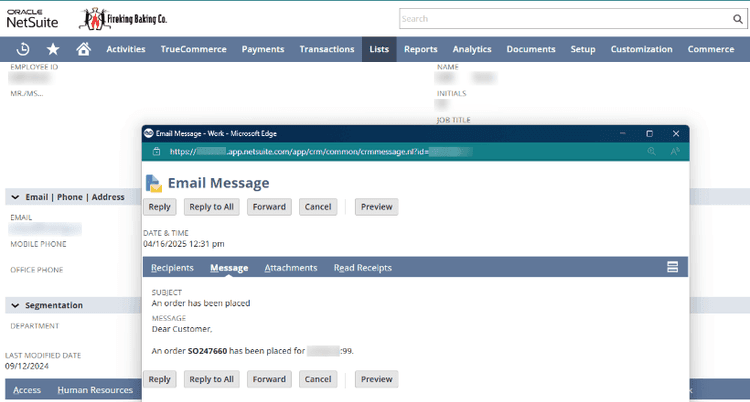
Jacob is serious, earnest, and humble—someone who leads by serving and pays close attention to the people and problems in front of him. His core values include servant leadership, focus, and delivering more value than he consumes. His Catholic faith grounds his life, as does his desire to be a devoted husband and father. He chose consulting, and ultimately Anchor Group, because he wanted to help businesses wrestle with real problems and find meaningful solutions. Before joining Anchor Group in 2020, Jacob completed graduate studies in Latin and philosophy and taught at the university level. That experience taught him how to ask good questions, think deeply about complex problems, write clearly, and educate those willing to learn. He also led wilderness leadership development expeditions, which strengthened his ability to guide and support others. One of his favorite parts of his work now is supporting employees as they grow—and building software solutions that make clients’ work more human and less stressful. Outside of work, Jacob enjoys speaking Latin, discussing great literature over tea or whiskey, and all things bicycles—from mountain biking to cargo biking with his family to restoring classic steel frames. He also enjoys ballroom and English country dancing and thinking about how places are designed—cities, homes, and transportation networks—to encourage virtuous living.
FireKing faced a costly order entry bottleneck in NetSuite. Anchor Group helped them save 40+ hours per week and eliminated manual data entry errors by automating email order capture.
Read the ArticleMyAccount is one of the most robust sections of the SuiteCommerce platform, and something that can set it apart from other ecommerce software. Here you find profile information, payment and shipping information, purchase history, and support cases.
Read the Article
Lindemann is an authentic, down-to-earth, American company that has become a true force to be reckoned with in the chimney supplies market. Although doubtless most of that success is due to their own hard work and innovation, they also attribute much to the benefits offered by SuiteCommerce.
Read the Article
How a Michigan ecommerce retailer saved $40,000 per year by adjusting their NetSuite EDI integration.
Read the Article
The Page Banner and Thumbnail Image fields are the relevant fields here. The banner is displayed on the top of the category page of this category, while the thumbnail is displayed on the category page of the parent category.
Read the Article
You can even choose only to have this field appear on specific items by selecting the 'Specific Items' checkbox and adding the items in the field below.
Read the Article
If your company uses NetSuite but has not yet engaged with the SuiteAnalytics Workbook tool, the time to start is now!
Read the Article
Learn how to setup the Google shopping feed for NetSuite SuiteCommerce.
Read the Article
If you haven't had the chance to dive into the NetSuite 2023.1 release notes yourself, here is a summary of some of the more interesting and important updates from the perspective of a NetSuite Consultant!
Read the Article
An API (Application Programing Interface) is a conversation or set of conversations that one software application can have with other software applications.
Read the Article
NetSuite is, fundamentally, a tool for collecting and distributing data. This means that it can only ever be as good as the data put into it.
Read the Article
It is worth noting that the SuiteCommerce Theme is fundamentally the layout of the website, not the colors, although you can specify the colors right in the theme code.
Read the Article