NetSuite Module
NetSuite Project Management
An Enterprise Resource Planning (ERP) Solution
NetSuite Project Management helps teams plan and track projects within NetSuite using project records, tasks, resources, time tracking, dashboards, and Gantt charts. Connecting project activity with NetSuite makes it easier to monitor progress alongside the financial side of project delivery.

About NetSuite Product Management
NetSuite Project Management offers a range of tools to help your business succeed, including project tasks, a project dashboard, a project center, project-based milestones, project templates, a project P&L tab, project billing, and project tracking reports. These tools enable your team to efficiently complete tasks such as tracking project time, estimating costs, and reporting utilization and backlog information.
Want more information on how NetSuite Project Management can help you? Continue reading, or download the PDF datasheet on NetSuite Project Management to learn more.

Key Benefits
- Improve and maintain tighter control of project accounting
- Understand the true costs of the services you render
- Broaden project visibility, measure performance
- Improve productivity and drive efficiencies
- Manage multiple project types
Key Features & Capabilities
- Tie projects to customers and bill directly
- Payroll expense allocation for Jobs
- Organize tasks and activities
- Mobile time and expense
- Automate job creation
- GANTT chart
- Timesheets
Project Management in NetSuite
Project management in NetSuite offers a structured workflow from proposal to delivery. Users can convert estimates or sales orders into projects, set up staffing plans, assign resources, and start tracking time immediately. Approvals, billing, and reporting occur seamlessly because all data remains inside the ERP.
Organizations that use project-based workflows benefit significantly from automation and role-based dashboards that highlight workload, deadlines, risks, and financial outcomes.
Project Management Basics
With NetSuite Project Management, your team can organize tasks and automate job creation to enhance productivity and drive operational efficiencies. The GANTT chart feature allows your team to broaden project visibility and measure performance for multiple project types.

Control Project Costs
NetSuite Project Management gives you a better understanding of the true costs of your products and allows you to have more control over project accounting. Financial aspects of projects can also be simplified through the ability to tie projects to customers and then bill them directly for services rendered.

Labor and Expenses
Payroll expense allocations for jobs help your team understand the true costs of the services you render, enabling you to price out products and services accordingly. Mobile time sheets enable your employees to input accurate time data from anywhere at any time, providing real-time, accurate data for each project.

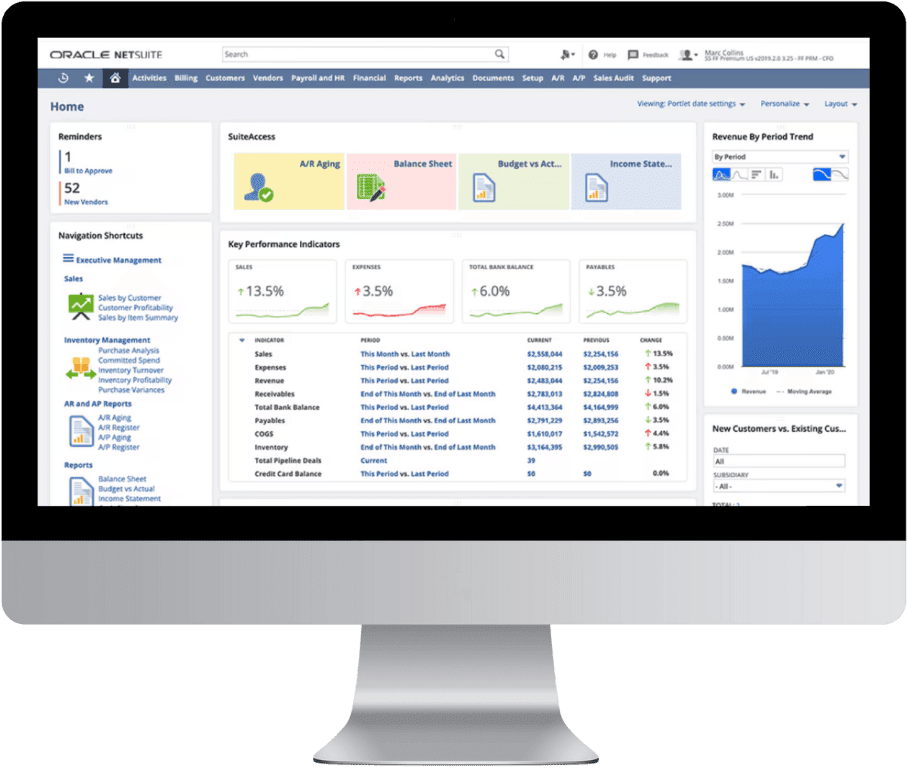
NetSuite Dashboard for Project Management
NetSuite dashboards for project management provide role-specific visualizations for project managers, consultants, finance teams, and executives. These dashboards include:
• Task progress summaries
• Budget vs. actual reports
• Profit margin indicators
• Utilization KPIs
• Billing and revenue snapshots
• Open tasks and deadlines
• Project risk indicators
Anchor Group customizes dashboards to match organizational reporting needs and ensure every team has access to the metrics that matter most.
NetSuite Project Management Module FAQs
The NetSuite Project Management module includes project creation tools, task scheduling, budgeting, billing rules, percent-complete tracking, resource allocation, time entry, expense reporting, and integrated reporting dashboards. It is deeply tied to NetSuite financials for real-time project profitability analysis.
Most service traditional service companies operate on a project-by-project basis rather than on a per-order basis. This business structure means customer orders, internal resources, and many other things must be associated with specific projects. Companies that operate in this manner require project management software to eliminate the tedious, time-consuming, and error-prone processes of manually tracking everything.
Pricing depends on the NetSuite edition, the number of project users, required add-on modules, and the complexity of your project billing model. Costs may also vary based on whether advanced features like OpenAir are needed. Anchor Group provides tailored pricing estimates based on your requirements. Contact us >
NetSuite Project Management has some limitations, such as basic task management compared to tools like Jira or Monday.com, limited Gantt chart functionality, and fewer agile features. Advanced resource planning may require additional modules such as OpenAir or NetSuite SRP. Many limitations can be mitigated through customization, integrations, or workflows that our team here at Anchor Group can design and develop for you.
NetSuite includes dashboards for project managers, consultants, finance teams, and executives. These dashboards display KPIs such as utilization, budget vs. actuals, open tasks, overdue deliverables, revenue forecasts, margins, and billing milestones. Our team here at Anchor Group can customize your dashboards extensively using saved searches and portlets. Contact us >
Related NetSuite Solutions
If the NetSuite Project Management module doesn't fit your needs, there are other NetSuite Enterprise Resource Planning (ERP) solutions available: